Quantization for ColBERT
 Isaac FlathDecember 20, 2025
Multi-vector search approaches are now critical for coding agents and multi-modal applications. MixedBread, Cursor, Parallel AI, and others have enabled coding agents to use this semantic search because it cuts token usage in half, allows agents to finish tasks in half the time, and yields better-quality outputs. I've validated the impact on my own commercial codebases and analysis.
Multi-vector search is more powerful because it uses more contextual data from the inputs. The architecture stores a separate embedding for each word in a document, rather than storing an entire document (or chunk) in a single embedding. This gives multi-vector approaches a more detailed understanding of the content, but it also means there's a lot more embeddings.
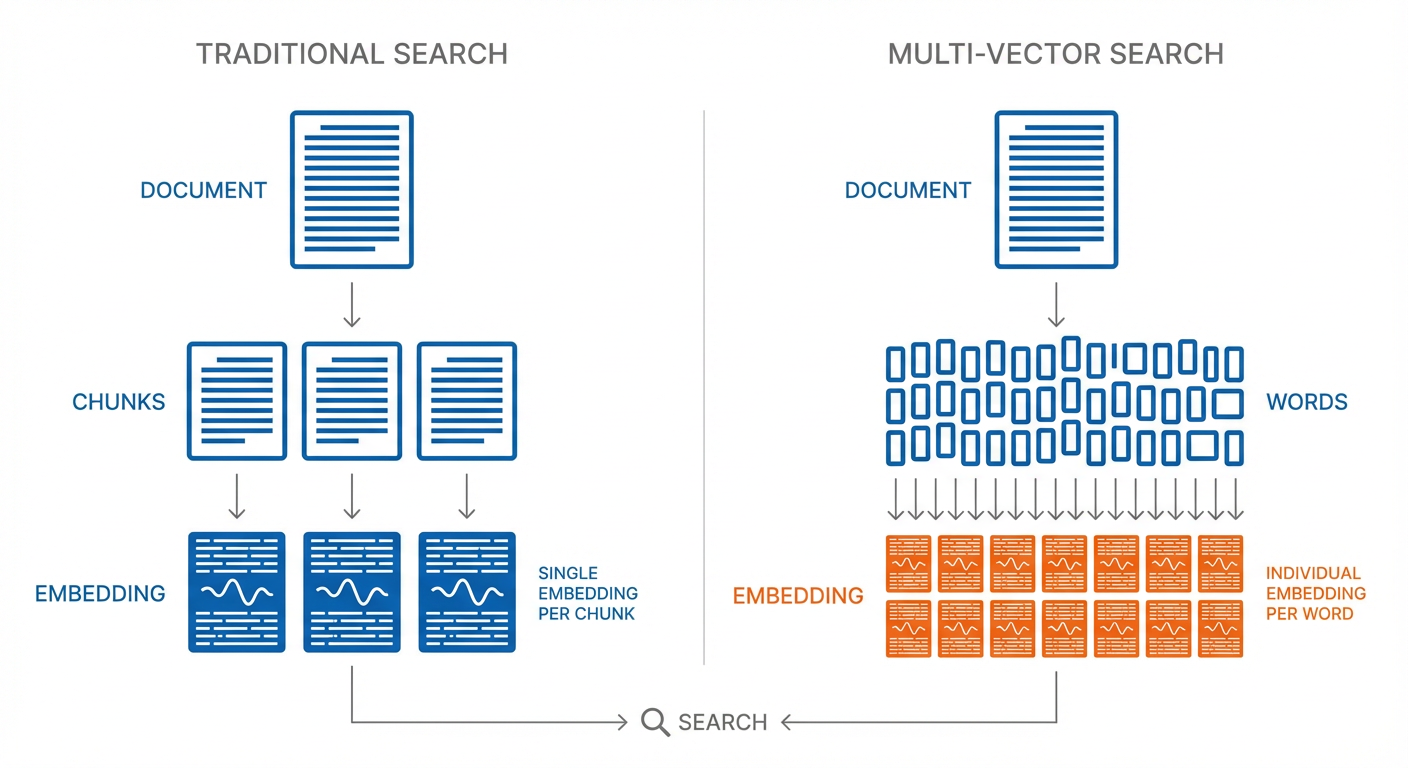
Quantization is what makes handling this extra information practical in many cases. By representing numbers with fewer bits (like rounding to fewer decimal places), quantization trades a small amount of precision for a large reduction in storage.
This post is a guide to understanding how quantization for multi-vector and ColBERT approaches work.
Related Posts on Multi-Vector Search
- Modern Multi-Vector Code Search – Technical deep-dive on the multi-vector approach by mixedbread’s founder
- The 1/2 Token Codebase Search – Benefits and intuition for using multi-vector search with agents to improve speed, quality, and reduce token usage.
Intro to Quantization
Before diving into the advanced approach ColBERT uses (Product Quantization), let’s understand the basic concept of quantization with a simpler approach.
We’ll start with creating some dummy data to quantize.
Loading...
We can look at the size of the data we are starting with. Our goal is to reduce the size of original_values without losing too much information. This is called Quantization.
Loading...
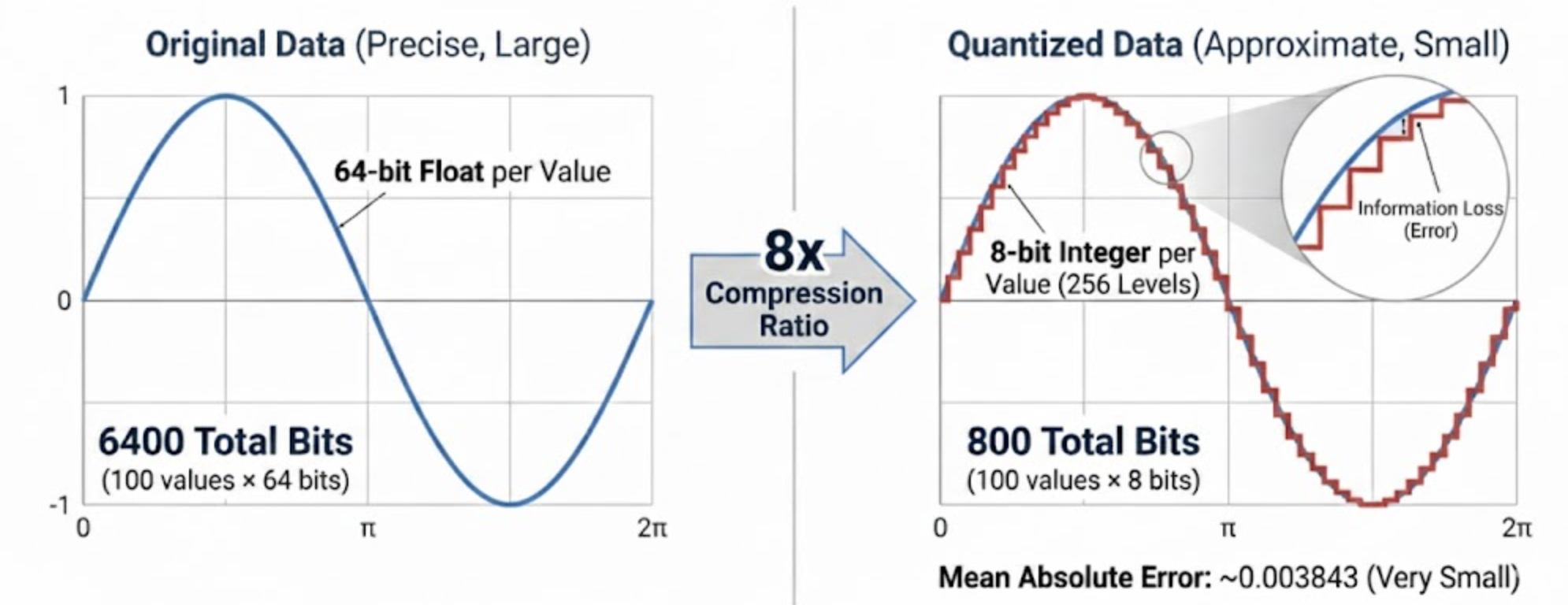
Let’s compress this data so we’re only storing 8 bits per value. All data values are between the minimum and the maximum value. We want to represent each one of them using just 8 bits. We do this by dividing up the range into 2^8 = 256 equal intervals (called levels) and storing which level each value is in.
Loading...
Let’s save the minimum and maximum values that defines the range we need to divide up.
Loading...
Now we can quantize the data to these levels by replacing the 64 bit data value with the 8 bit level it lies in. We’ll use the astype function to convert the data to the new type. This is a simple form of quantization called uniform scalar quantization.
Loading...
This is our quantized representation - just 8 bits per value instead of 64. Much smaller!
Loading...
Loading...
We can calculate how much space we saved by comparing the original size to the quantized size.
Loading...
Loading...
This is a compression ratio of 8x. We’ve gone from 64 bits per value to 8 bits per value. Not bad!
Now what's the catch? We've lost some information.
We’ve rounded the values to the nearest level. This means that some values are not exactly the same as the original values. Sometimes this is a big deal, but sometimes it’s not.
We can measure how much error we introduced. We’ll use mean absolute error, which is just the average difference between the original and reconstructed values. Quantifying information loss is an important concept to be aware of.
To calculate the error, we’ll need to convert back to the original range. This is the inverse of the scaling we did earlier.
Loading...
Loading...
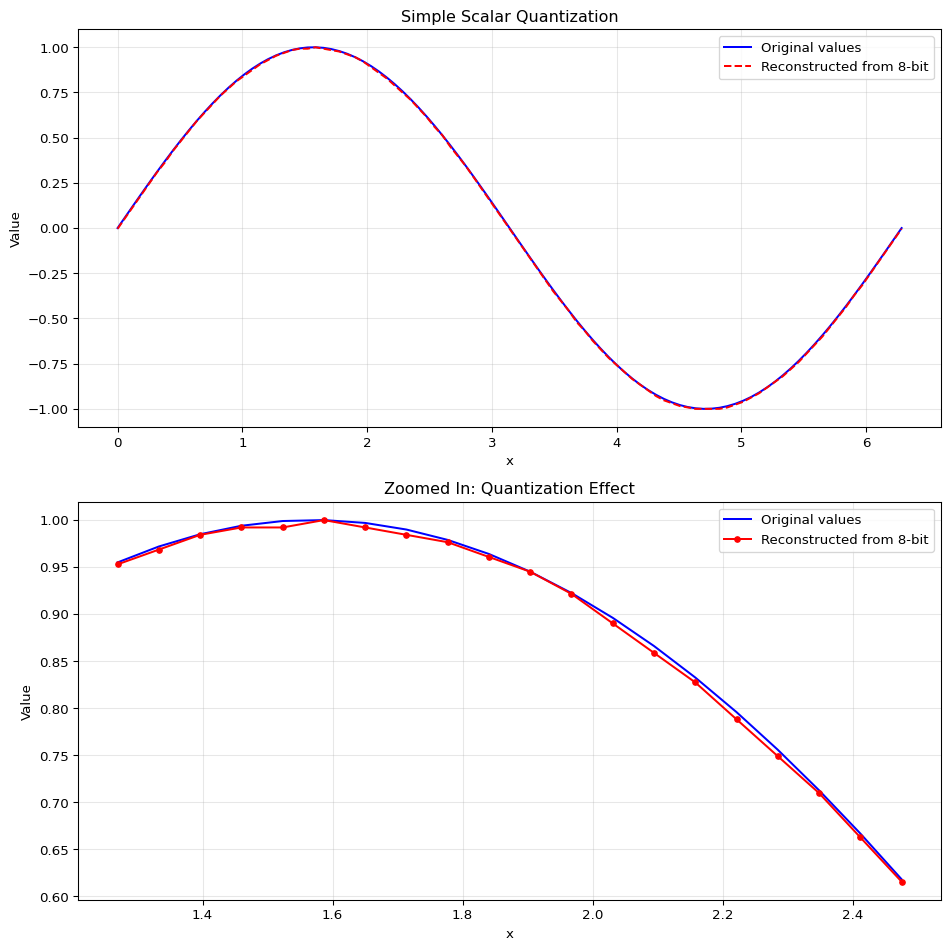
Because our sample data is so simple, we can see the error is very small. We’ll plot the original values and the quantized values. You can see that while it’s almost the same line, our reconstructed values are not exactly the same as the original values. That’s called information loss. We reduced the size of our data from 64 bits per value to 8 bits per value, but we lost some information in the process.
Code
Loading...
This is the most basic form of quantization - uniform scalar quantization. We’re simply:
- Taking continuous values in a range
- Mapping them to a smaller set of discrete levels (like 256 levels for 8-bit quantization)
- Using these discrete levels to reconstruct approximations of the original values
The tradeoff is clear: we reduce storage space at the cost of some precision. With 8 bits, the error is usually very small for many applications.
Quantizing Whole Vectors
We've seen how to quantize scalar data. For ColBERT, we need to quantize embeddings (high-dimensional vectors).
We could apply scalar quantization to each number independently, but quantization errors add up across all dimensions. Finding quantization parameters that work well across the entire embedding space would be challenging.
In practice it often works better to quantize vectors as a whole. This is done using a clustering algorithm like KMeans to group similar vectors. The algorithm organizes the data so that vectors with high similarity end up in the same cluster. Each cluster is represented by a single point called a centroid. Instead of storing each vector's exact values, we store two things:
-
The cluster ID that each vector belongs to.
-
The centroid value for each cluster.
When we need to reconstruct a vector, we look up its cluster ID and use the corresponding centroid as its approximation. This reduces storage space while maintaining a reasonable approximation of the original data. The trade-off: more clusters yields better approximation but requires more storage for centroids and larger cluster IDs.
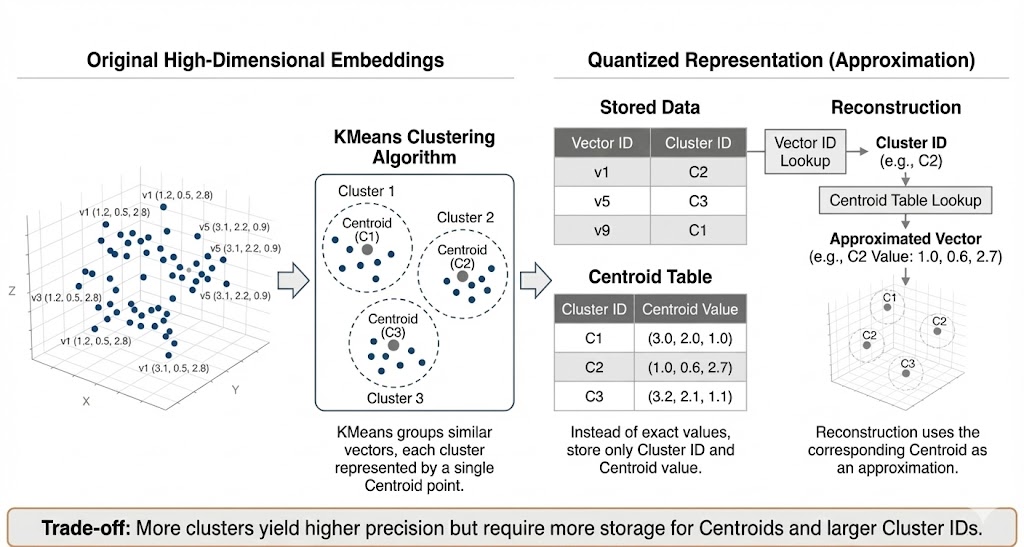
This approach, called Vector Quantization (VQ), is a solid foundation. However, achieving high precision would require a massive number of centroids, making it impractical for large-scale systems. This is where Product Quantization comes in.
Product Quantization builds on the clustering idea but achieves far better compression by splitting each vector into smaller pieces and clustering those pieces separately.
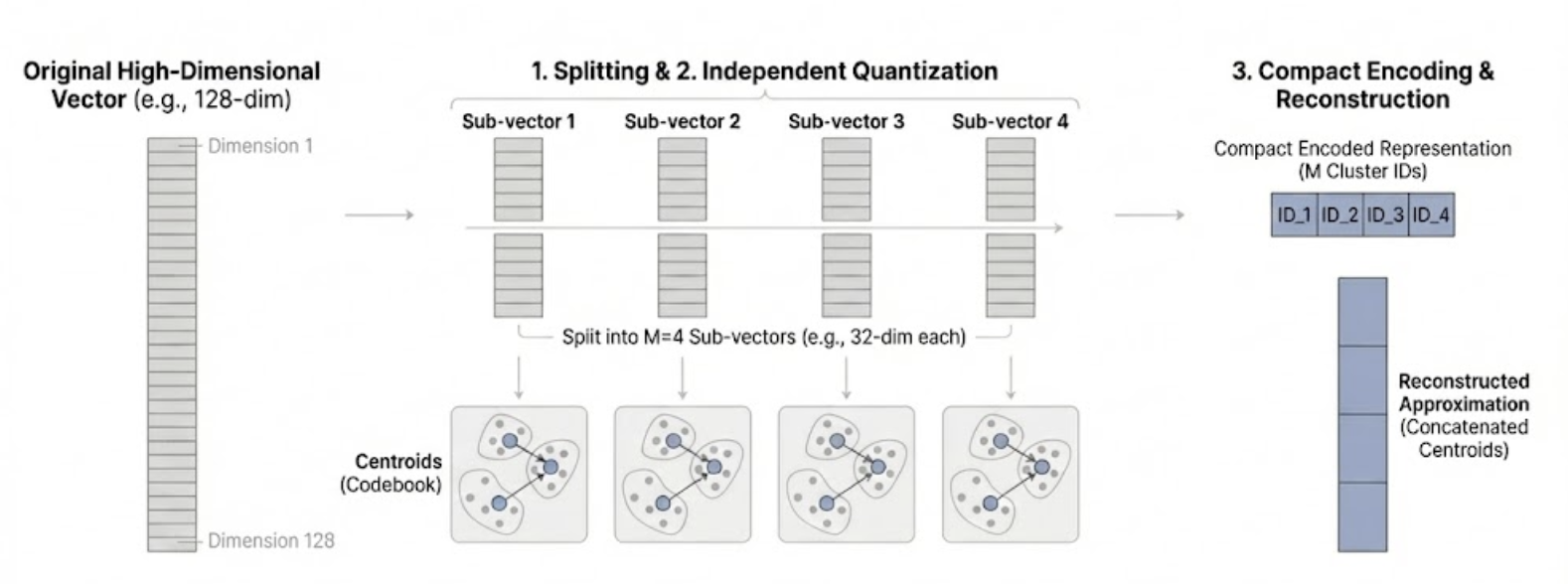
Simplified Version
Let's understand product quantization with a simple example: 5 embeddings, each a list of 4 numbers.
Loading...
Step 1: Split each embedding in half.
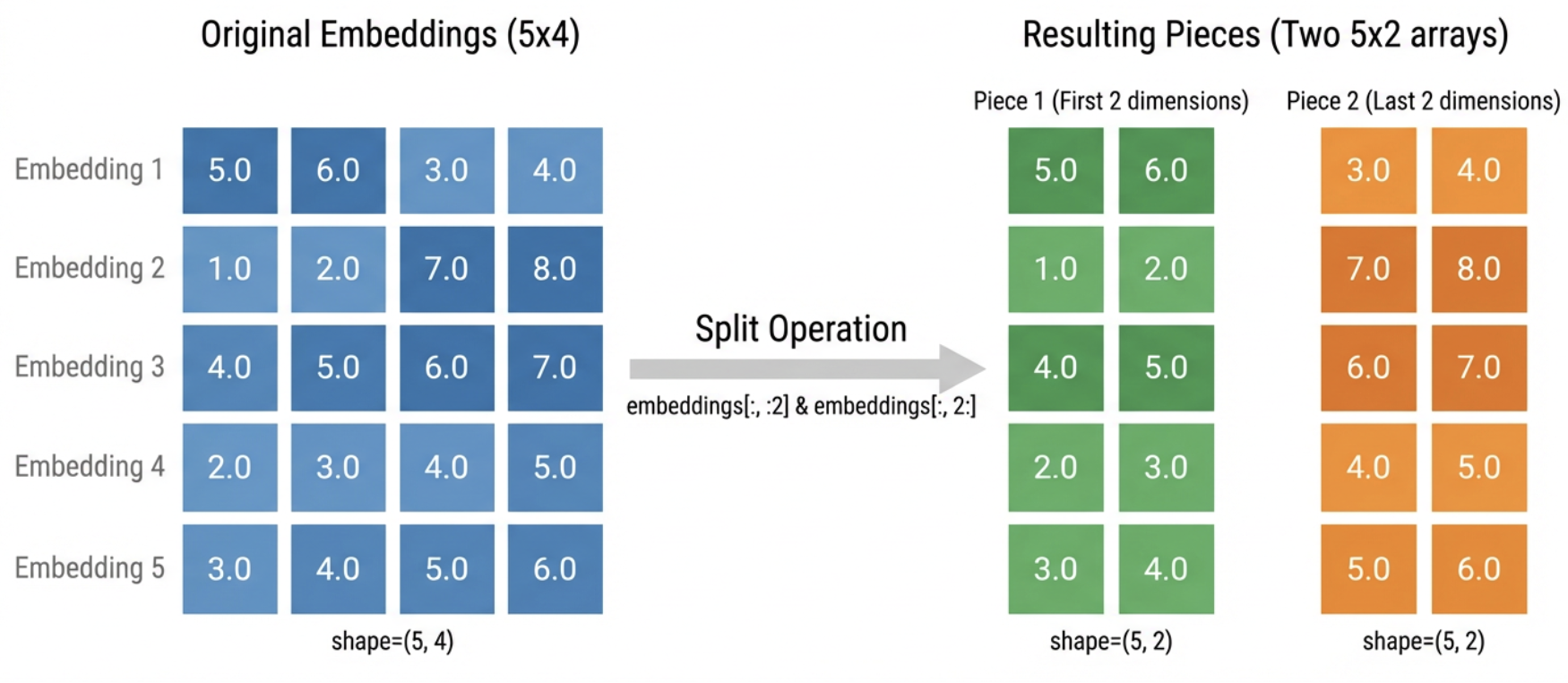
Each embedding has 4 numbers. We split it into two “pieces” of 2 numbers each:
- Piece 1: the first two numbers (positions 0-1)
- Piece 2: the last two numbers (positions 2-3)
For example, embedding [5.0, 6.0, 3.0, 4.0] becomes piece 1 = [5.0, 6.0] and piece 2 = [3.0, 4.0].
Loading...
We still have all 5 embeddings, but now organized into two separate collections of pieces.
Loading...
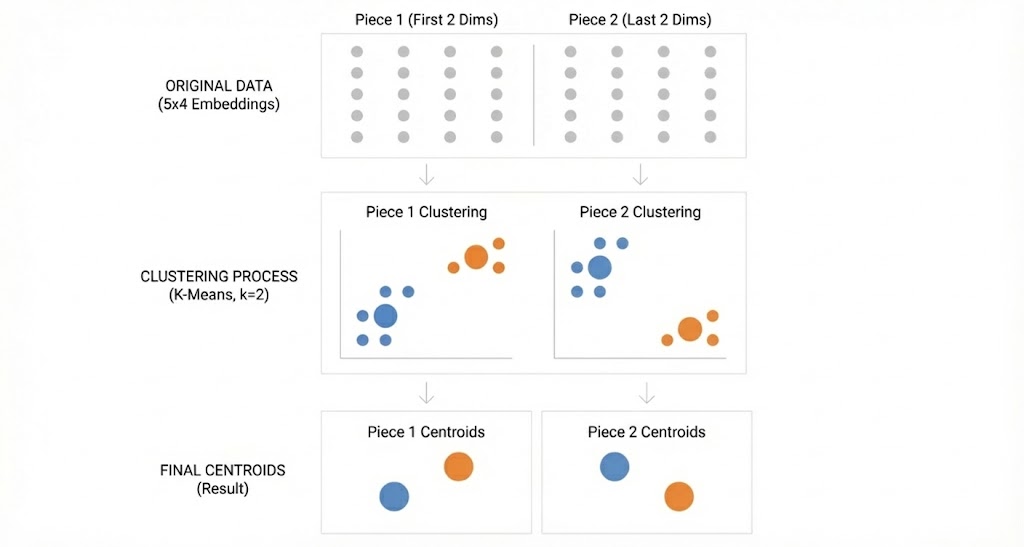
Step 2: Cluster each collection of pieces separately.
Now we cluster each collection using 2 clusters per collection. After clustering, each piece gets assigned to a cluster, and we store the cluster's centroid (the average of all pieces in that cluster).
💡 K Means is a clustering algorithm that is a component of product quantization. If you have no familiarity with clustering and want to understand how it works, check out my previous post for a dive into K Means.
Loading...
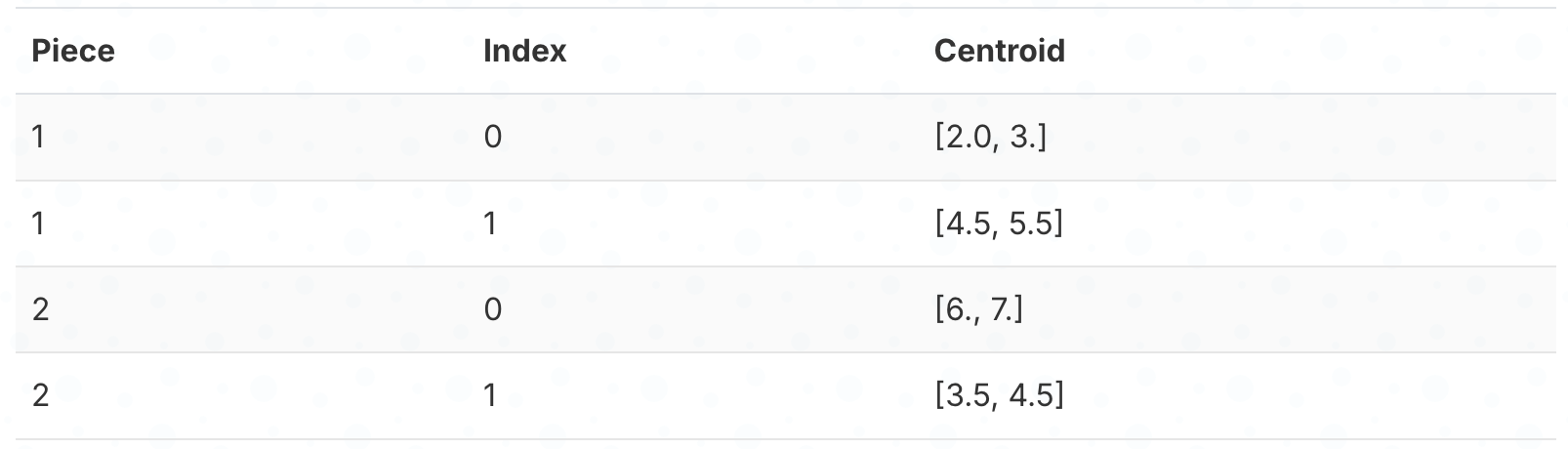
This gives us 2 centroids for piece 1 and 2 centroids for piece 2
Step 3: Store which cluster each piece belongs to.
Instead of storing the actual numbers, we just store the cluster index (0 or 1) for each piece. We’re replacing 2 floating-point numbers with a single small integer.
💡 You may notice that we are using
.astype(np.uint8)like we did in the scalar quantization example for these indices! These indices just tell us which cluster each piece belongs to, and there aren’t very many clusters so 8 bits is plenty.
Here’s which cluster each embedding’s pieces belong to:
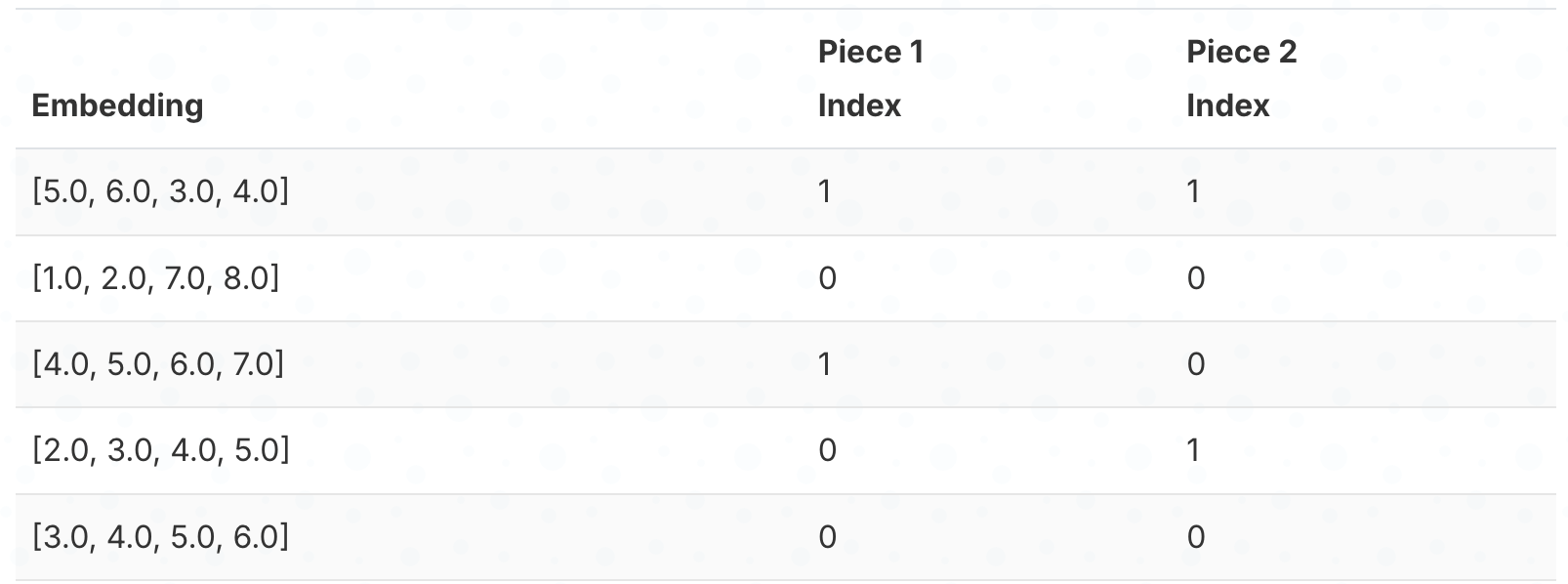
Step 4: Reconstruct by looking up centroids and combining.
To reconstruct an embedding, we look up the centroid for each piece and concatenate them. For example, embedding 1 has cluster index 1 for both pieces, so we look up centroids[0][1] = [4.5, 5.5] and centroids[1][1] = [3.5, 4.5], giving us [4.5, 5.5, 3.5, 4.5].
Loading...
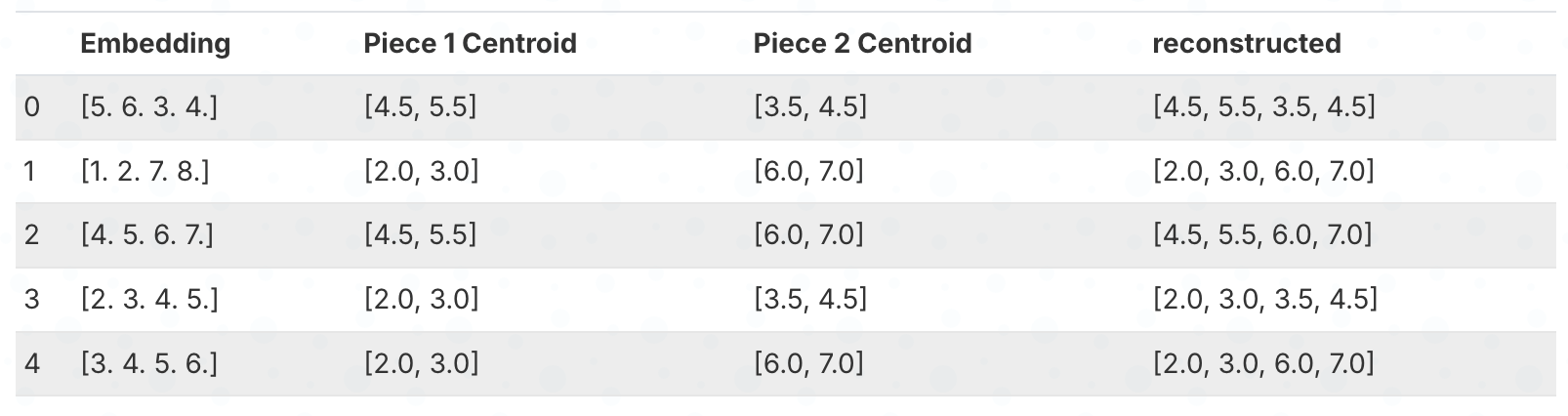
The reconstructed embeddings are not exactly the same as the originals. But we've compressed the data by storing only cluster indices instead of the original numbers.
We can calculate the compression ratio to show that we are using less space even in this simple example.
Loading...
Loading...
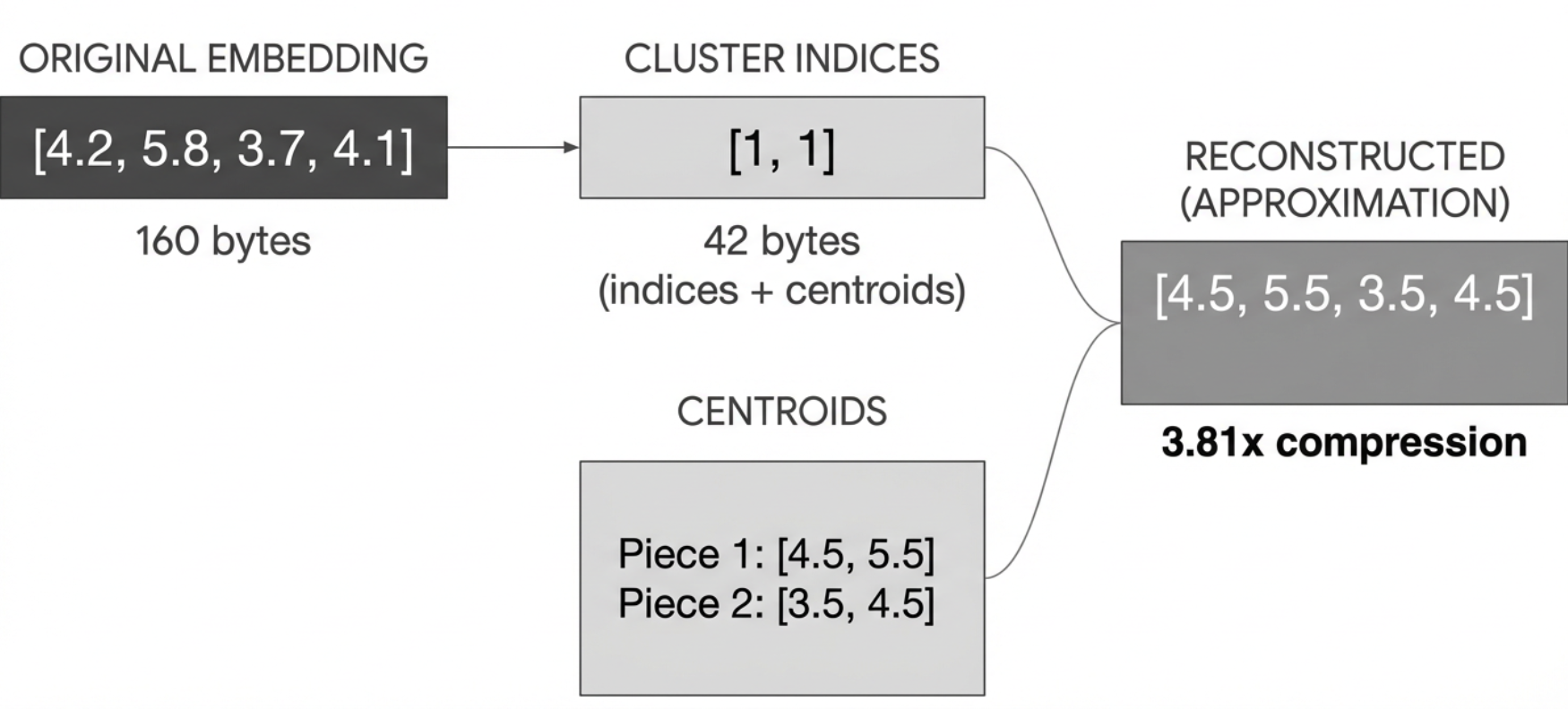
Overview
To summarize, the steps of product quantization are:
- Split each embedding into pieces
- Cluster each collection of pieces separately
- Store the centroid for each cluster
- Store which cluster each piece belongs to
- Reconstruct by looking up centroids and concatenating them
In the real implementation, we:
- Have many more embeddings (100,000+)
- Have many more dimensions (128)
- Use many more pieces (32)
- Have many more groups per piece (256)
But the basic idea is the same!
Real Implementation
Let's create a larger synthetic dataset to demonstrate compression at a realistic scale. Product quantization shines with lots of similar vectors, so we need a bigger dataset to see benefits to the compression ratio.
💡 While this quantization only working well with lots of similar may sound like it only works in specific cases, that specific case is always true in practice. Any dataset worth retrieving from is full of similar vectors based on topics within the dataset domain.
Loading...
Loading...
We've created a dataset of embeddings of dimension 128, where each embedding is a combination of a topic and a random noise vector. This is more realistic and closer to what you would see in practice.
Example: If you are retrieving legal documents, you might have a topic like “Patent” and a random noise vector that represents the specific patent. The documents about Patents will typically have more similarity to each other than they do to documents about criminal law. However, each patent is different and so will have a different noise vector to represent that. This synthetic dataset loosely mimics 10 different topics with varying sizes like you would see in practice.
Let's quantize these embeddings. We refactor the code from the previous example to handle more data, more groups, and more dimensions.
Instead of splitting the embeddings in half, let’s make a flexible function that allows us to choose how many pieces we want to split the embeddings into.
Loading...
Here we split the embeddings into 32 pieces. Each piece has the first 8 dimensions of the embeddings.
Loading...
Next we find the groups for each piece the same way, but make a more flexible function with parameters we can tune and GPU support.
Because we're using the fastkmeans library we can put it on a GPU. fastkmeans is a fast implementation of kmeans by Ben Clavié and Benjamin Warner without painful dependencies.
Loading...
Let’s calculate the compression ratio to see how much space we’ve saved for this dataset.
Loading...
Loading...
Much better than the 8x we got with scalar quantization.
Now that we have our compressed embeddings, we can reconstruct them. Let’s do that so we can measure the error.
Loading...
We can calculate the compression ratio to show that we are using less space, even in this simple example.
Let’s calculate the error on a sample of the data.
Loading...
Loading...
Let’s visualize multiple samples to get a better understanding of the reconstruction quality:
Code
Loading...
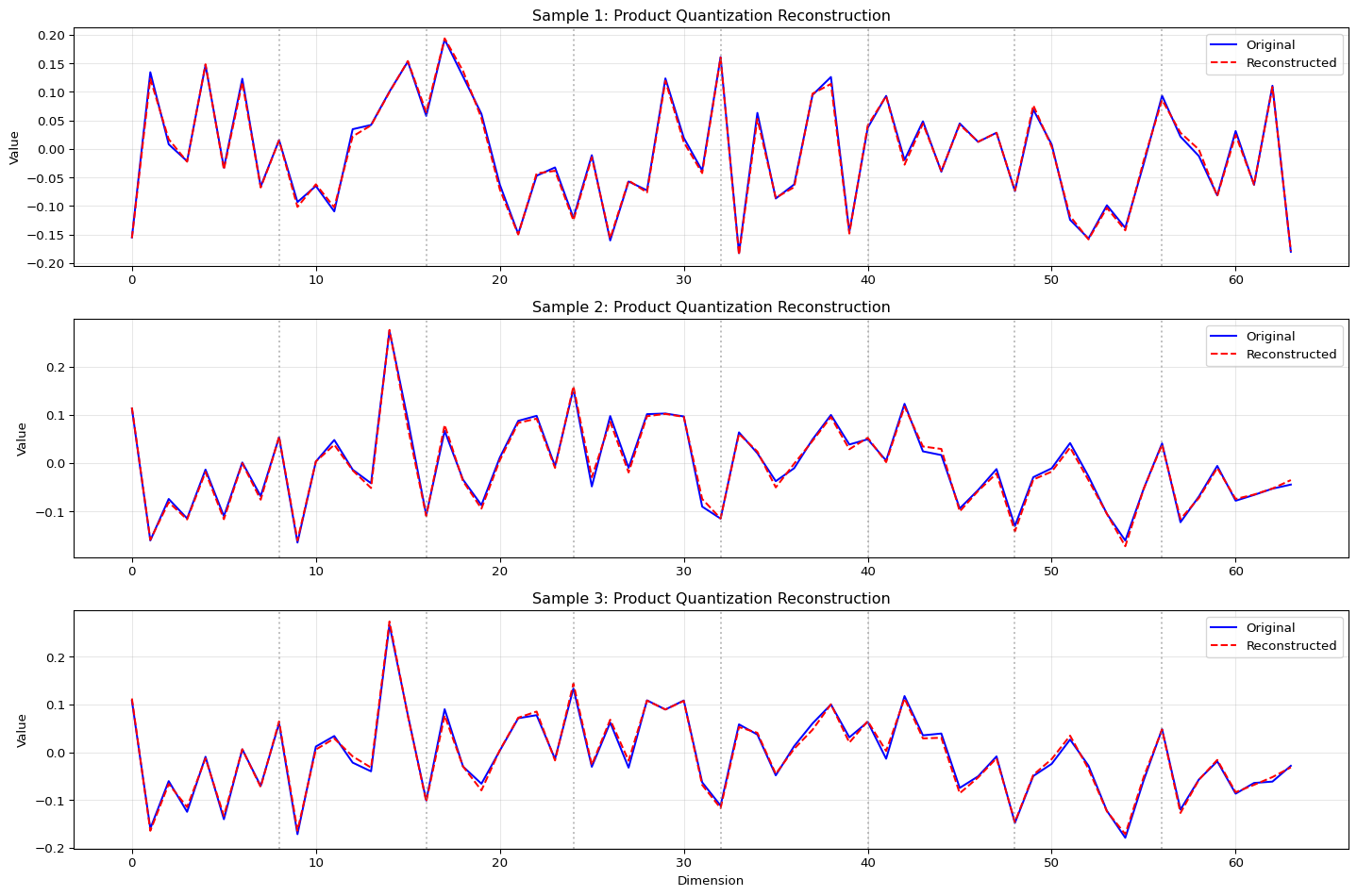
Extreme Quantization
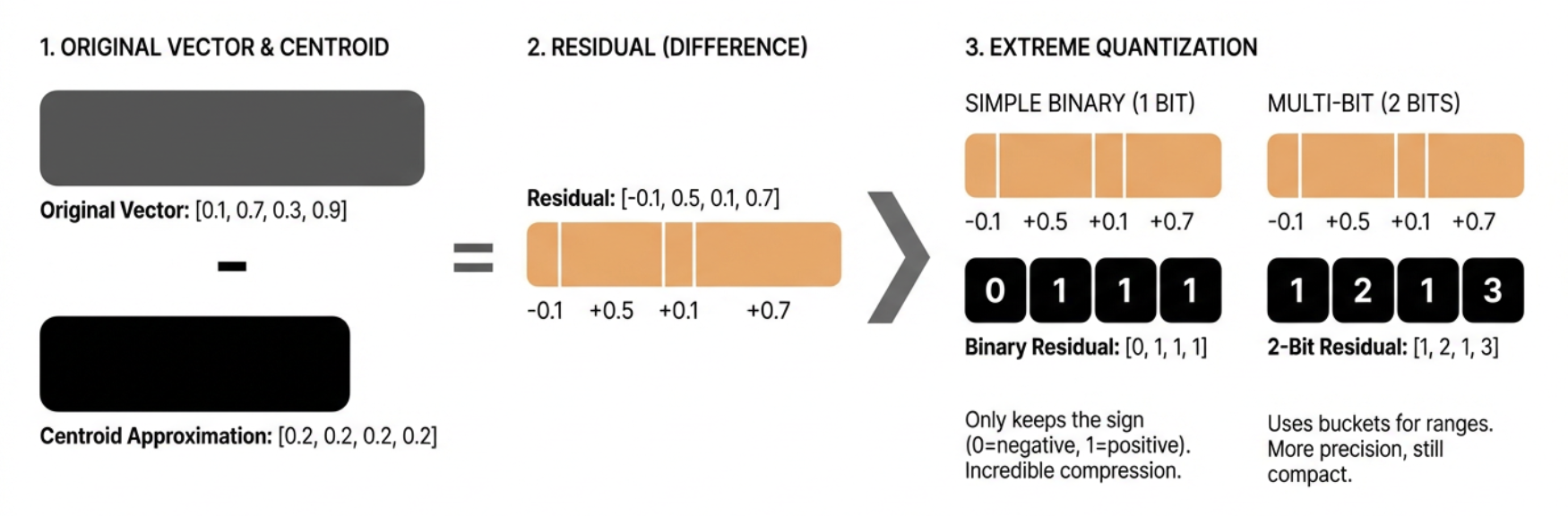
We've seen how product quantization gives great compression ratios while maintaining quality. What if we want to go further? That's where extreme quantization comes in.
The key insight is that after product quantization, we still have some information left in the original vectors that we haven’t captured. We can capture this “residual” information using an even more aggressive form of quantization.
Let’s start with a simple example to understand the concept:
Loading...
Loading...
The residual is what’s left after we subtract the centroid from the original vector. In our case, it’s the difference between our product quantized approximation and the true vector.
Now, instead of storing these residuals as full floating-point numbers, we can quantize them extremely aggressively. One way to do this is to use binary quantization (represent each value with a single bit).
Here’s how we can do binary quantization:
Loading...
Loading...
This is aggressive. We're only keeping the sign (positive or negative) of each number. But when combined with product quantization, it can still be useful because:
- The product quantization already captures most of the important information
- The residual is usually small, so just knowing its sign can be helpful
- We get incredible compression - just 1 bit per dimension!
In practice, we can be more sophisticated. Instead of 1 bit, we can use multiple bits to represent different ranges of values. This gives more precision while maintaining good compression.
Here’s a more advanced version that uses multiple bits:
Loading...
Loading...
This approach gives us more precision while still maintaining good compression. We can choose how many bits to use based on our needs:
- More bits = better precision but more storage
- Fewer bits = worse precision but less storage
The actual implementation in ColBERT uses a similar approach but with some optimizations:
- It uses bit packing to store the quantized values efficiently
- It handles the quantization in chunks to work with GPU memory efficiently
- It includes special handling for edge cases and different data types
By combining product quantization with extreme quantization of the residuals, we get even better compression ratios while maintaining quality. Product quantization captures the main structure; extreme quantization of residuals captures the fine details.
This is useful in ColBERT because:
- It allows storing more token embeddings in memory
- It enables faster similarity calculations
- It maintains good retrieval quality despite the aggressive compression
The tradeoff is that we need to do more computation to reconstruct the vectors, but this is usually worth it for the space savings we get.
The Real ColBERT Approach
Now let's look at how ColBERT implements extreme quantization. The real implementation is more sophisticated and efficient than our simple examples.
Here’s the actual code used in ColBERT:
Loading...
Let’s break down how this works:
- Bucketization: First, we convert the residual values into buckets using
torch.bucketize. This is similar to ourmulti_bit_quantizefunction but more efficient. Thebucket_cutoffsdefine the boundaries between different values. - Bit Expansion: We expand the bucketed values to add a new dimension for each bit we’ll use. This is where we prepare to extract individual bits from each value.
- Bit Extraction: The
>>(right shift) operation moves each bit into position, and the& 1operation keeps only the least significant bit. This effectively converts each value into its binary representation. - Bit Packing: Finally, we pack these bits into bytes for efficient storage. This is where we get our extreme compression - we’re storing multiple values in a single byte!
Let’s see this in action with a small example:
Loading...
Loading...
The key differences from our simplified version are:
- Bucketization: We use
torch.bucketizeinstead ofmulti_bit_quantize - Bit Expansion: We expand the bucketed values to add a new dimension for each bit we’ll use
- Bit Extraction: We extract individual bits from each value
- Bit Packing: We pack these bits into bytes for efficient storage
This is the actual implementation used in ColBERT. It’s more sophisticated and efficient than our simple examples.