Boosting Claude: Faster, Clearer Code Analysis with MGrep
 Isaac FlathNovember 24, 2025
A better search tool helps an LLM understand code. When I told Claude to use mgrep, a semantic search tool from mixedbread, its analysis became faster, more efficient, and more accurate.
Note: Mgrep uses advanced multi-vector, multi-modal search. It is not the older semantic search that once hobbled agents.
I asked Claude to explain a complex feature in one of my projects, running the same prompt twice: once with standard Claude, once with mgrep. The results show how a simple tool transforms an LLM's performance.
What does Mgrep do?
mgrep is a grep-like tool for semantic search. Basic usage looks like this:
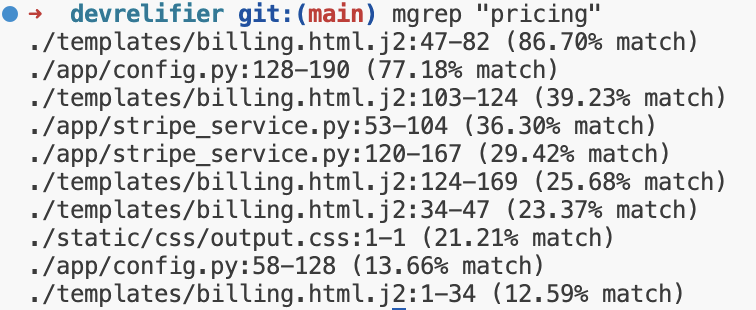
It didn't pull files by the string "pricing"; it pulled semantically related code.
The A/B Test Setup
I asked the AI to explain the image handling, UX, and editor architecture in my application.
Prompt A (Standard Claude):
Can you explain the image, UX, and the editor, and all the things that are done to support that?
Prompt B (Claude + mgrep):
Same prompt, with one addition:
Use mgrep extensively for search. It's the most powerful semantic search tool. Use it like
mgrep "whatever you want to search for". Start with that before diving deeper.

I used no special plugins or integrations. The only change was a hint in the prompt.
The Numbers: Faster and More Efficient
Better search produced a faster, lighter analysis. I ran three trials.
Speed:
-
Standard Claude runs:
- 1 minute, 58 seconds
- 2 minutes, 28 seconds
- 4 minutes, 7 seconds
-
Claude +
mgrepruns:- 1 minute, 6 seconds (56% of standard time)
- 1 minute, 48 seconds (73% of standard time)
- 1 minute, 48 seconds (44% of standard time)
The mgrep version ran nearly twice as fast.
Efficiency (Agent History File):
-
Standard Claude:
- 4,984 lines
- 4,868 lines
- 5,626 lines
-
Claude +
mgrep:- 2,061 lines (41% of standard lines)
- 1,948 lines (40% of standard lines)
- 2,549 lines (45% of standard lines)
The mgrep run used less than half the context. This meant fewer tokens and a more focused analysis.

But speed and efficiency only matter if the quality improves.
The Analysis: Better Insight, Accuracy, and Structure
The mgrep response was more insightful, accurate, and structured.
High-Level Insight from the Start
The mgrep response immediately understood the feature's architecture.
-
Standard Claude started with a generic description: "the editor supports images through multi-layered architecture."
-
Claude with
mgrepwas specific and useful. It identified the TipTap React editor and the gallery's two core modes, "selection" and "gallery change."
Improved Technical Accuracy
Standard Claude made a subtle but important error. It described two ways to enter the full-screen gallery as separate features. The mgrep version correctly identified them as two triggers for the same action.
A More Logical Flow
The report's structure also differed.
The mgrep response flowed logically from front-end UX to back-end routes, the storage layer, and markdown handling.
Standard Claude's response was scattered. It jumped between front-end UX, back-end details, and other front-end components.
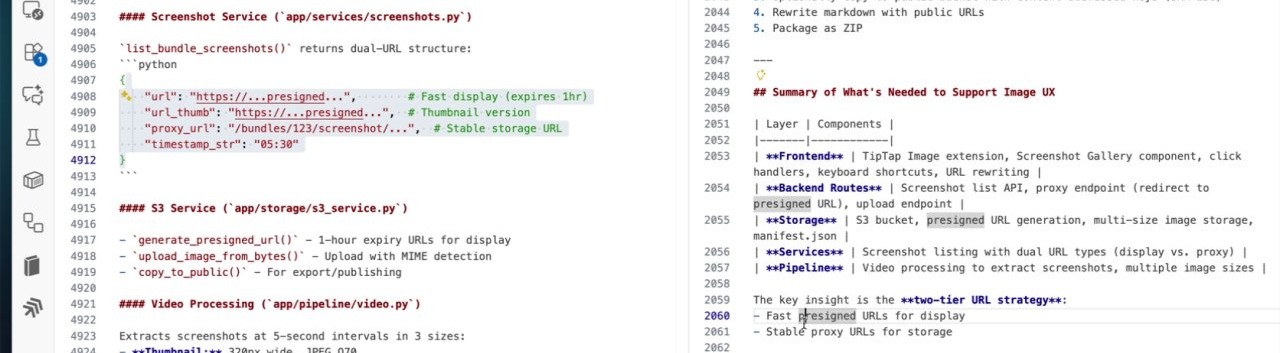
For example, my app uses a two-tier image URL strategy. The mgrep response explained the design's intent: fast, pre-signed URLs for thumbnails and a stable proxy for permanent images. Standard Claude just presented raw JSON and missed the point.
Key Takeaways
The tools you give an AI assistant matter.
-
Better tools produce better results: A semantic search tool like
mgrepyields faster, more efficient, and higher-quality analysis. -
Efficiency signals quality: The
mgrepversion used less than half the context. This was not a shortcut; it was a more direct path to the answer.