My Local App for AI Writing
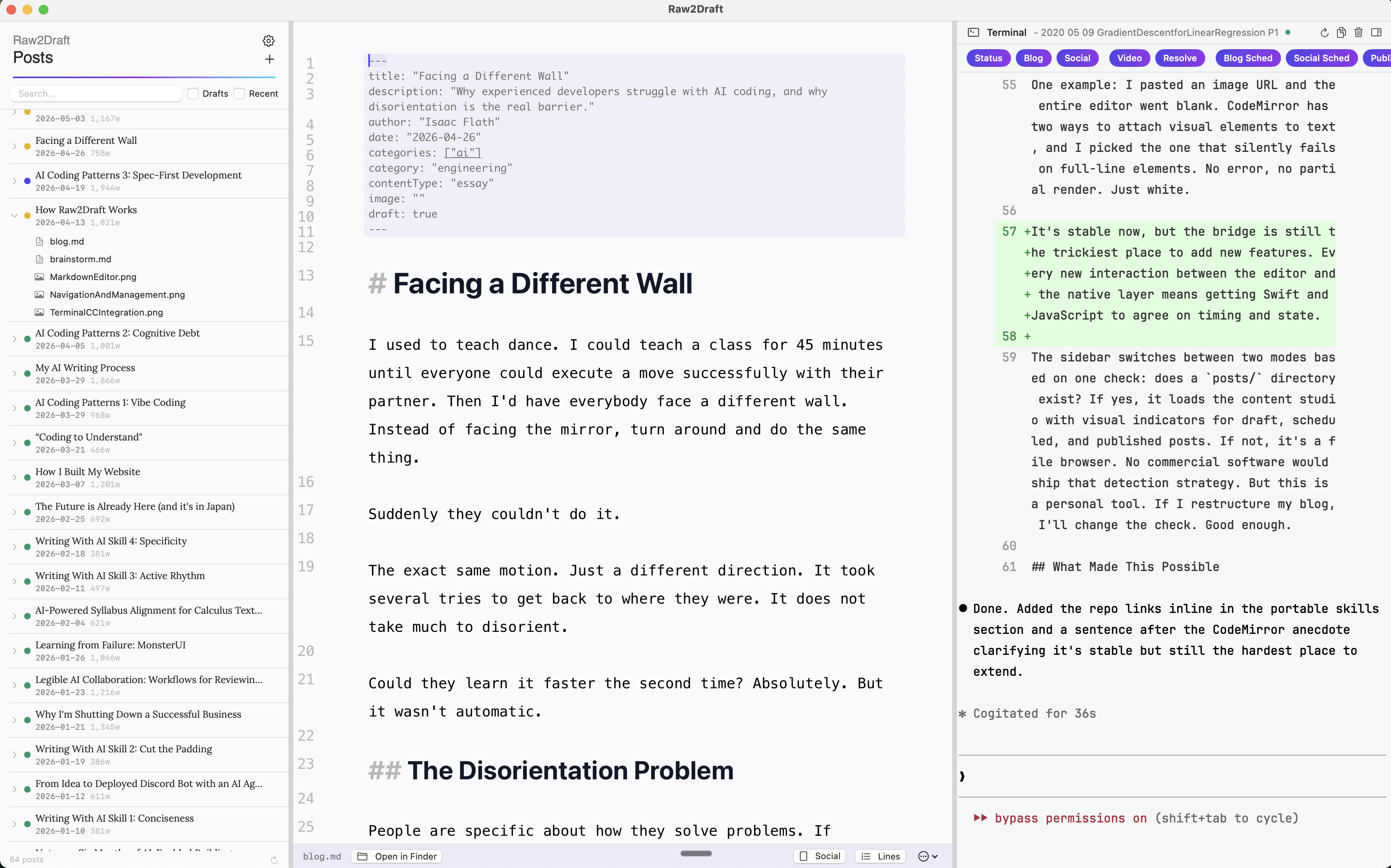
I built a markdown editor called Raw2Draft. It has an embedded terminal running Claude Code, a preview pane that matches my blog's typography, and an iA Writer-inspired styling layer. The interesting part is the agent skills that power my AI writing workflow. They're portable: they work in Raw2Draft, in a plain terminal, and in other agents.
Portable Skills
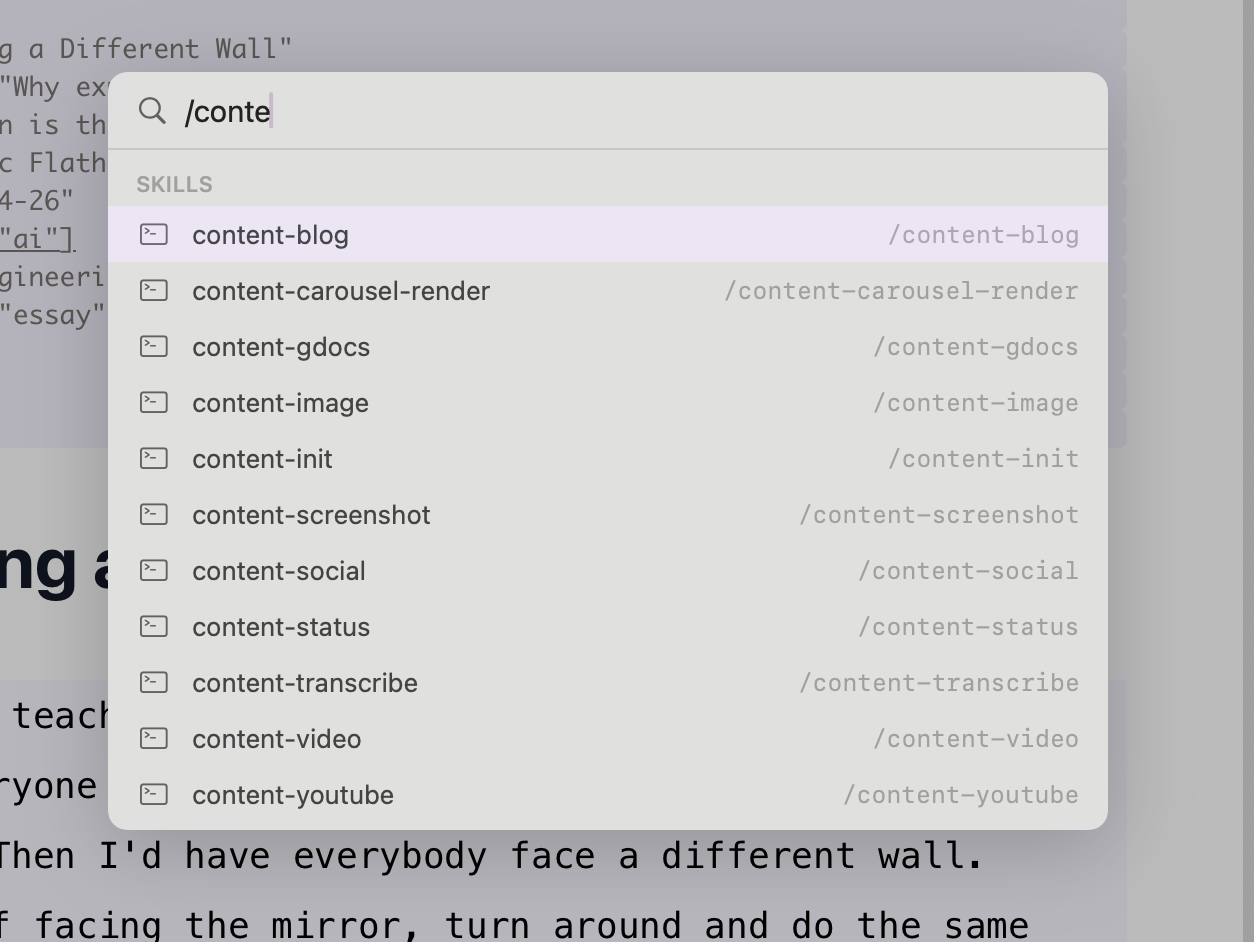
The skills that power my writing workflow are Claude Code skills: markdown files with plain English instructions. The same skill files work in Raw2Draft, in a plain terminal session, in Codex, or any other agent. If I switch editors tomorrow, the skills come with me.
On first launch, Raw2Draft clones two public GitHub repos: agent-starter-skills (skills for blog writing, transcription, social media, publishing, scheduling, and video editing) and agent-starter-wiki (a knowledge base with reference docs like writing style guides). Both get passed to Claude Code as context directories via --add-dir. Both are designed to be forked and replaced with your own.
The skills are procedural: do this, then this, then this. The knowledge base is about taste and judgment: how I write, what I’ve learned about specific APIs, style decisions I’ve made. That separation keeps the skills clean. I’ll write about my personal knowledge base separately.
Composition
I use a "parent skill" pattern. /content-blog calls /transcribe if there's a video, calls /screenshot to capture key frames, sends everything to Gemini with my writing style guide, and runs two editing passes. I don't call the sub-skills manually. I call the parent, and it orchestrates.
The same sub-skills get reused in different contexts. When I'm writing a spec, I call the screenshot skill directly. When I'm editing video, the transcription skill uses a different provider because video editing needs filler words preserved for accurate cut detection. Different parent skills compose them differently, and I compose them by hand when I need something one-off.
I don't write a script until the plain English version fails. Scripts handle Gemini calls, S3 uploads, frontmatter parsing. The decisions about what to do and when live in plain English.
What a Writing Session Looks Like
A post starts as a voice transcription (my wife calls it recliner rambling) saved alongside screenshots, videos, or reference files. I call /content-blog and get a first draft. The first draft saves hours, but editing is where the post becomes mine. I rewrite sections, reorder arguments, cut two paragraphs of AI writing down to a sentence. I read passages aloud to check rhythm. I use Claude Code as a reviewer, asking it to find clutter or critique the argument from different angles. I wrote about the full writing and editing process here.
When the post is ready, /publish validates frontmatter, syncs images to S3, rebuilds the search index, and deploys.
Embedding Claude Code
Raw2Draft doesn't have its own AI. It launches Claude Code as a subprocess in an embedded Ghostty terminal, passing it the project directory and a set of context directories. Claude Code provides the reasoning, file editing, and skill execution. Raw2Draft provides the writing surface and the glue between them.
That glue is small. The app writes the current file path to ~/.raw2draft/active-file whenever I switch tabs, so Claude Code always knows what I'm looking at. When Claude Code edits a file, the editor picks up the change. A command palette (Cmd+P) sends slash commands to the terminal. The editor and Claude Code work as one system, but the boundary between them is clean.
The Terminal
The hardest part was the terminal. I tried xterm.js (too many edge cases), then SwiftTerm (rendering bugs because Claude Code assumes a full terminal). I switched to libghostty, the core of the Ghostty terminal emulator. I already used Ghostty as my daily terminal, so embedding its core felt right. I haven't had a terminal issue since.
The Editor
The markdown editor uses CodeMirror. It handles markdown well, it's extensible, and the styling system let me build the look I wanted. The whole thing is a small JavaScript project embedded inside the native app.
The native app and the editor talk through a bridge: Swift sends content in, JavaScript sends keystrokes back. That bridge has been fragile.
One example: I pasted an image URL and the entire editor went blank. CodeMirror has two ways to attach visual elements to text, and I picked the one that silently fails on full-line elements. No error, no partial render. Just white.
It's stable now, but the bridge is still the trickiest place to add new features. Every new interaction between the editor and the native layer means getting Swift and JavaScript to agree on timing and state.
The sidebar switches between two modes based on one check: does a posts/ directory exist? If yes, it loads the content studio with visual indicators for draft, scheduled, and published posts. If not, it's a file browser. No commercial software would ship that detection strategy. But this is a personal tool. If I restructure my blog, I'll change the check. Good enough.
What Made This Possible
I started with three separate repos: the blog, Raw2Draft, and a knowledge base. Skills and reference docs were duplicated across all of them. I consolidated into one monorepo so everything could share context.
Then I built the knowledge base into its own system, and that let me decouple again. The skills and knowledge live in their own repos. Raw2Draft, the blog, and any future tool can pull from the same source. The consolidation taught me what needed to be shared. The knowledge base made sharing possible without coupling.
The skill architecture means adding a new capability is writing a markdown file. When I designed a social media skill, I wrote three rules in English: find the hook, maximize white space, preserve voice. A year ago, writing instructions in a markdown file would not have been enough. Now it is.
I like Raw2Draft better than any other writing tool I've used. Better than Google Docs. Better than Typora. Not because it's more polished. Because it does exactly what I need, the way I need it, and nothing else.