How retrieval works for agents
 Isaac FlathJanuary 11, 2099
An agent finds information and uses it to answer or act.
A model can use only the information in its prompt and tool results. A better model cannot recover a source the agent never found.
Specstory wanted users to ask questions about past agent work, such as why a team chose Authlib and which alternatives it considered. The chatbot must find the conversations where the team discussed that decision.
If search returns code but misses the discussion, the agent may explain how the team used Authlib instead of why it chose Authlib.
An AnkiHub operator in our private community had a retrieval problem with study requests. A study request based on lecture slides depends on matching the relevant flashcards. A lecture on heart function may match hundreds of cards. Ranking selects which cards enter the prompt. Raising top_k adds more cards, including weaker matches.
An agent may search local files, a semantic index, the web, an API, or a database. The agent, a fixed workflow, or the app may run the search.
A coding agent runs rg, opens files, reads logs, and inspects tests before writing a patch. A research agent searches the web and internal notes before writing an answer. A study assistant searches deck facts and user context before suggesting what to learn next.
Retrieval failures affect the output, token use, and latency.
| Effect | Retrieval cause |
|---|---|
| Hallucination | The source needed for the answer is absent from the prompt. |
| Context rot | Low recall leads to a higher top_k, which adds noisy results to the context window. |
| Latency | More tool calls, possible matches, and prompt content increase processing time. |
The Mixedbread OfficeQA-Pro Eval uses 89,000 pages of financial documents, dense tables, scanned PDFs, and questions that require reasoning across documents. Mixedbread reported fewer Codex tool calls and higher answer quality after improving the search tools.
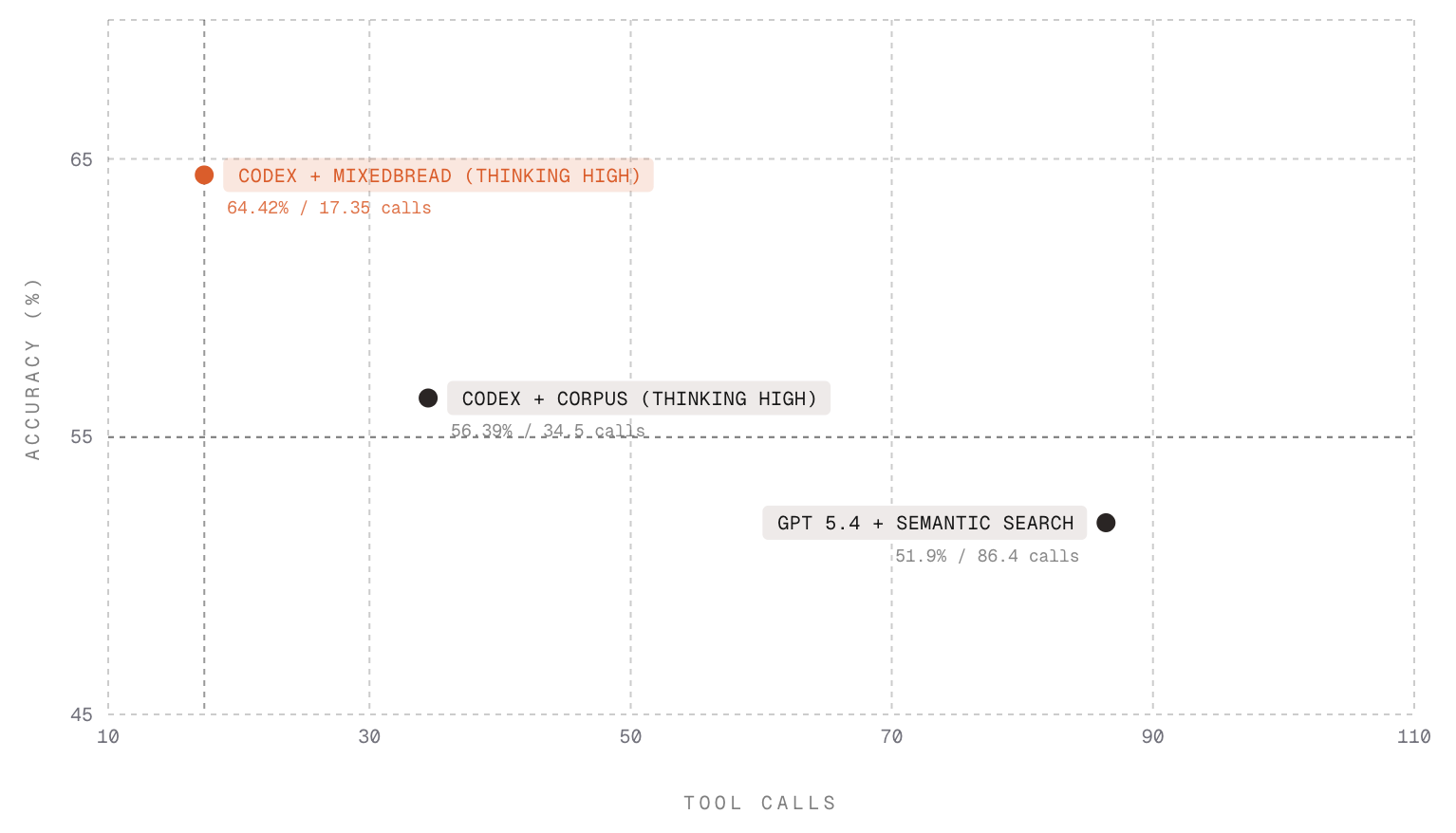
grep and rg search exact text in files. Searching PDFs, tables, chat histories, images, web results, and access-controlled data can also require semantic matching, metadata, permissions, and ranking.
Search records
A trace stores the request and results from each search.
An eval labels which results were relevant, which were noise, and which relevant results were missing.
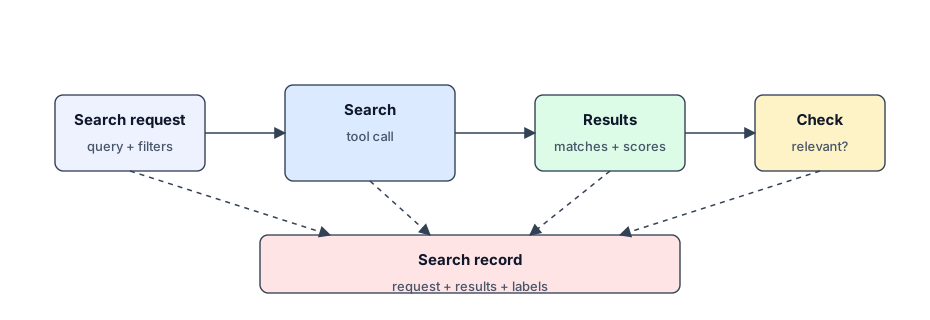
For a coding agent using rg, the trace contains the command, returned snippets, relevance labels, and missing files.
A product may use BM25, semantic search, hybrid search with reranking, or a generated SQL query. The trace contains the query, filters, returned documents or chunks, and relevance labels.
Each search trace shows whether that search returned relevant information. The full trace shows whether the agent collected the information required for the answer. If the full trace contains that information, the failure occurred during generation. If it does not, the failure occurred during retrieval.
The trace identifies where the failure occurred.
Where search fails
A relevant document can disappear while the system builds the query, runs the search, filters results, ranks results, or builds the prompt.
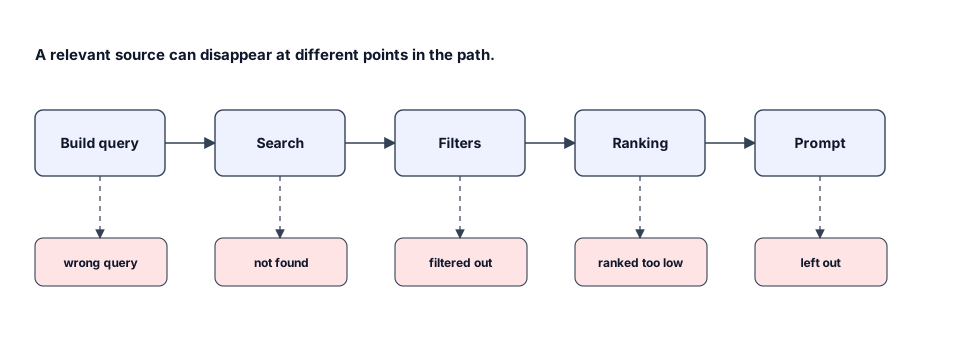
| Where it failed | What happened | What to change |
|---|---|---|
rg / grep | A search for an idea returns literal matches and misses the relevant files. | Add semantic search over files or chunks, or build more specific keyword queries for rg. |
| BM25 | The query and the source use different words for the same idea. | Add semantic search, synonyms, or query expansion. |
| Semantic search | Results leave out exact names, error strings, document IDs, or terms from the field. | Add keyword or BM25 search, or give more weight to exact matches. |
| Hybrid retrieval | The relevant passage ranks 7th, but the model only gets the top 5 results. | Add or tune a reranker, or raise top_k before reranking. |
A question about a past decision requires the decision, alternatives, and related conversations. A study question requires the lecture material, deck details, related cards, and the user's study history.
Search flow
The agent searches sources, ranks the results, selects the prompt content, and produces an output.
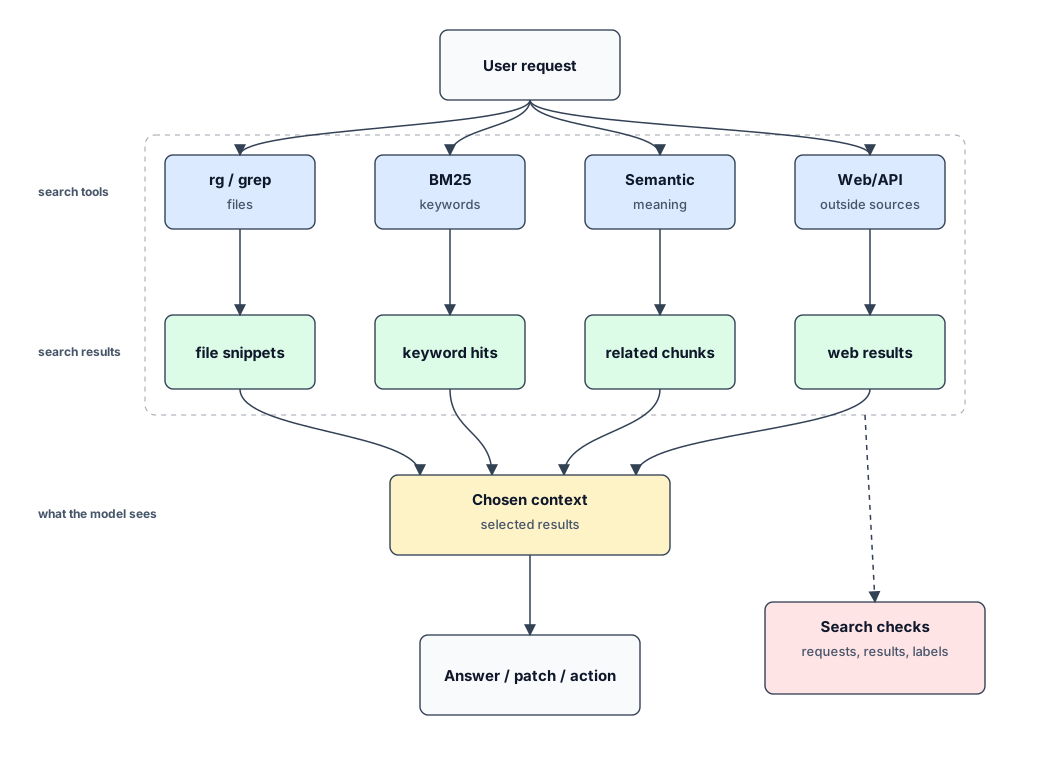
The search may use a search engine, vector database, SQL query, local file tool, web search API, or custom service. Each method returns results for filtering, ranking, and selection.
Search controls
Semantic search compares embeddings that represent meaning. It can match queries and sources that use different words. A meeting search can also filter by person, date, project, and source. A finance search can filter by filing date, quarter, and source. An e-commerce search can filter by stock status. These controls determine which results reach the agent.
In a chat app, these controls are defined in the tool schema, query planner, or app code. The agent receives them as tool arguments.
Search can combine these controls:
| Control | What it does | Example |
|---|---|---|
| Exact match | Matches names, IDs, error strings, quoted phrases, tickers, or product codes. | Find EADDRINUSE, Authlib, or a specific SEC accession number. |
| Semantic match | Finds related content when the wording differs. | Find the meeting where the team discussed authentication tradeoffs. |
| Filters | Removes results that do not apply before ranking. | Limit by tenant, permissions, person, date range, size, or stock status. |
| Sorts | Orders results by a field. | Prefer the newest filing, lowest price, or highest rating. |
| Ranking | Scores candidates by likely usefulness for this request. | Combine semantic match, exact match, freshness, source quality, and use. |
| Reranking | Uses a slower model or scorer on a smaller candidate set. | Compare the query against the top 100 candidates before returning 10. |
A chunk is a piece of source content. The first search returns a set of chunks. Ranking orders them. The app selects the chunks and fields added to the model prompt.
Precision is the share of returned chunks that are relevant. Higher precision reduces the number of chunks, tokens, and irrelevant results sent to the model. A chunk ranked below the cutoff is absent from the prompt.
A search interface shows a person titles, snippets, dates, domains, and URLs. The person can open a result or submit another query. An agent receives a limited set of documents. If a relevant source falls below the cutoff, the model receives partial context. The system can raise the candidate count, run more searches, or add more documents to the prompt.
A missed document can change the next search. If a request asks why a team chose Authlib and the first search misses the comparison transcript, the agent may search the codebase. That search can return imports, callback handlers, tests, and comments. Those results describe how the team used Authlib, not why it chose Authlib.
A reranker can score only the candidates it receives. It cannot add a missing date, person, source, size, or stock filter. If the tool lacks date_range, person, source_type, size, or in_stock, the model must put those requirements in the query text.
Search volume
Search systems use indexes, filters, facets, sorts, caching, limited reranking, and update jobs to control query cost and result quality.
One agent request can rewrite a query, run keyword and semantic searches, inspect results, submit follow-up searches, and open source documents. Concurrent requests multiply those operations.
Teams can compensate for weak ranking by raising top_k, running keyword and semantic searches in parallel, adding reranking, fetching more documents, and adding more text to the prompt. These steps use more tokens, increase latency, and add search load. Higher precision reduces the number of results required.
The cost of searching a dataset in full increases with its size. With millions or billions of chunks, each search, candidate, ranking pass, and returned token adds cost.
Search stages
A search system can run several steps behind a chat interface.
| Step | Operation | Failure |
|---|---|---|
| Build the search | The app or agent chooses the query, filters, and sort order. | The query or filter is wrong. |
| Find possible matches | Text, vectors, or structured data return possible chunks. | The relevant source is absent. |
| Filter | Permissions and product rules remove results that do not apply. | A valid source is removed. |
| Sort | Dates, prices, ratings, or other fields put results in order. | A required item is out of order. |
| Rank | The system scores results for the request. | A relevant source is below the cutoff. |
| Return results | The system sends selected fields to the agent. | A required field is absent. |
| Choose model input | The app formats the results and adds them to the prompt. | A required result is absent. |
| Check the search | People or automated checks label the search result. | The trace does not show the failure. |
Wrong filters require a change to the search arguments. A missing date sort requires a change to the search API. A result below the cutoff requires a ranking change. A returned source missing from the prompt requires a change to prompt construction.