Document Evals: OCR, Retrieval, and Agents
 Isaac FlathOctober 11, 2026
The process I use every day
I'm going to walk through the process I use every day to evaluate OCR models as well as agents that answer questions over documents. This is how I try new model releases and figure out where things are going wrong in a project and how to fix them.
Let's start with this food inspection report. Everything's typed up. Nothing's hard to read. At a glance it appears easy.
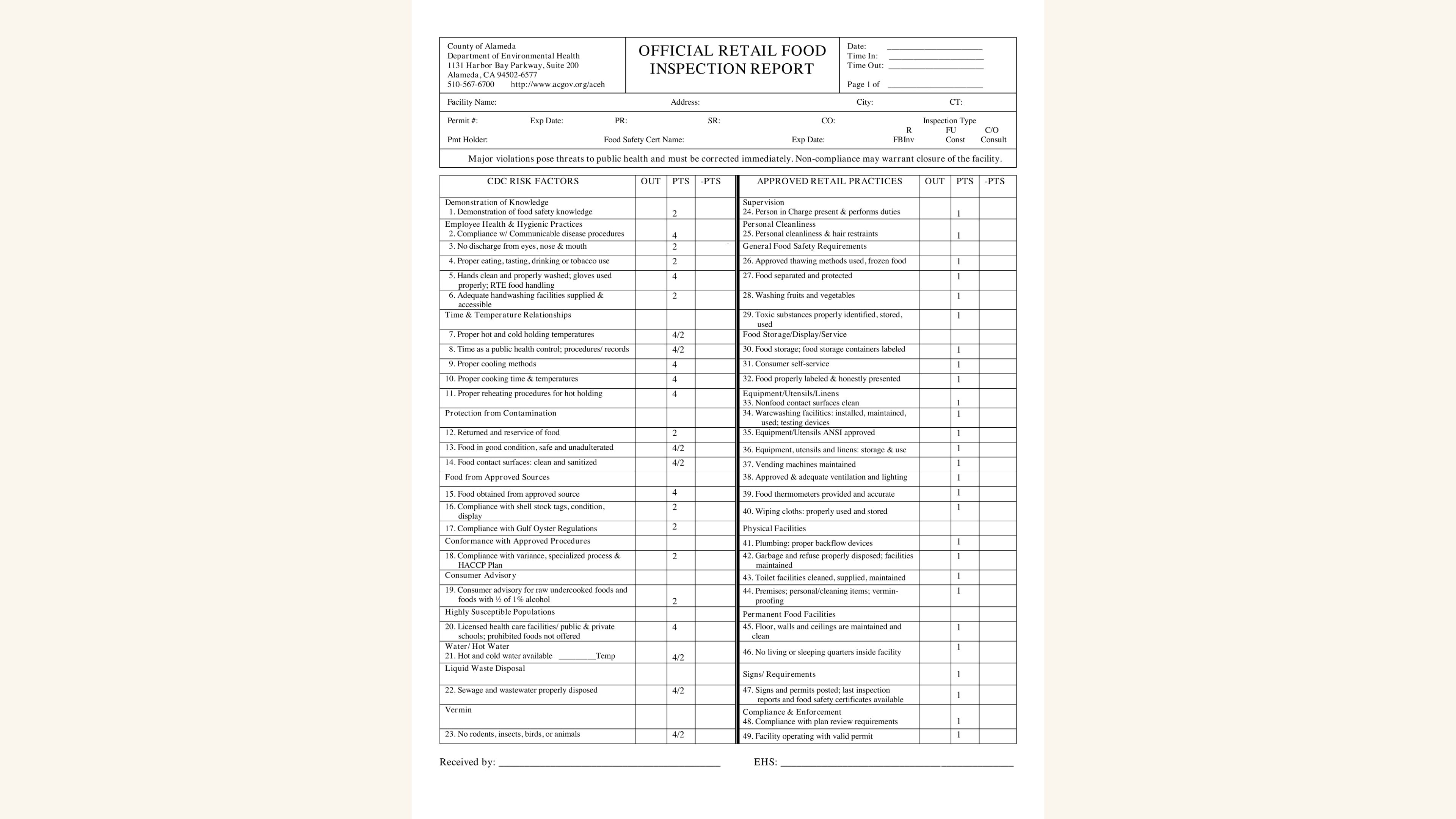
What the agent gets
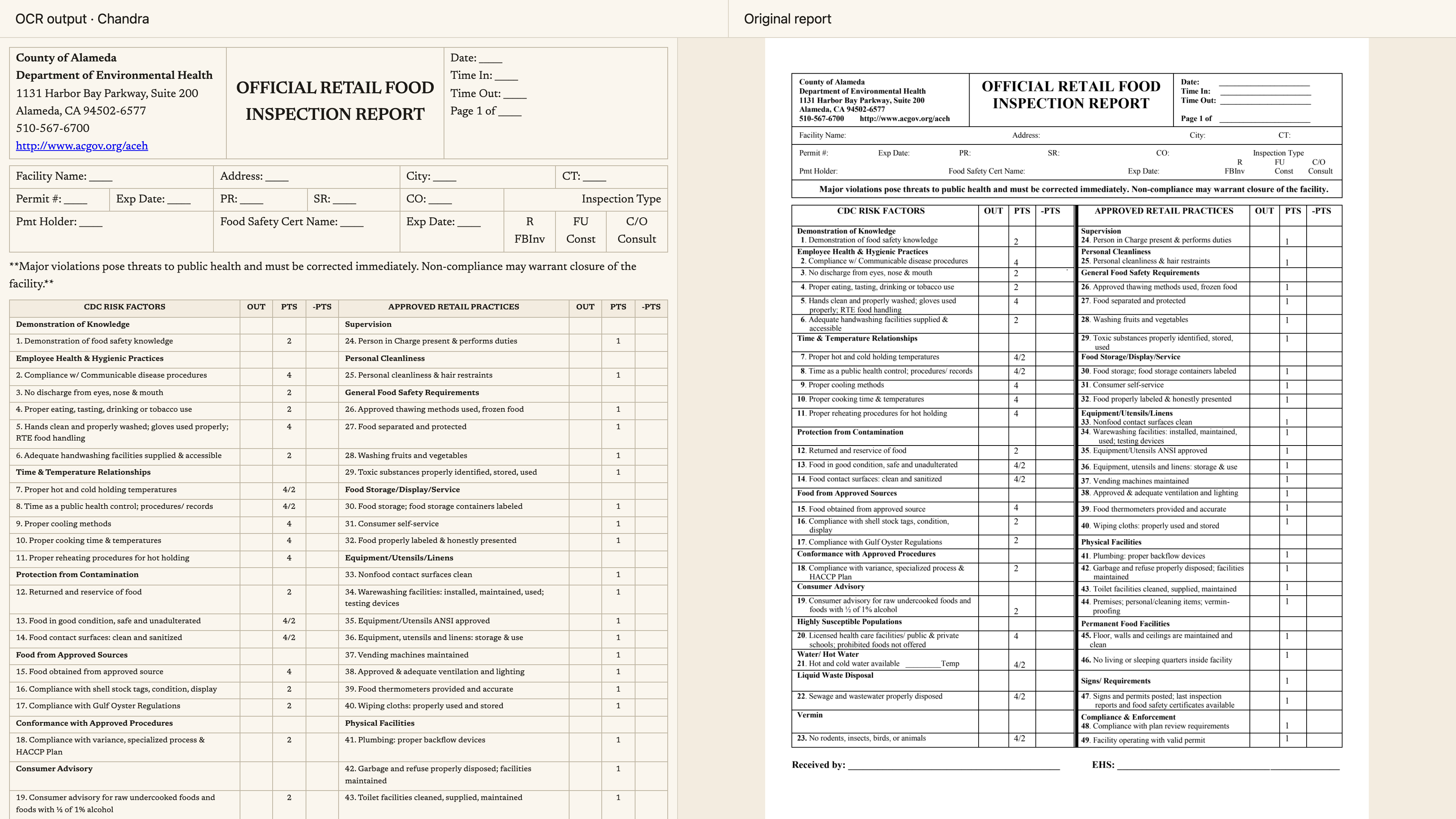
Here's that PDF beside what an OCR model extracted from it. The original report is on the right. If we give that extracted text to an agent, that's what it has to work with when it answers questions about the document.
When you compare the original with the OCR output, there are differences. Some are harmless differences while others are factual inaccuracies.
I see this all the time with clients. They're tuning their prompts, moving to a larger model, or trying to fix their retrieval system. They haven't even considered that the OCR process might be where the error came from.
Which differences matter?
Comparing the output with the original can feel like a spot-the-difference game. You might have a dense table with a hundred values, and you're like, “Well, what's wrong?”
And there are a lot of judgment calls already, so lets look at some.
Some of these fields have underlines and some don't. Do you care about that? Should they all have underlines? Should none of them have underlines? Do you care what the model does?
You might say, “No, that's a harmless change. We'll ignore that.”
Other changes aren’t so harmless. For example, the number of points that each one of these gets: if that's wrong, that's almost certainly bad.
Then we have these groupings. In one place, the bold header goes in the first cell, but it belongs to the cells and rows below it. In another place, the bold header gets a row of its own, and everything below it is clearly under that group.
And this is a pretty ordinary document. You still have these issues.
The annotation app
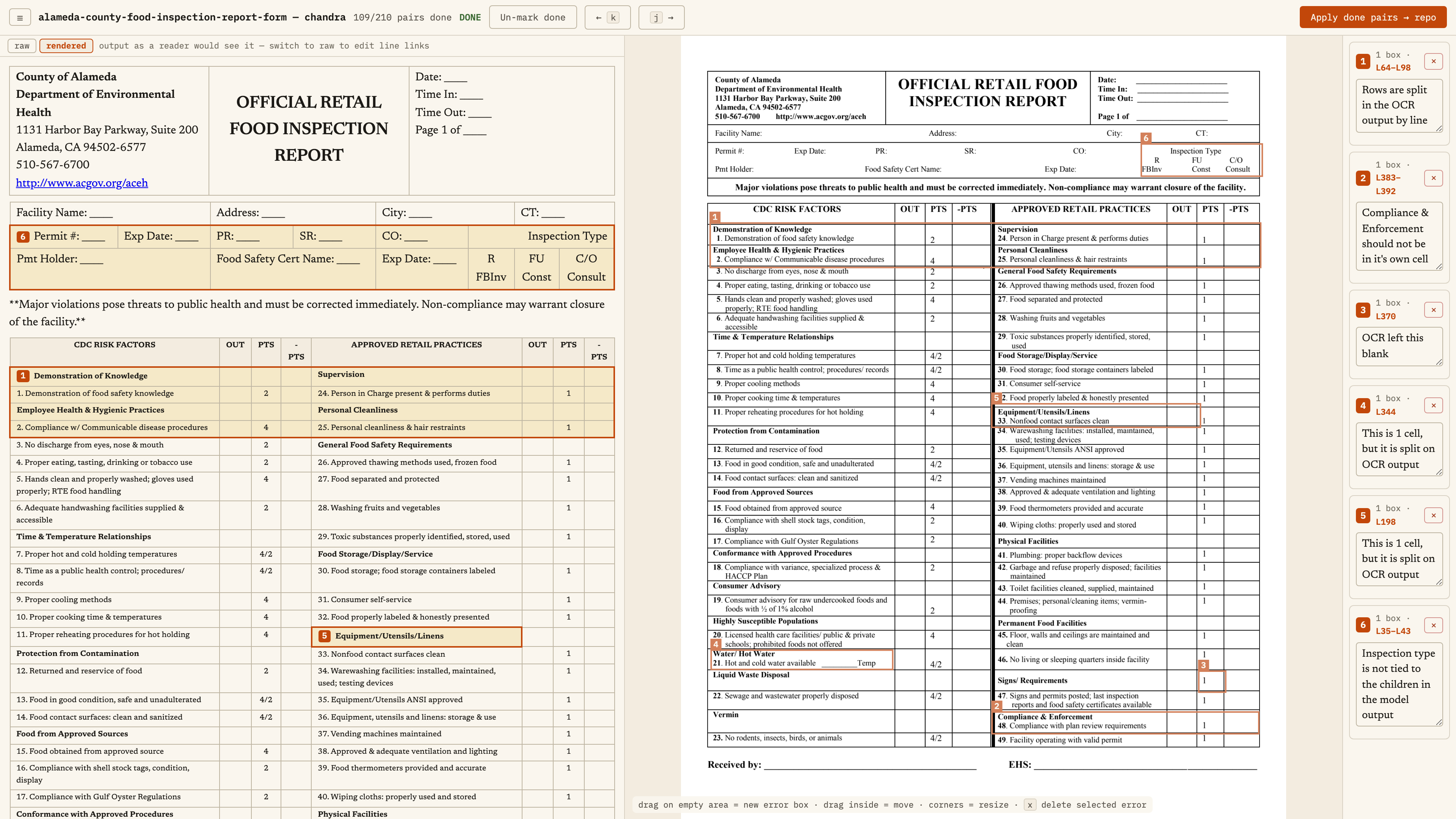
Here's the same comparison inside my annotation app, with my annotations showing. The original report is in the middle. The orange boxes are places I've marked while reviewing it. Each number links a comment (on the right) to a bounding box on the original PDF (middle) to a box on the OCR model output (left). All three need to be linked together to understand the issue.
So on the left I have the model output. In this case, I'm using Chandra in this view (really great VLM for OCR).
Let's look at the inspection type. In the model output, it's not tied to the children in the same way it is in the original document. I'd call that an error.
I can look at the rendered output, or I can click on raw and see the actual output of Chandra.
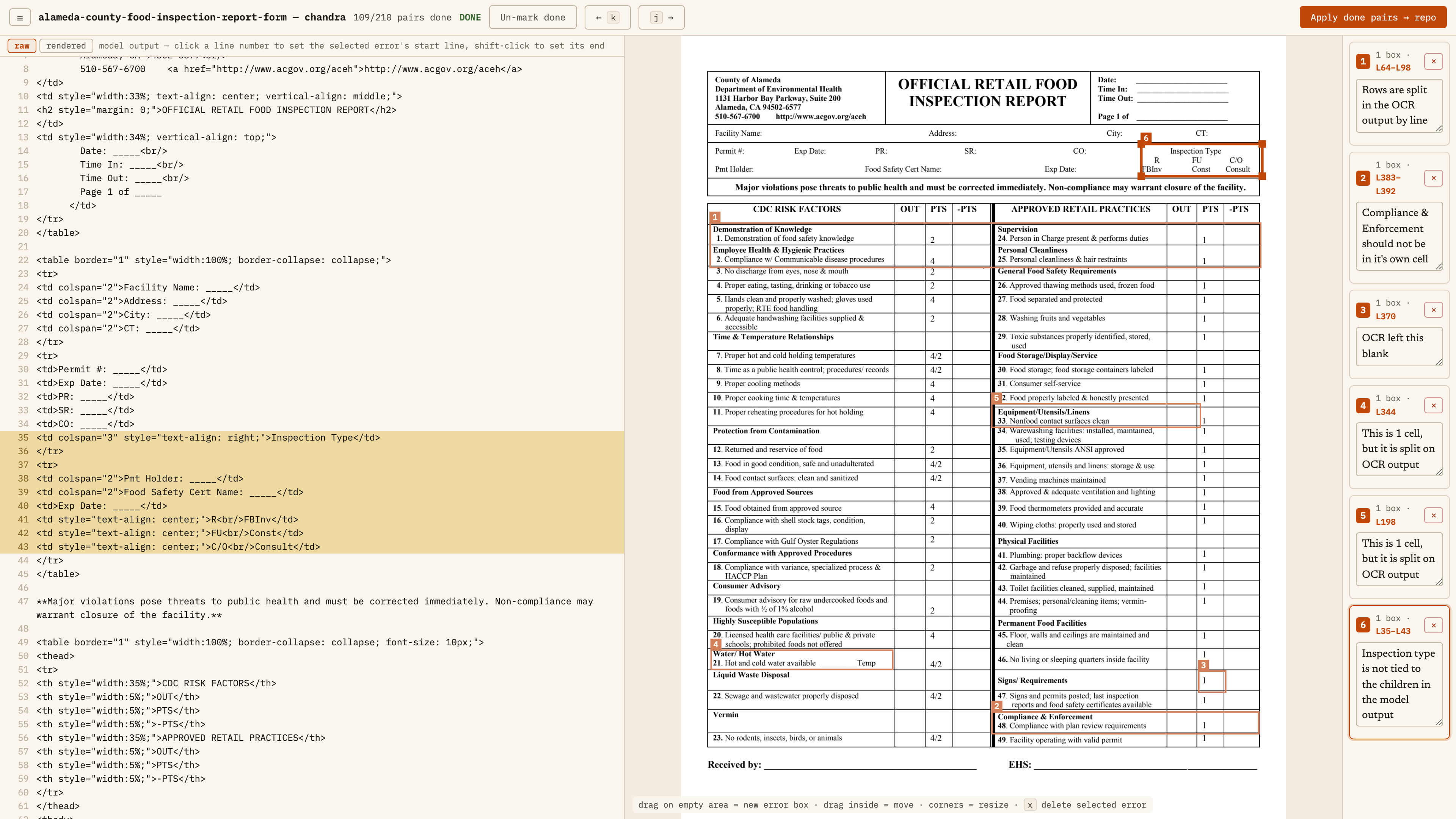
It's giving this HTML-style format, which is nice if you have a really complicated table structure, because Markdown tables don't always do it. If the table structure is really important, that might be something to consider.
Here I've drawn a bounding box and written my note: “Inspection type is not tied to the children in the model output.” Then I tied it to the relevant lines in the output.
So here's that connection for this error. I can revisit it without having to figure out what I meant all over again.
You can think of this as open coding. I wrote a note but I didn't classify it.
Is the OCR wrong, or is the document wrong?
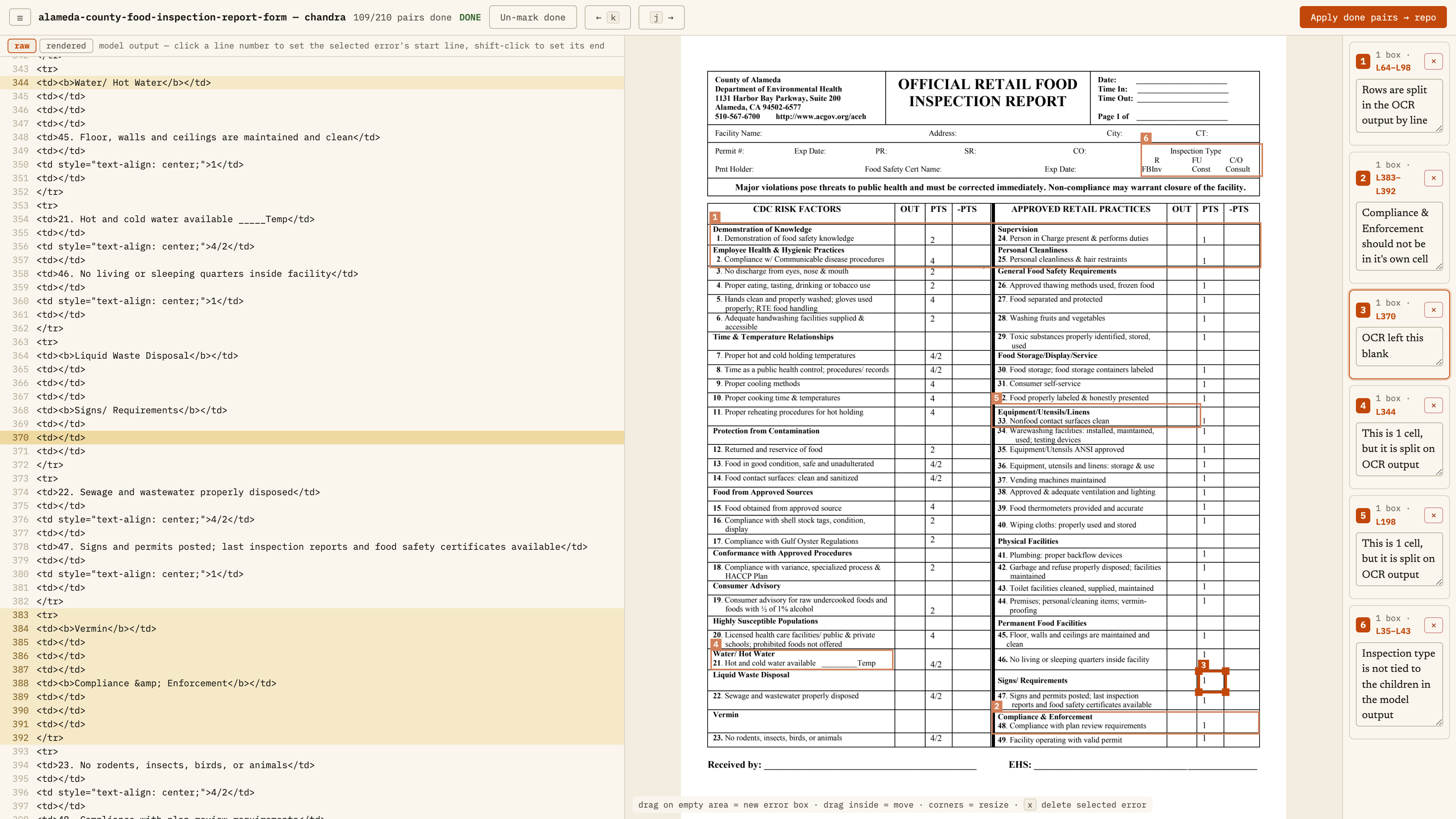
Here's an interesting one. Next to “Signs / Requirements,” there's very clearly a one in the points column. In the OCR output, it’s blank. It missed it.
That seems pretty bad and clearly the OCR output table data does not match. But even here, it's ambiguous.
This looks a header, and it has a point value. Everything else on this page suggests that headers don't get a point value. “Demonstration of Knowledge,” “Employee Health and Hygienic Practices,” “Protection from Contamination”. Those headers don't have one.
Here, the header has a point value, and the model left it out.
You might need some domain expertise to say, “Should it have a point value? Is there something different about this?”
It's clearly not representing the document correctly. But is the document wrong, or is the OCR model wrong?
I'm not a food inspection expert. If I had a product around this, my first path for resolving it would be to say, “Interesting. Let me see if this original food inspection report is wrong. If it is, how do I get the source data fixed?”
This looks like a form that people are walking around with on clipboards and filling in. Maybe there's a process there. Or maybe there is a reason this one is goofy, and the OCR model is wrong and I need to address that.
This doesn't even get into complex things like a chart with no labels, where you might have to estimate the values, or a flowchart where you might want to OCR it to json, or mermaid. There are things that are much trickier than this. But this is the start, and it's already ambiguous.
A checkbox is a judgment call
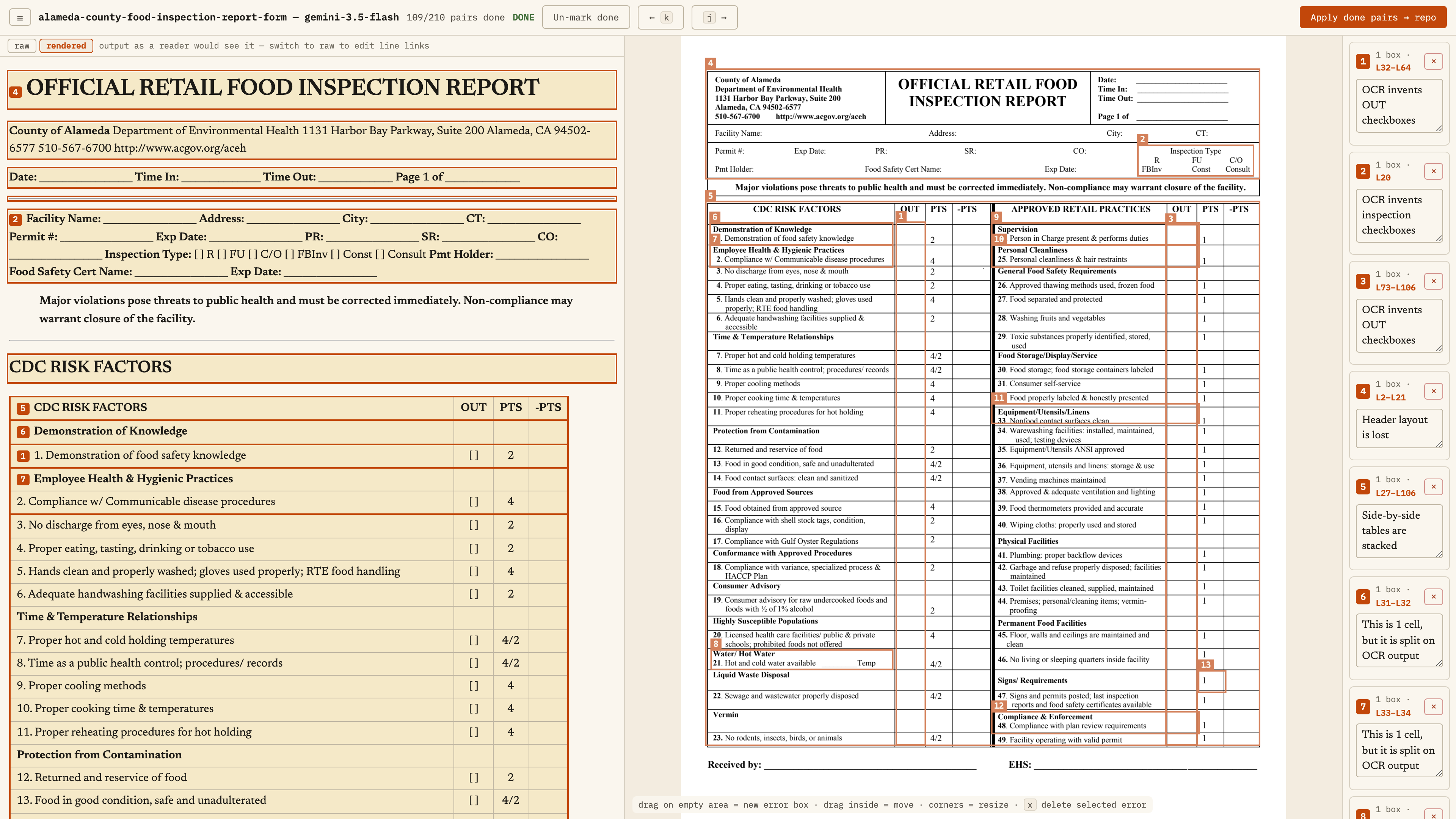
This is the same document but instead of chandra we use Gemini. In this case, I asked it to return Markdown.
It broke the two sides of the table into separate tables. Maybe you say, “That's fine. I don't need that exact format and it’s not a format that’s supported well in markdown”
It did better at grouping the inspection type, but it added checkboxes. Those checkboxes aren't on the original document.
My guess is that you're supposed to check or circle one of these inspection types. A checkbox makes sense.
One problem with a checkbox is that you can't easily put “not applicable,” especially if we want an agent to fill it in.
Is the checkbox checked or not checked? If it's not checked, is that because someone didn't check, or because it's not applicable for this particular restaurant?
Maybe if it's not applicable, you shouldn't count those points at all. Maybe if you couldn't check it because you weren't able to get access to it, that's a marker against the restaurant.
That depends on how the form is used. Again, lots of ambiguity and domain knowledge in something that looks pretty straightforward.
The watermark changes the meaning
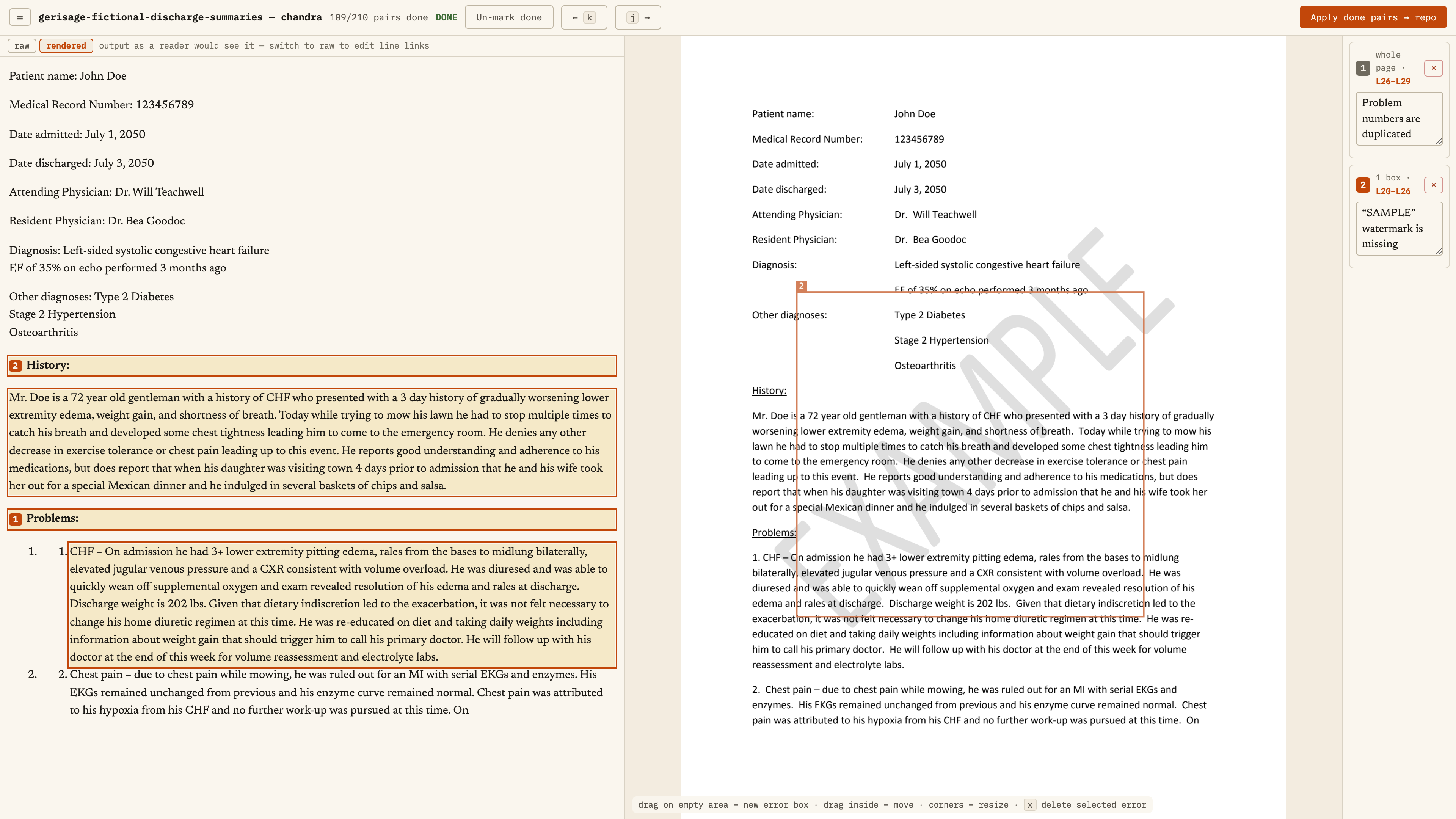
Here's another one that appears to be very simple. We have a patient name, medical record number, a bunch of prose, and a watermark that says “SAMPLE.”
Everything works pretty well, except the OCR output. both Chandra and Gemini Flash in this example, don't capture that watermark.
If the question is, “What patients did Dr. Teachwell see?” it can answer the question. But it should probably tell you, “Hey, this isn't an actual report. This isn't a real patient. This is just an example document.”
You might say, “Well, this example document shouldn't be in the dataset at all.” That's probably true. But you have the same issue in legal and finance and government all the time.
The watermark might say “confidential.” If an agent answers a question using confidential documents, it would be really nice to tell the person that the answer touches confidential documents.
In legal documents, things are often marked “draft” or “not for execution.” You write up a contract, watermark it as a draft, and send it over for review.
That might be really important when someone asks, “What are the terms with these people?” The answer might be, “There's no executed contract, but there is a draft contract marked ‘not for execution’ that says these terms.”
Or you're doing OCR over invoices, and there's a big “VOID” watermark. That makes a big difference to what you can do with that invoice.
These watermarks are extremely easy to see. It's not guaranteed that the model is going to capture them. You can't assume that your data is just going to magically be OCR'd.
So what do you do with this?
You could prompt the model: “Be sure to include any watermarks as YAML front matter before you OCR the rest of the page.” Ask it specifically to look.
Another option is structured data extraction. You might not need all this text. You might just need the patient name, medical record number, dates admitted and discharged, attending physician, and the status of the document.
You could use a vision model to extract those fields so you can search and filter.
There are ways to handle it. But you need to look at your data to find which of these edge cases you're hitting.
And I want you to keep in mind that as far as PDFs go, these are pretty harmless. No handwriting, crazy dense tables, images, flow charts, blueprints, etc.
Work backward from the wrong answer
Usually when you take a document and put it into text, you're not like, “Great, it's in text. That's all I wanted. A text file sitting on a computer” You want to do something with it. There's a reason you wanted it in a format you could work with.
One of the most common ways to work with that now is with an agent. OCR is one piece. When you're working with agents, citations are very important, and it's important to test both the OCR and the final answer.
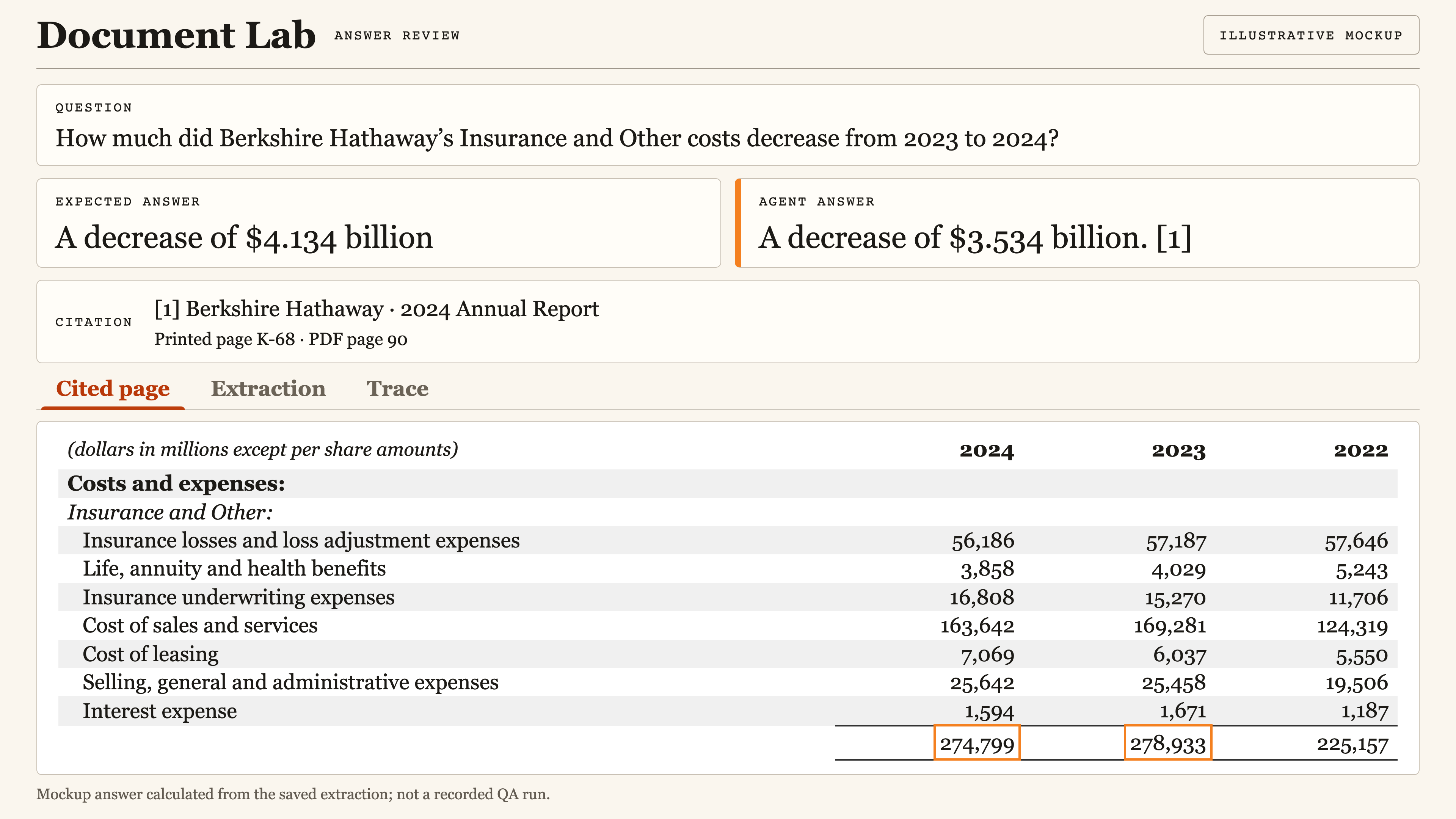
Here's a simple example: “How much did Berkshire Hathaway's Insurance and Other costs decrease from 2023 to 2024?”
To get the answer, the agent needs to look at two numbers and do simple subtraction. It also needs to give me a citation.
In this example, the answer is about three and a half billion dollars. It should be 4.134 billion. So it's wrong.
That can be a top-level eval. When I ask this question, does the right answer show up in the response? You can write a test for that.
The question is, why did this happen?
This is where the annotation apps are helpful. I want the question, the expected answer, the agent answer, and the citation together so I can see where it failed. Next, I’ll show you that in an actual agent run. For this example, let’s say the citation points to the right numbers.
Why would it get this wrong when it seems to have good citations?
Maybe it hallucinated a number. Maybe it didn't find the right document. Maybe the citation was added in a post-processing step. It's not clear why it got to this wrong answer.
Can I fix this by writing a better prompt? Can I fix it by paying a bit more and moving to a bigger model? I don't know, because I don't know what the problem is.
So I start from the endpoint and work backward.
First: is the wrong answer a model hallucination, or is it repeating something from its context window?
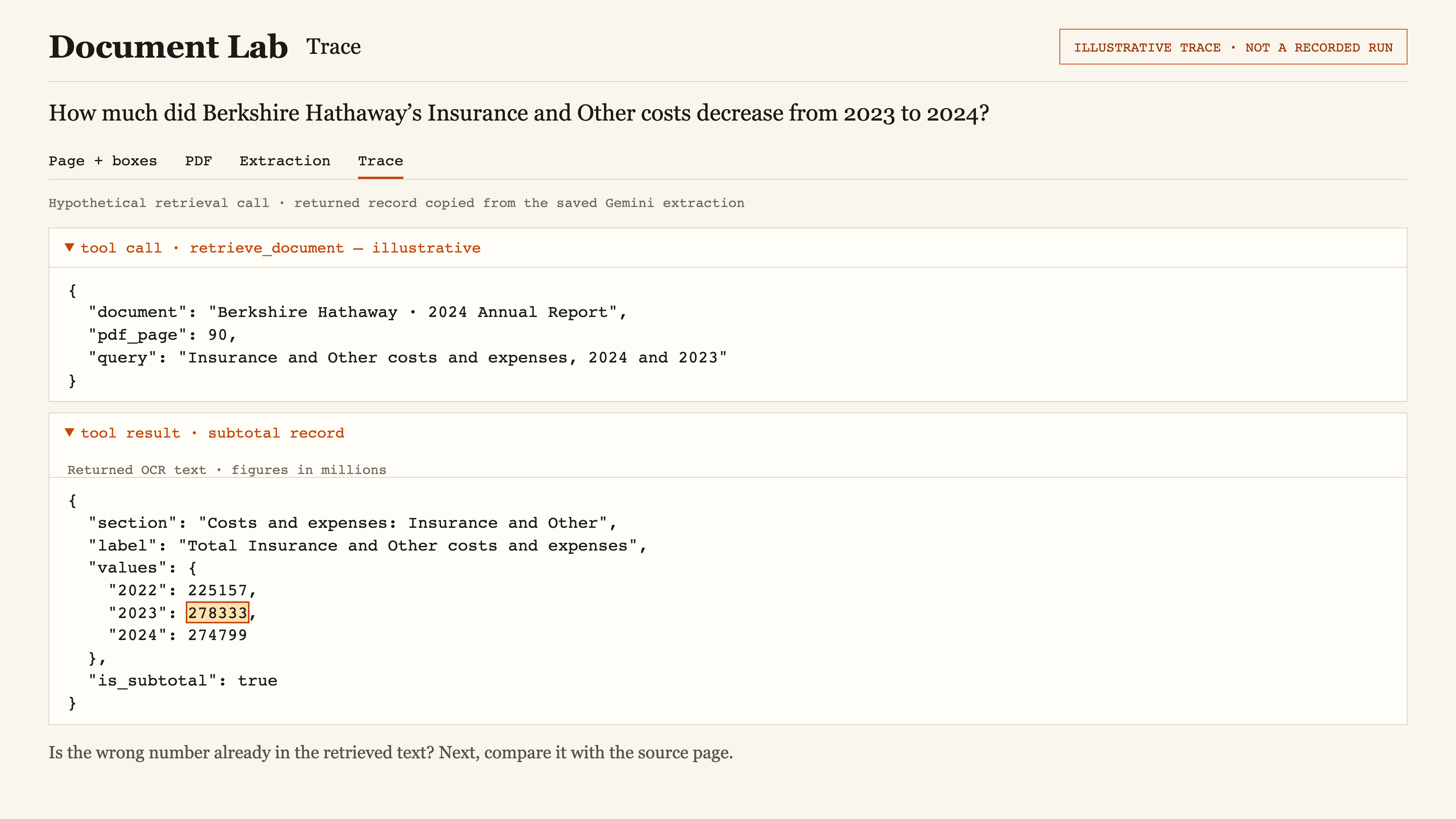
I'd look at the trace. I'd look at the tool calls. I can search for the wrong value and read around it. If the wrong information is already in the model's context window, that's useful to know.
A better prompt or a more expensive model might not address that problem. The model got information and used that information.
The next question is: how did the wrong information get there?
It could have been hardcoded in a prompt. It could have come from a retrieval tool call. Say it came from a retrieval tool call.
So did retrieval fail and give me the wrong page or document? Or did it retrieve the right page, but the data was wrong?
If the trace shows it got the right page, then I want to look at the data it brought in.
Then I want to know: is the source PDF wrong, or was there an extraction error?
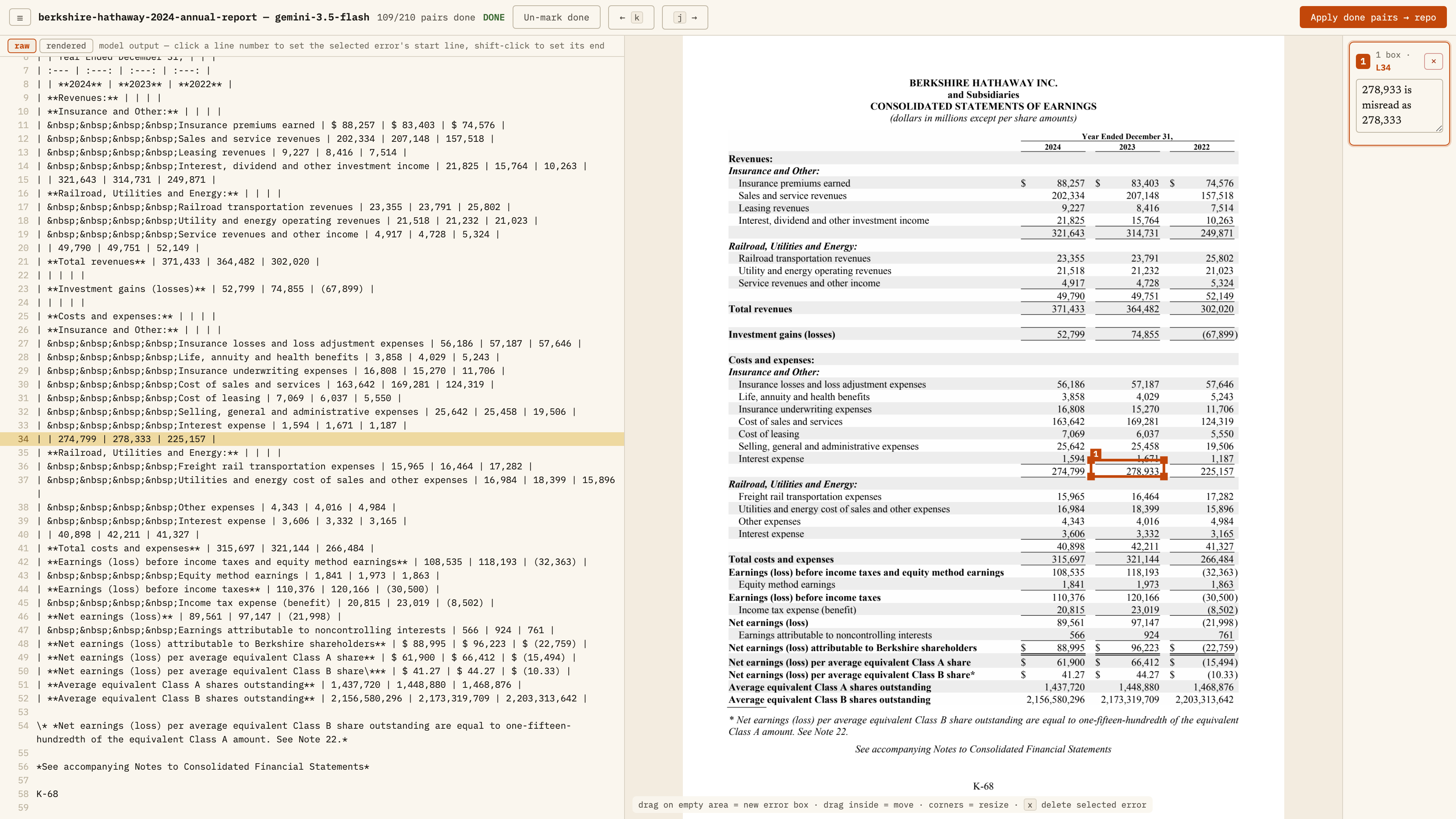
Here's the extraction error. The source PDF does not match the extracted model output. The source says 278,933, and the extracted text says 278,333. The figures are in millions, so that one digit changes the answer by six hundred million dollars.
Now I know where the issue is, and I can work on formulating a little test around it.
Maybe I take the extracted text and use a model to do structured extraction of those values. Then I can check: if I sum all these up, does it equal the total?
It's possible that one value is a hundred too big and another is a hundred too small, and the test still passes. But in practice, a check like that would catch a lot of these errors.
That gives me a fast test I can run without rerunning the whole agent loop over and over.
I still want the test for the final answer. But now I also have a test much closer to the problem.
Maybe eighty percent of my failures are actually because my OCR model failed. In that case, prompt tuning is a waste of my time right now. I need to know where the failures are coming from.
Check the answer and the citation
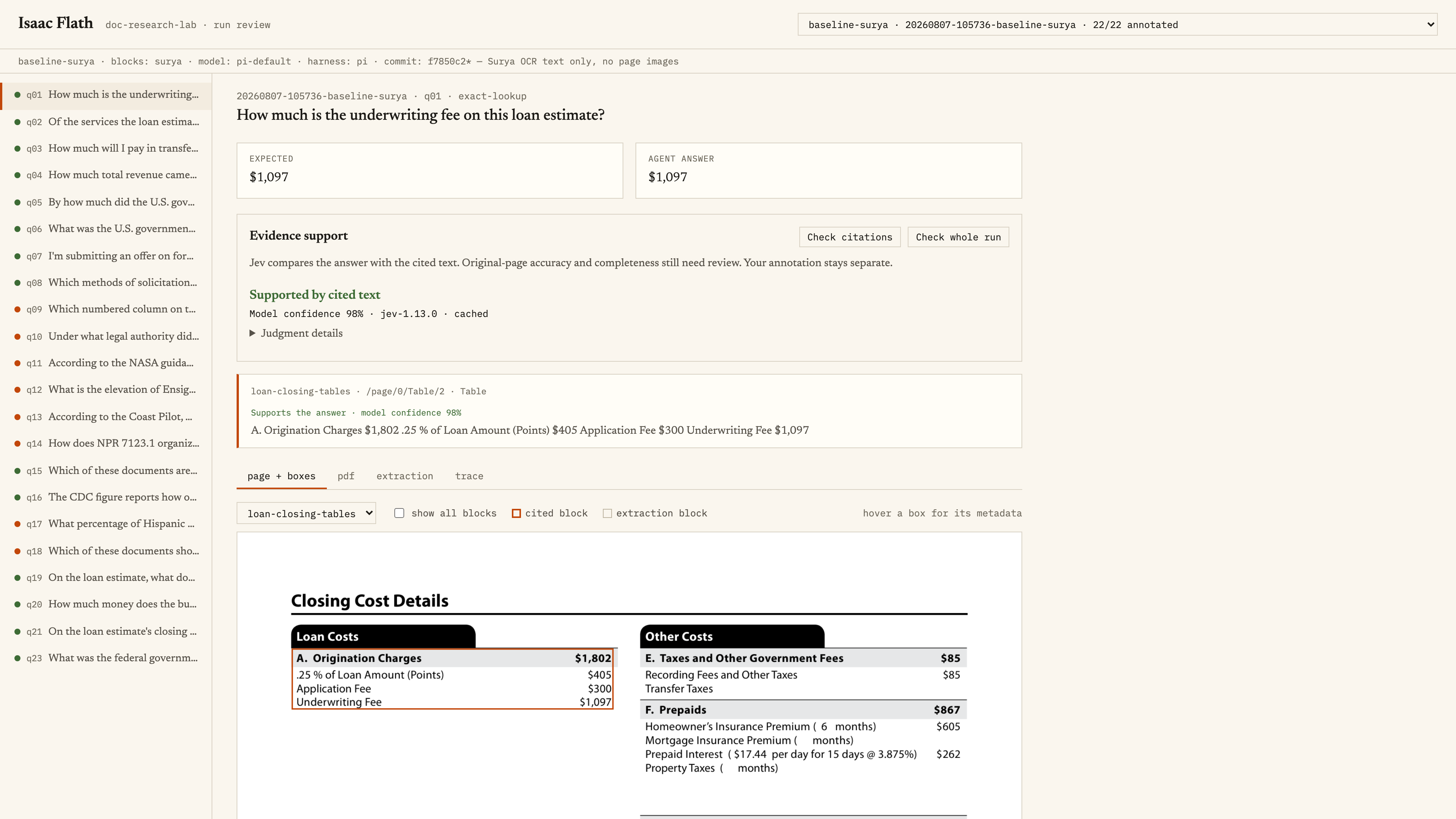
Let's look at an actual agent example: “How much is the underwriting fee on this loan estimate?”
The expected answer is 1,097.
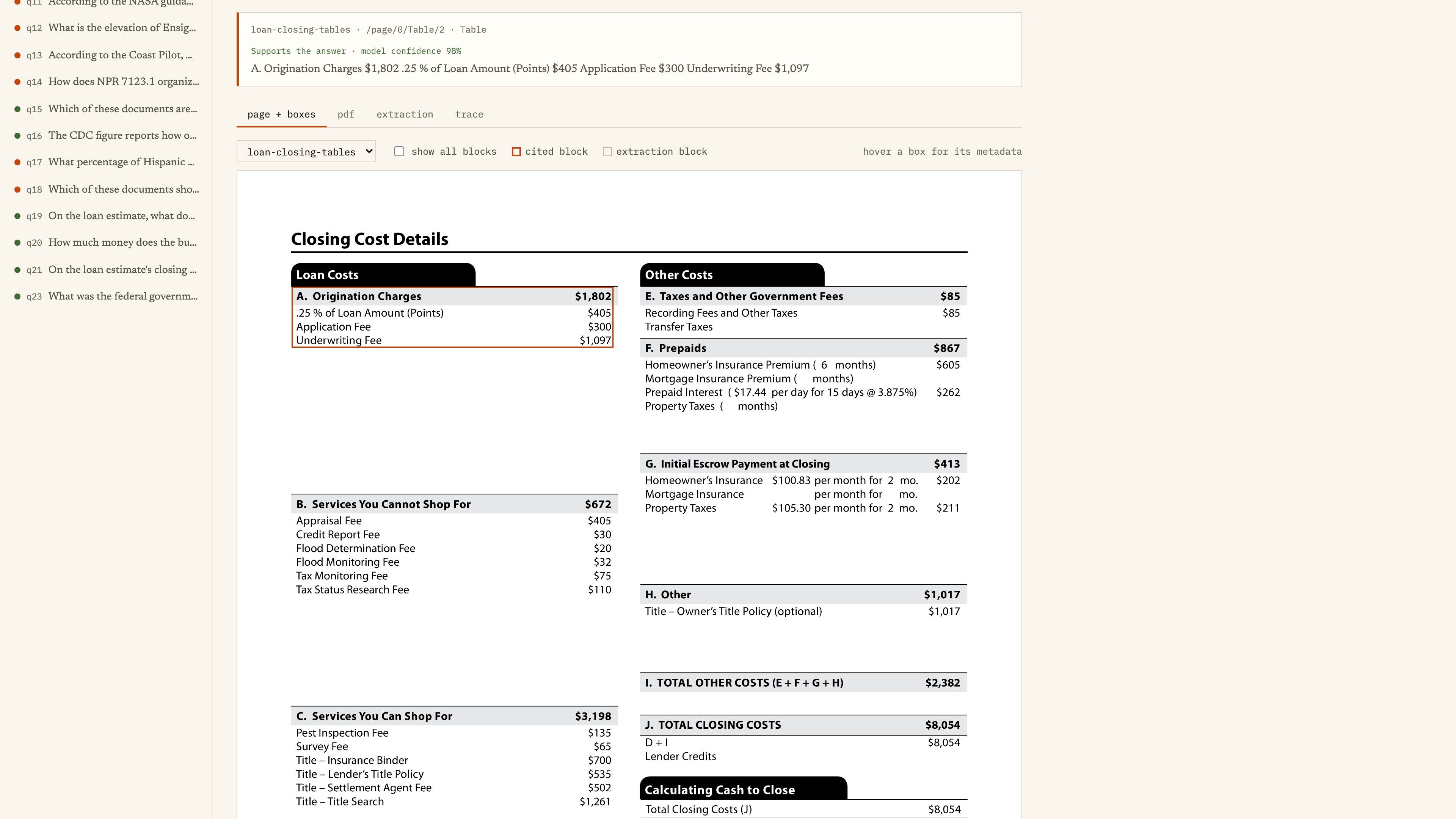
I have a citation, and it highlights the table that contains the value.
You can decide whether that's granular enough. For me, it is. Maybe you want it at exactly the right row. That depends on your application. I call this a pass.
I also use Jev in small ways in my annotation app. Here, it predicts whether the agent's answer is supported by the citation, contradicted by it, or not established by the cited text.
I used to have an automated test that just said, “Does a citation exist?” This is a little bit nicer. It looks at the answer and sees whether the cited text supports it.
I still have to look at the data. It speeds me up.
I can also look at the page and bounding boxes, the PDF itself, the full extraction text, and the trace.
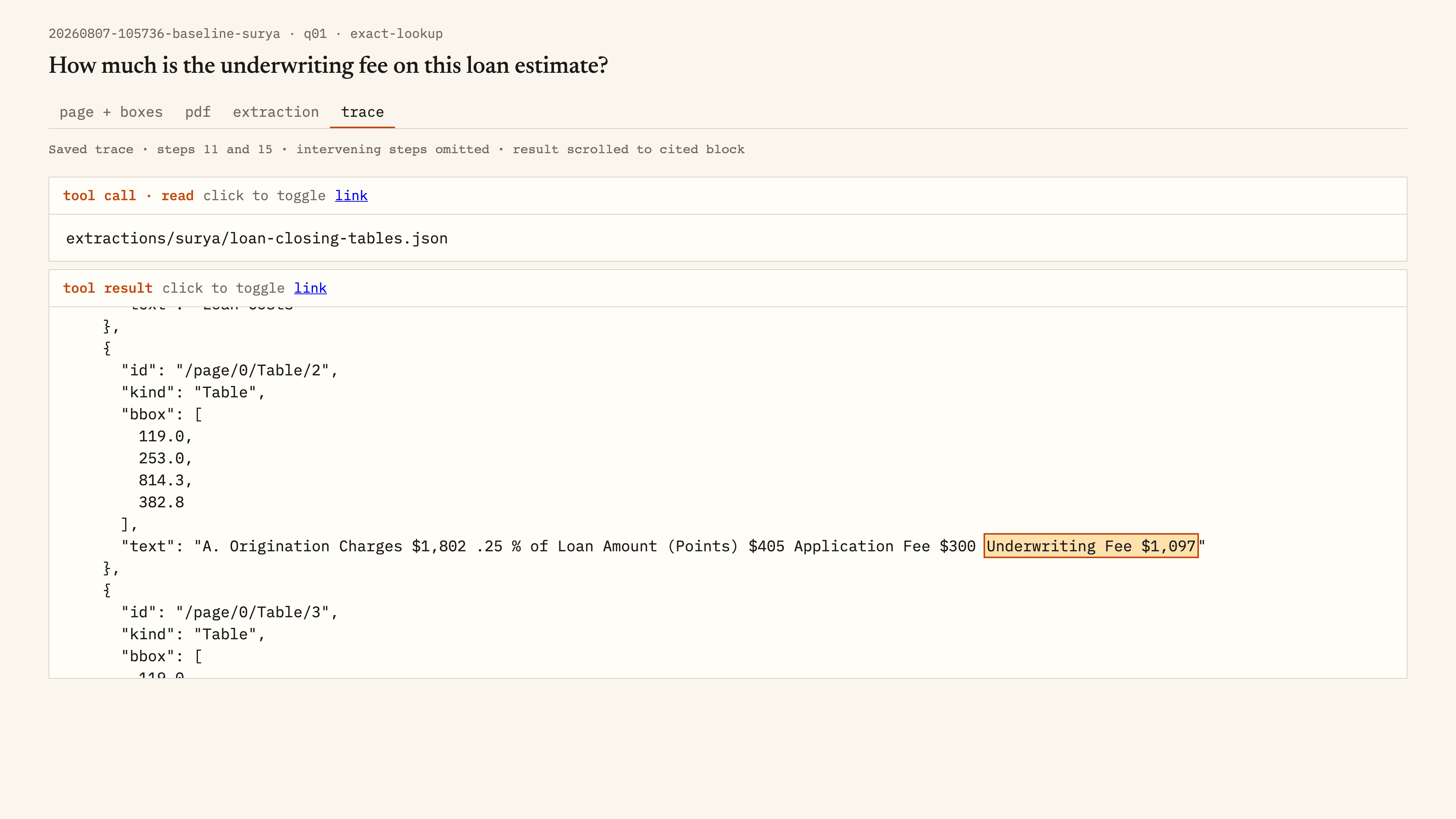
I can see what the agent read and how the information got there.
I'm a big fan of visual citations. If I have to look through the whole dataset manually to verify the answer, and more importantly, if your user has to do that, then they're better off doing it themselves.
In this setup, I ask the agent to list its citations as part of the answer.
You can do citations in a second pass, and sometimes that's useful because you can get more accurate citations. But the hard part, and why I try not to decouple them, is that you need to make sure the second model only gets the material that was in context for the agent that answered the question.
You have to aggregate the information from the retrieval tool calls and cite that. Otherwise, the second model might find a different document that was never in the answering agent's context window and cite it. That can be really confusing.
If the OCR model returns Markdown, matching a citation back to the page can be a little tricky. You might be doing string matching. A lot of models include block IDs, and then you can ask the agent to cite the block ID from the document.
Usually I want the answer and citations together, but not always.
The census form turns into mangled text
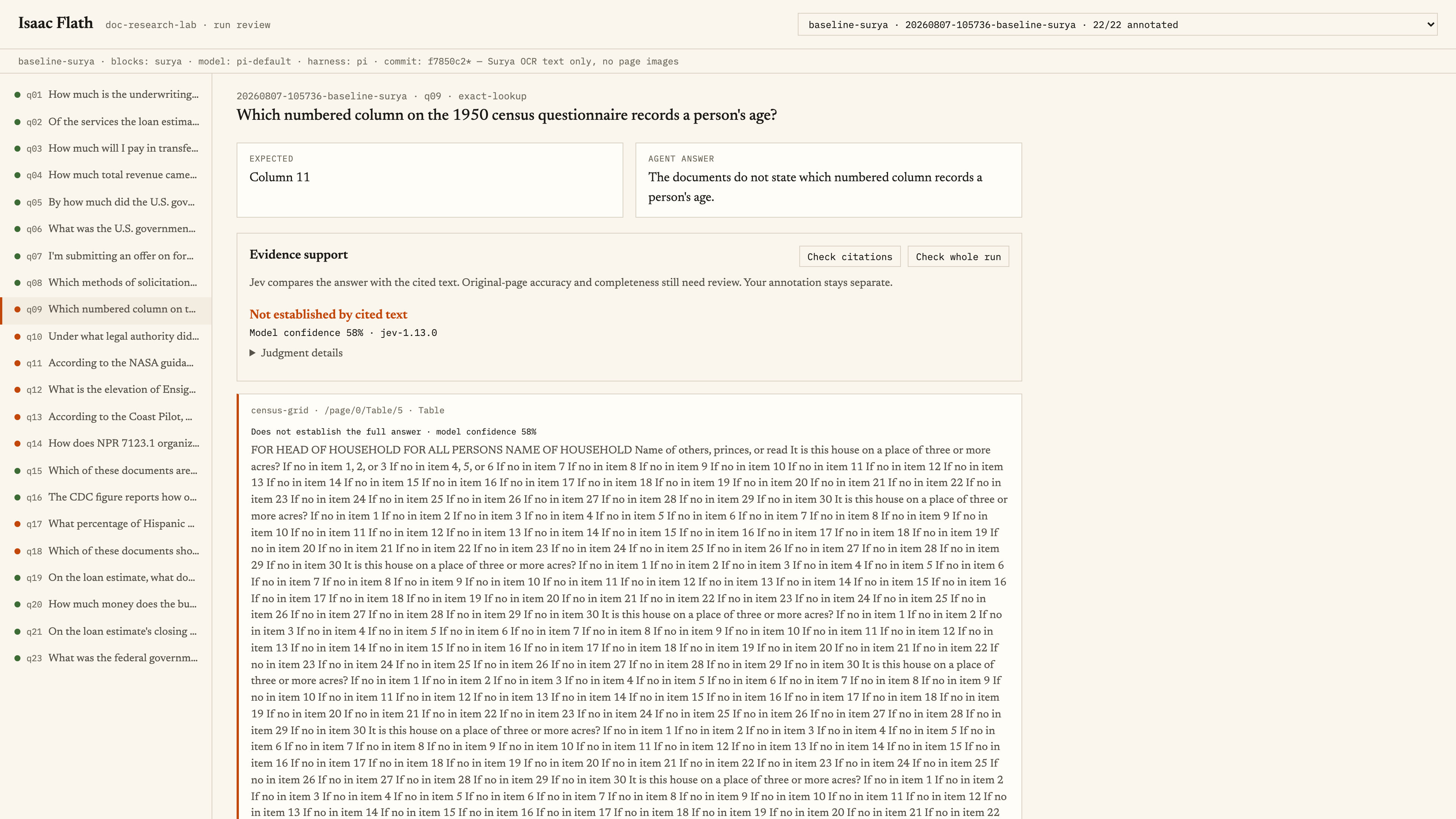
Here's another example. The question is which numbered column on a census questionnaire records a person's age.
In one run, the agent says the documents don't state that. I look at the citation, and it's this entire form turned into a big block of mangled text.
Jev says, ‘Not established by cited text.’ And I look at the citation and I'm like, ‘Yeah, that doesn't seem great.’
That would immediately make me suspicious. Rather than going through every step, I'd jump to checking whether the OCR process was wrong. This clearly isn't a great format for the form. I'd say this OCR failed.
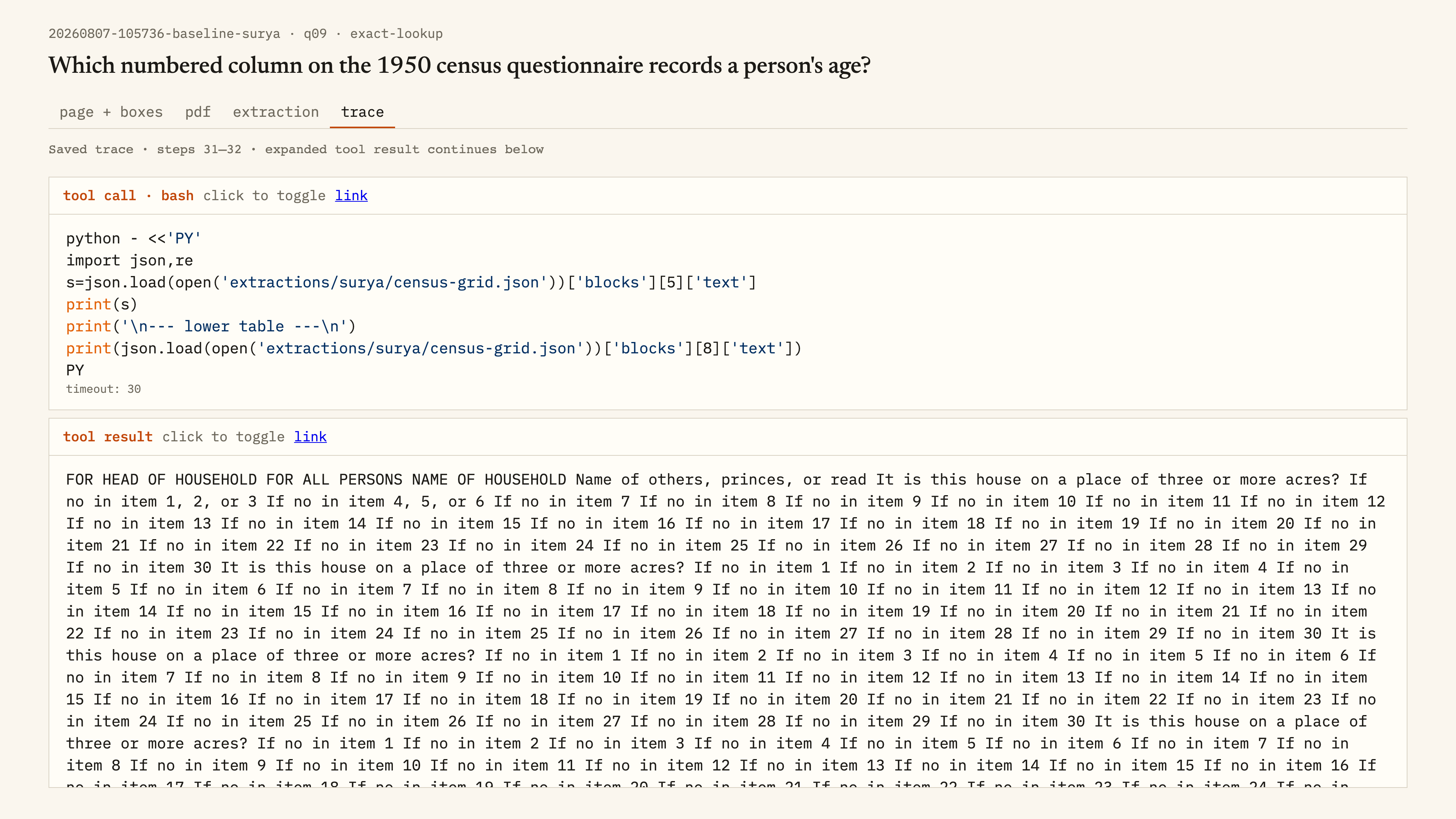
It's just really mangled. It's like it's putting field names inside data. This text field is just trying to shove stuff in there. It's not a great data format to parse. If you had to parse that big text field, it'd be really brittle and error-prone.
Change the input, then look at what happened
There are three big parts of this question-answering setup. There's OCR: take the document and get it into text I can work with. There's retrieval: find the right document with the right information. And there's the agent loop.
I can change the OCR model. I can change the retrieval approach, whether that's grep or semantic search or SQL queries. Or I can change the agent harness.
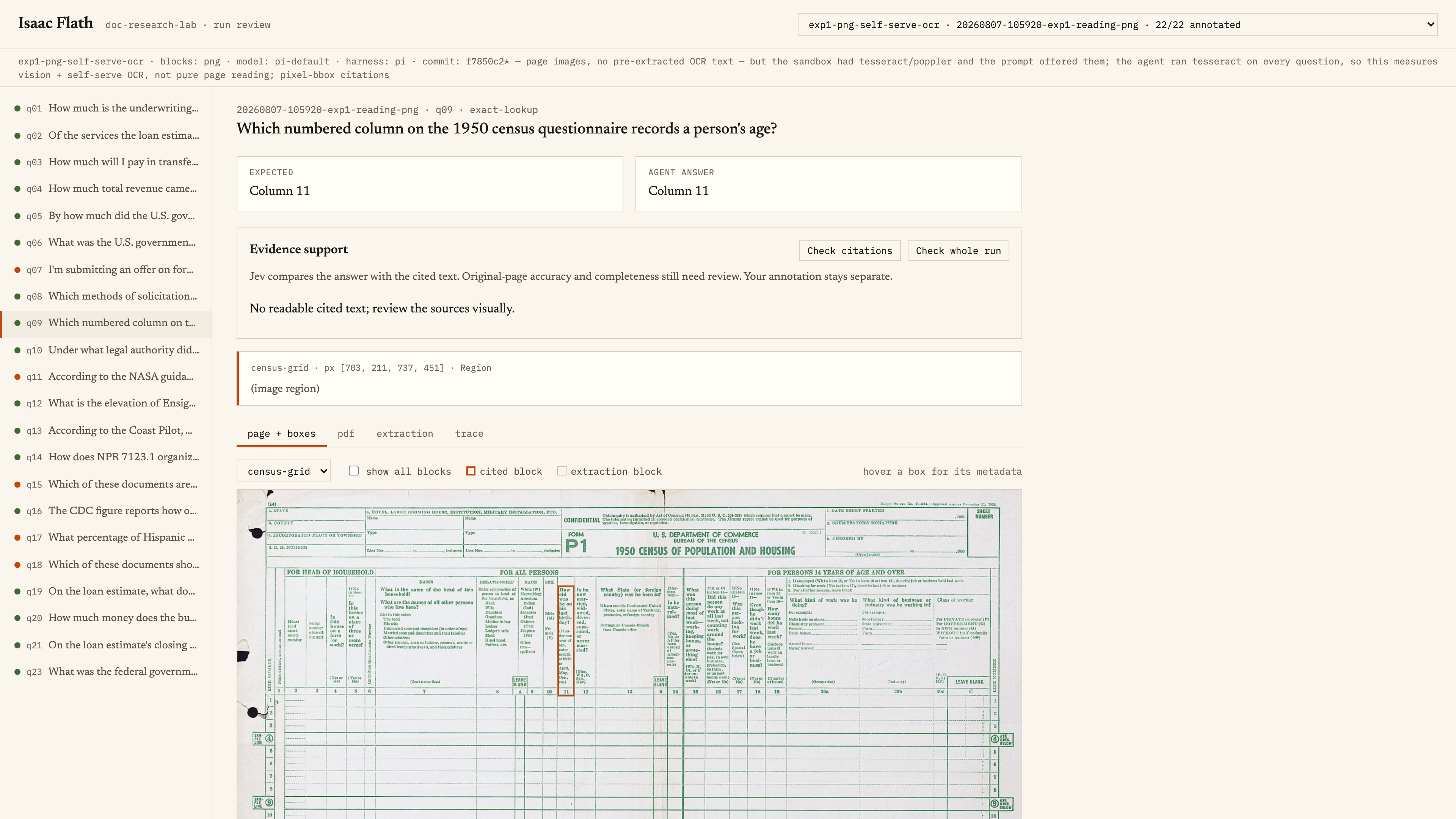
In another setup, I gave the agent page images, Tesseract, and tools that let it crop and zoom.
This time it gets the answer right: column eleven.
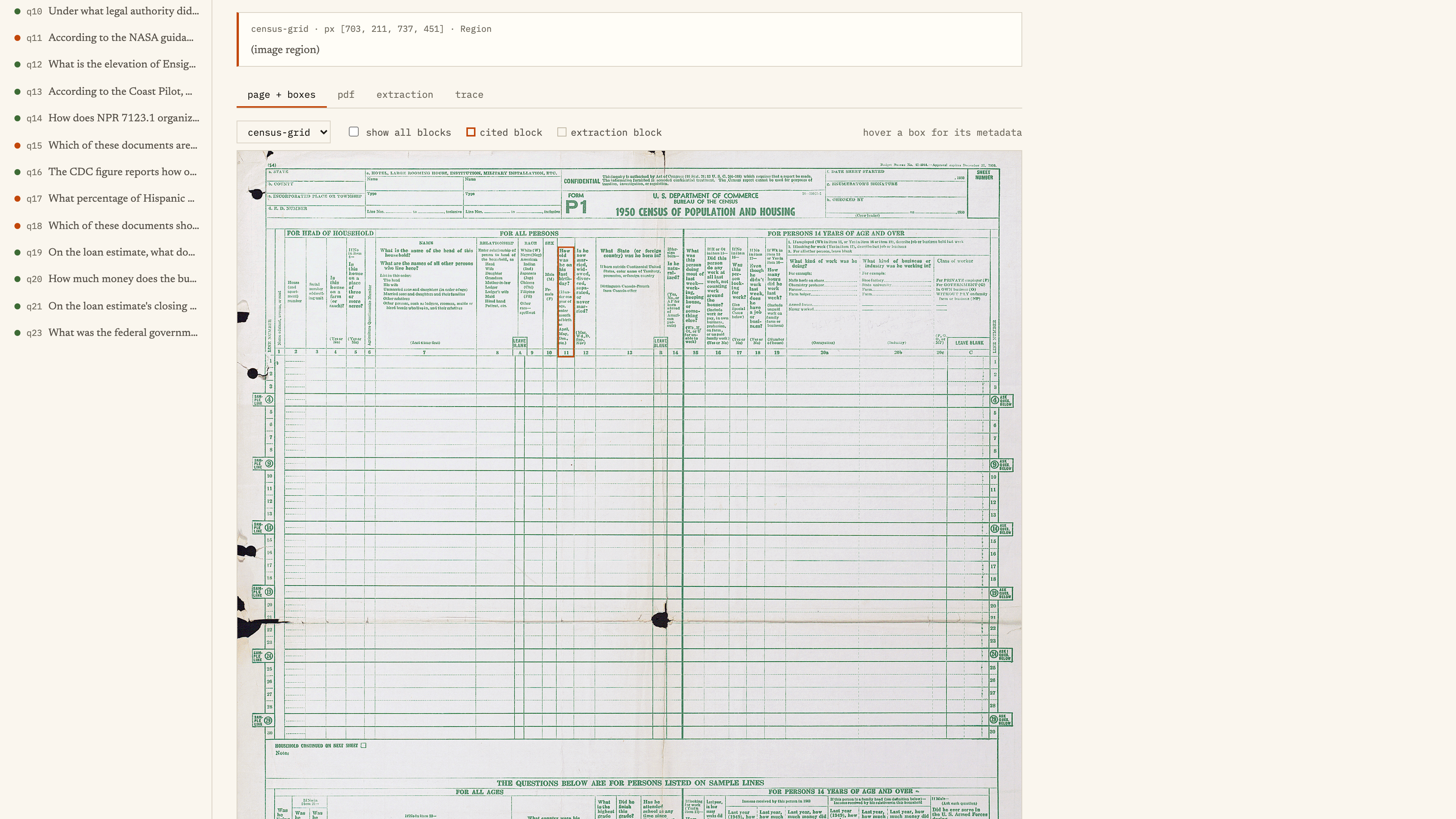
It also gives a very specific citation.
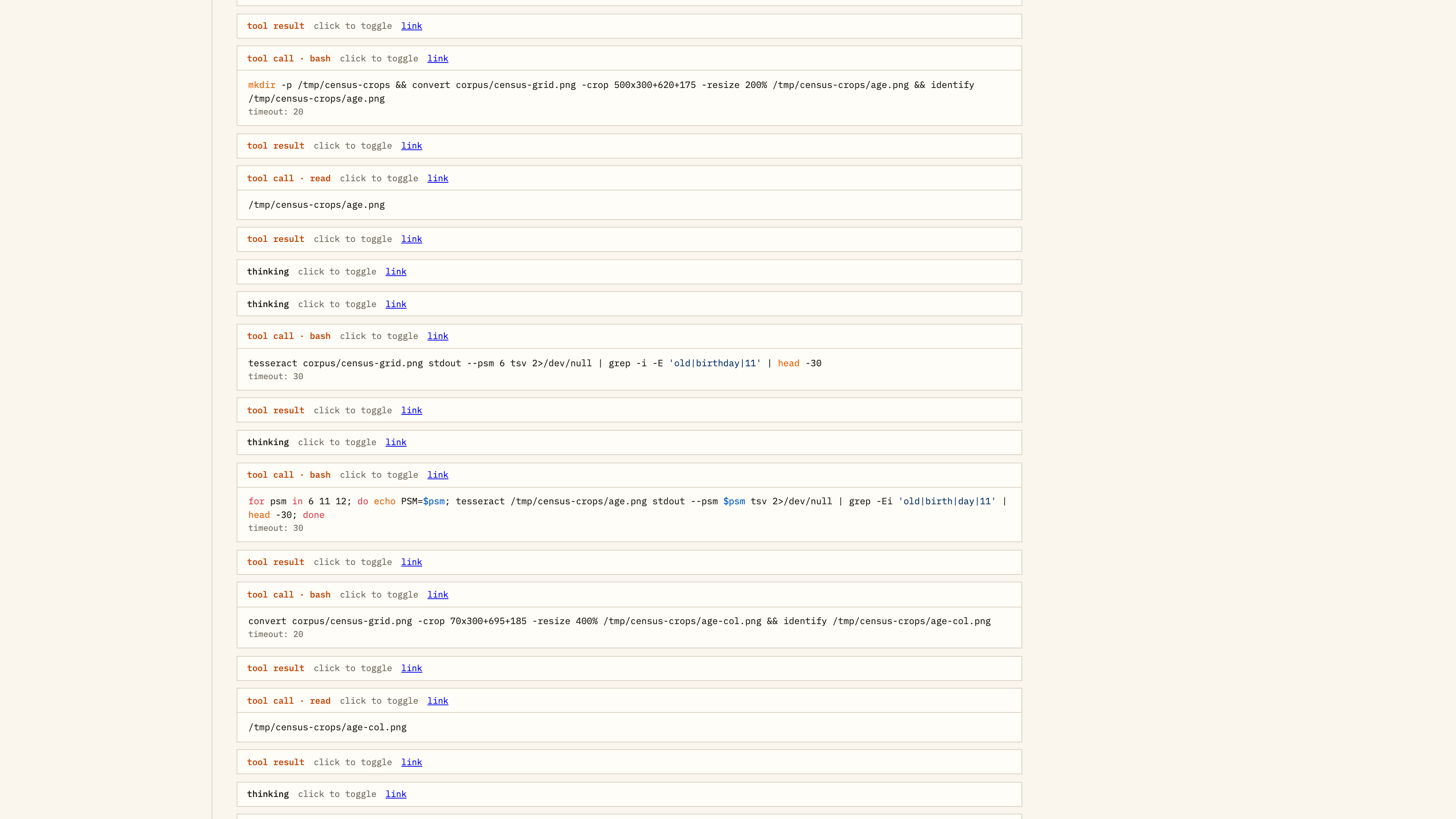
When I look at the trace, I can see it doing resizes, crops, and conversions, grepping through outputs, and getting to an answer.
It works for this question. Across my experiments, though, this approach could get really expensive and really slow.
It got pretty good results overall actually, but some runs could take about ten times as long on the agent loop. So it depends on what you want to do.
Sometimes it gets into a loop and keeps cropping and OCRing things. I asked a question that I knew wasn't in the dataset because I wanted to see whether it would tell me the answer wasn't there.
With all those small tools, there was always more it could try. It kept cropping and zooming around maps. One of those runs went for forty-five minutes and burned about twenty dollars trying to answer a simple question.
So I want to see the answer, but I also want to see how it got there.
Is this document signed or not?
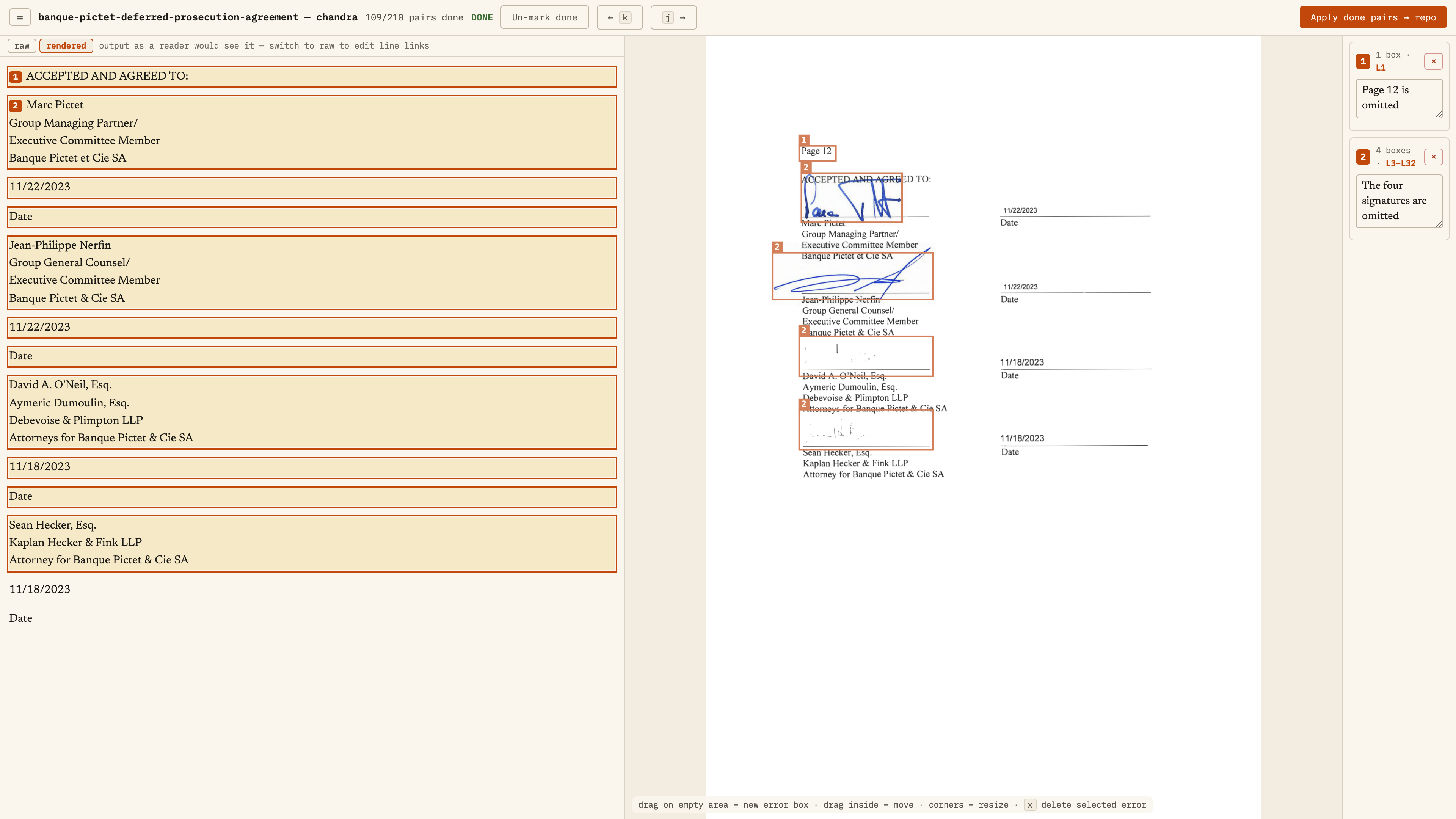
Here's another one: a signature page. The original is in the middle, and the OCR output is on the left. The names and dates came through, but the signature marks didn't. There are two clear blue signatures and two much fainter areas lower down.
Think about these signatures. What do I do with these? Do I go back to the source documents? Was this just scanned a whole lot of times, or did someone try to erase the signature?
Did Marc Pictet accidentally sign the wrong place, then say, ‘Oh, let me erase that and put it back’? I don't know.
There's a different date attached to these. These were earlier, so why are these missing?
And if this is at the end of a contract, is this contract legally enforceable? I don't know. How do I mark this?
Do I say there is a signature? Do I say, ‘Is this document signed or not?’ Do I do a percent likelihood that this is signed by Sean Hecker?
And if it says yes or no, do you trust it? Probably not.
There are all kinds of ambiguous cases like that. These aren't ones I made up to create ambiguity. They're ones I just saw.
How I build these tools
You can build these tools too. I didn't start with all of this.
The first version of this annotation app probably took about an hour. But the first version sucked, as most things do.
Every time I tried to do a trace, it got a little bit better.
At first, I just had notes. I'd write, “This one cell is split in the OCR output.” Then I'd go back and say, “Wait, what cell is this talking about? I have no idea what this error is.”
So I added bounding boxes.
Then I was like, “I hate looking at the raw output. Let me add a rendered view, because I also probably want to go back to the raw.”
Then I hated jumping back and forth to see exactly what the model output was, so I added a hover where it highlights that.
It was an hour at a time, every time I got really annoyed. Most of the time was telling the agent to quit adding unnecessary labels everywhere.
So start with the document and the model output. Use it on real examples, and add the things you keep wishing were there.
This is how I stay on top of it
I use this all the time. When a new model comes out, I run it through these examples. I can annotate, and I can quickly look at traces because I have an annotation tool that makes that easy.
When you see my takes on models, I don't always go into exactly how they scored on my benchmark, but I try them. This is how I evaluate them and stay on top of things.
The number one question people ask is, “What model do I pick?” Now you know that there's a process.
Look at your data. When the answer is wrong, work backward and find where the information went wrong. Then you know what you need to fix.
If you want more of these document examples, you can subscribe at isaacflath.com/subscribe.
You can tell I love documents.