Formative vs. Summative Evals for Document AI
 Isaac FlathSeptember 23, 2026
To generate instructions for assembling furniture, the best eval would be to have someone assemble the furniture from the generated instructions. That's a summative eval, doing that after every tweak and experiment would be very impractical.
So you want to ensure when you do those tests it’s worthwhile. To do that you make small tests to catch anything you can first. For example, you might check that every item on the parts list is somewhere in the generated instructions. This is a formative evals. Formative evals are much faster and cheaper, so you reserve slow expensive summative evals for things you can’t test any other way.
That formative eval does not guarentee that the final instructions are good, but it is a requirement of good instructions. Anytime you change anything you can run this test quickly.
Most systems need both of these types of evals, and both start with doing error analysis to understand the issue. In this post I will walk through 3 examples and the kinds of evals I build with them.
For an example specific to medical record review, check out Joe Barrows post.
Financial: tracing a wrong answer back to the subtotal
I want an agent to answer, "How much did Berkshire Hathaway's Insurance and Other costs decrease from 2023 to 2024?" My agent said it’s a decrease of about $3.5 billion. That’s wrong by almost 600 million dollars according to the report.
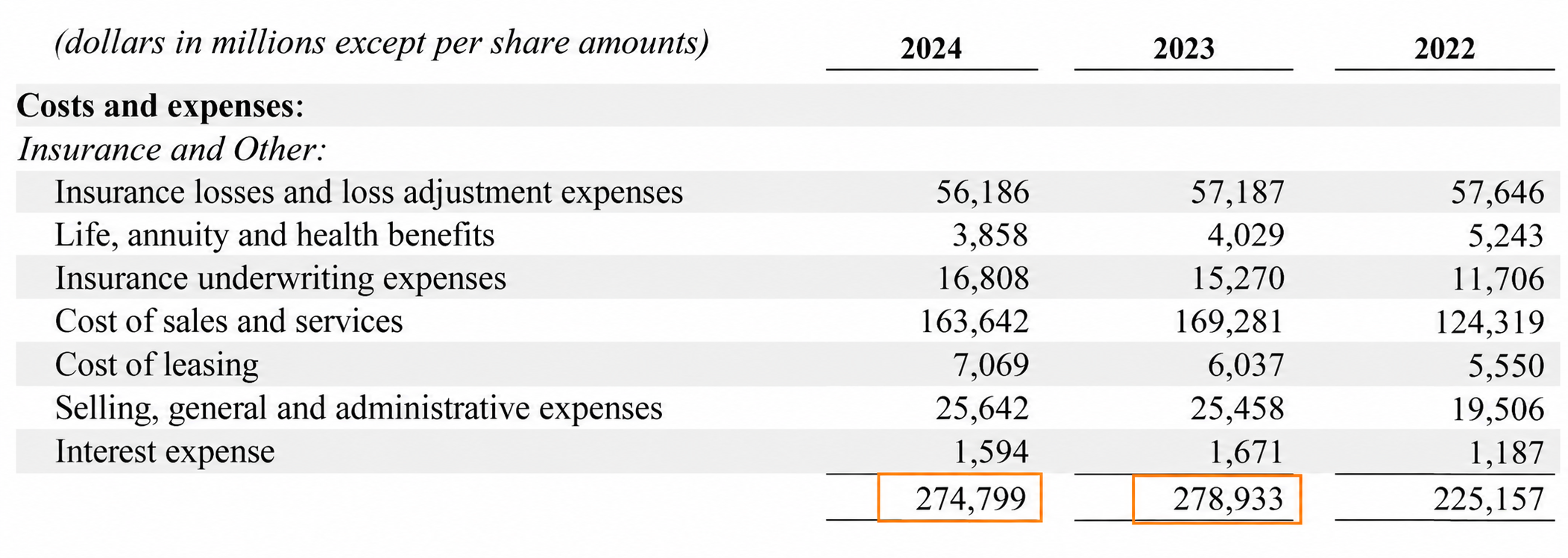
This gives us our first summative eval! Is the agent’s final response report a decrease of $4.134 billion like the cited report does? We can build an interface to see that (below), or write a test to see if the agent response contains the correct answer.
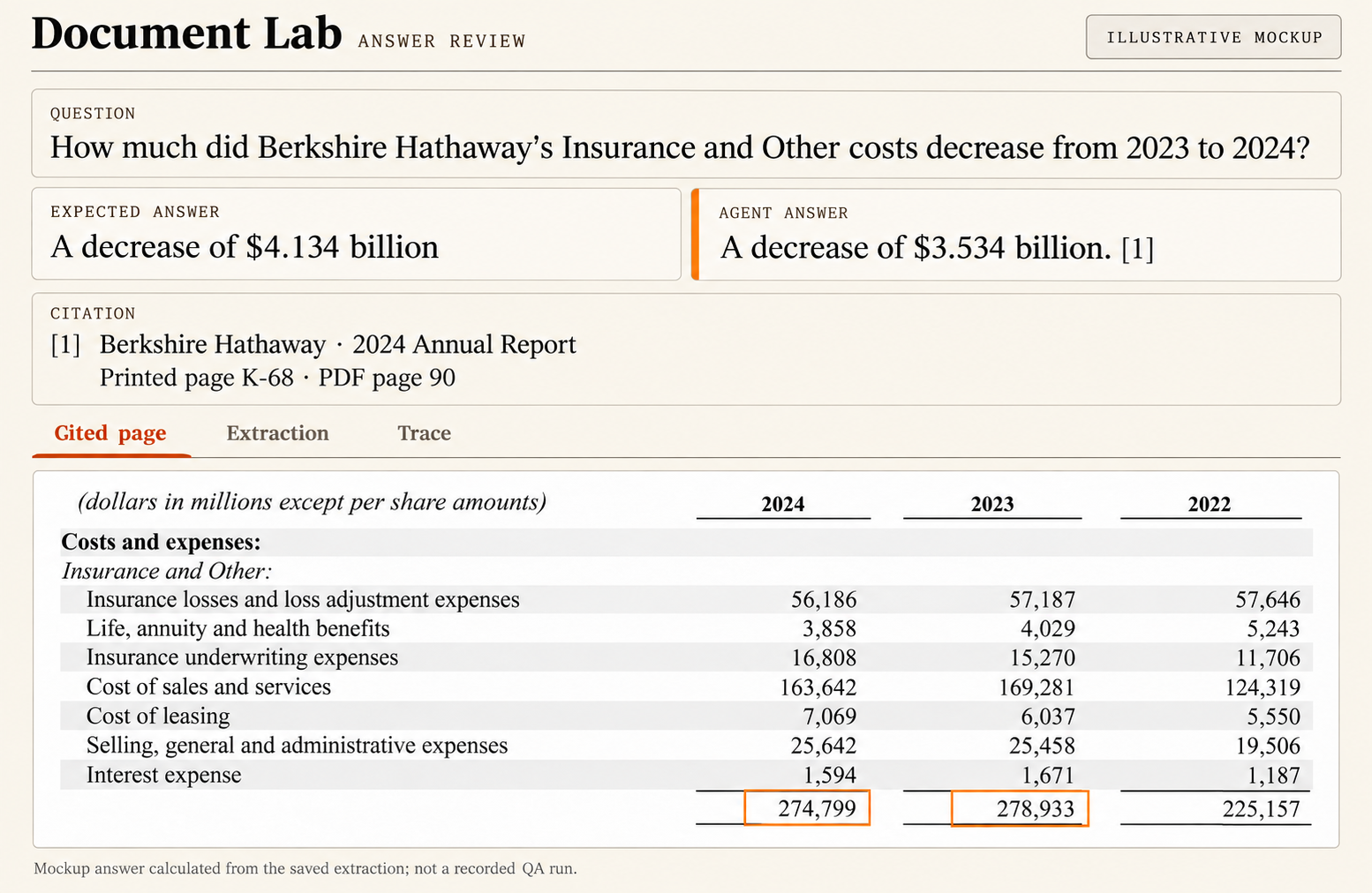
Now that we identified it is wrong and can test for that with a summative eval, we need to understand why to test for the root cause with a formative eval.
To do this I start from the end and work backward.
Is the wrong answer a model hallucination, or is it repeating something in it’s context window?
It’s repeating something in it’s context window.
How did it get into the context window? From a prompt, or from a retrieval tool call?
From a retrieval tool call
Is this wrong because the retrieval tool call returned the wrong page, or because the data it retrieved over was wrong?
The data it retrieved over was wrong, but it got the right page.
Why is it wrong? Is the source wrong, or was there some extraction error?
There was an extraction error. The source PDF does not match the extracted value.
Now, I know exactly where the issue is! The OCR model had an error when it converted the PDF to text.
This tells me my formative eval needs to target the OCR process. Improving retrieval wouldn’t help because the failure was more upstream than that.
It’s also important to have an annotation interface that lets you drill down into these steps. This is what it looks like when I am looking at the OCR step.
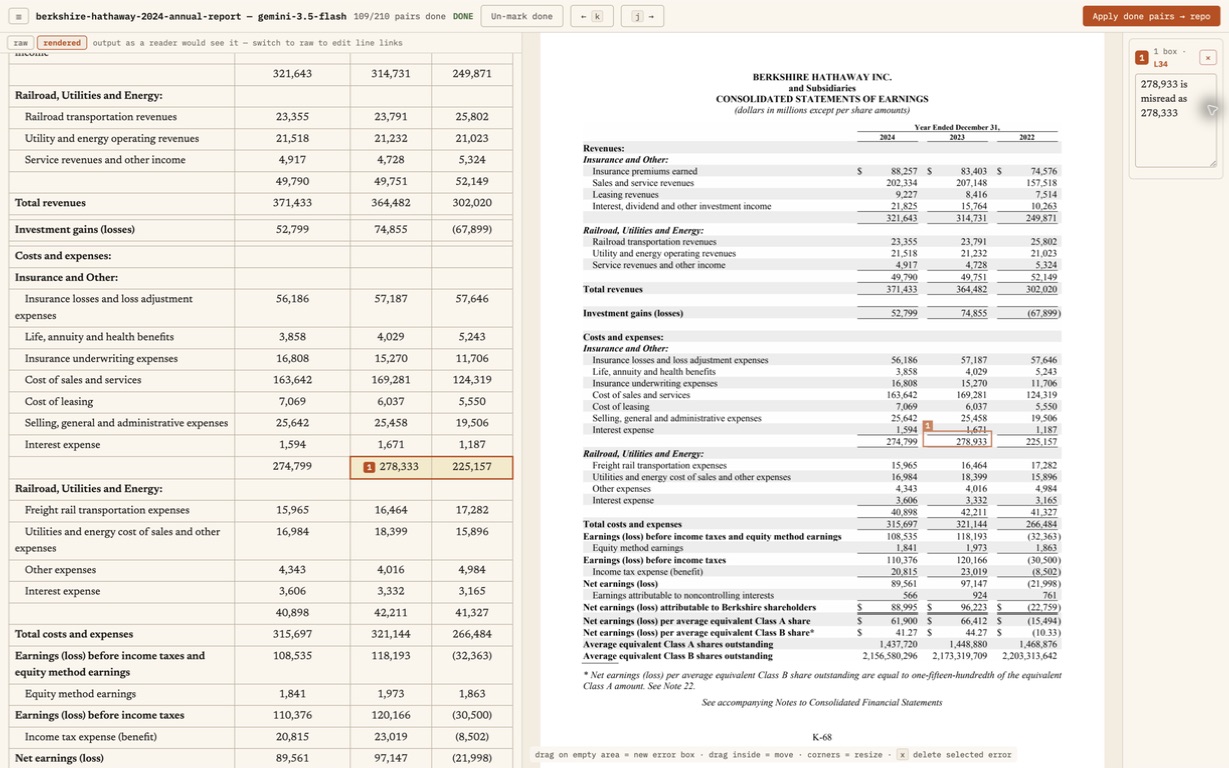
All seven individual cost amounts are correct. They add to 278,933, which doesn't match the extracted subtotal. That gives me a formative eval I can run in code on this document. I can sum the extracted rows and compare them with the subtotal for each year. If any 1 or 2 numbers are wrong the assertion will fail.
Now I can try changes to extraction and rerun that smaller test. Once it passes, I ask the full agent the original question again to check whether it gives the right answer or shows the next error.
Medical: finding the missing event in a timeline
In a medical example, I ask "When was the pacemaker implanted?" The agent answers April 8. That’s wrong.
The PDF operative report clearly says April 10.
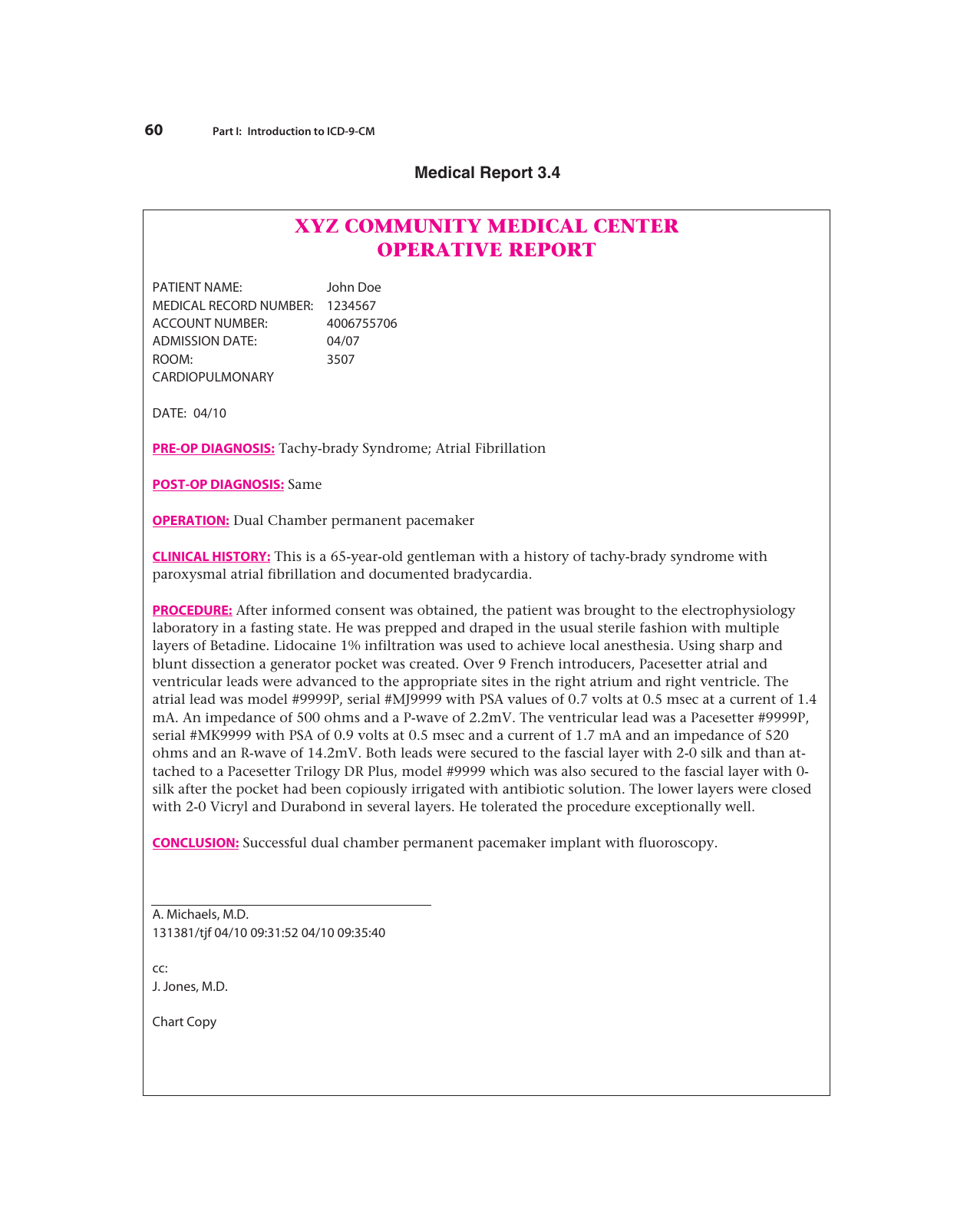
Source: LWW sample medical chart, printed pages 60–61.
First, I want a summative eval on this. Does the agent's answer contains April 10? Now I work backward to find out where the April 8 date came from.
Was the incorrect date (Apr 8) in the agent's context window?
Yes. It had a progress note dated April 8 about plans for a pacemaker, so we can rule out a pure hallucination.
How about the correct April 10?
No. The April 10 operative report was not in the agents context window, so it had no chance of getting it right.
How did records get into context window?
The agent searched for “pacemaker surgery"
Why didn't it return the operative report?
The data was extracted from the PDF correctly through OCR, but the operative report ranked fourth. Since top_k was 3, it returned 2 progress notes and a consultation but not the operative report that it needed.
That gives me a formative eval for retrieval. I save the search query and label the operative report as the correct answer.
I can iterate and test this failure mode much quicker and cheaper because I don’t need to run the agent loop to test it.
Floor plans: counting the same sink twice
Now, for a more complicated example. "Make a sink order from these plans, with model numbers and quantities." Consider an illustrative failure where the agent lists two Kohler K-2035-8 bathroom sinks and two Fiat L-1 janitor's sinks.
That's wrong. There is only one of each. Following this order would buy two extra sinks.
My summative eval checks that the order contains those model numbers with a quantity of 1 each. Now I work backward to find out why it doubled the quantities.
Where did the quantities come from?
A tool returned four fixture IDs; two bathroom sinks and two janitor's sinks and the agent used those to build the order. The LLM agent did what it should have based on the information it was given.
What did the tool count?
I look at the detected sink locations. There is a box around each sink in the water plan and another around each sink in the drainage plan. These are different views of the same plan though, so I think it’s double counting.
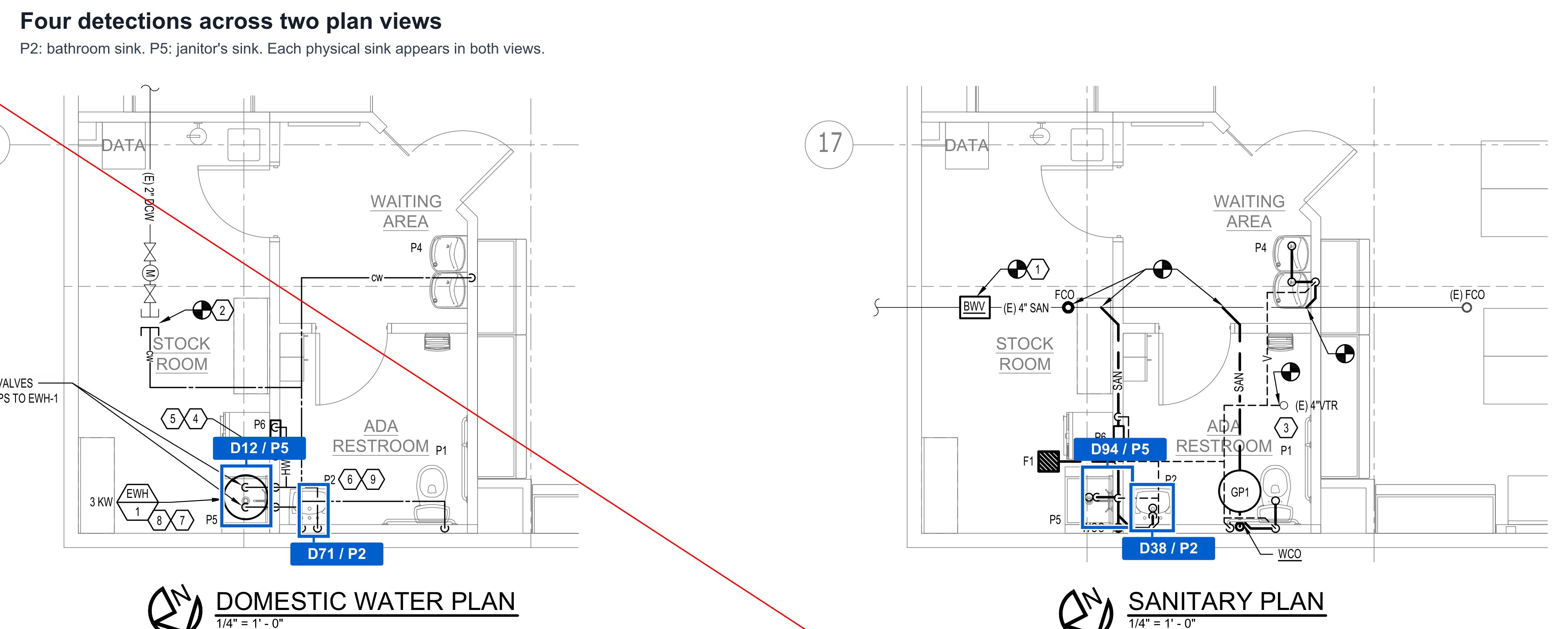
Source: Kirkland permit drawing, sheet M2, PDF page 18.
So did detection get it wrong?
No. There really are four sink symbols. The detection worked, but there should have been a dedupe step based on these being 2 views of the same rooms.
How should the tool recognize the same sink across views?
After detection, I pass both cropped plan views and the detected sink boxes to a matching model (VLM). It compares room layouts and fixture positions to identify which detections show the same physical sink, then assigns shared room and fixture IDs.
If this step assigns different fixture IDs to the same sink in each view, the final order counts that sink twice.
That gives me a formative eval. I save the views and detected boxes and cache that. I can then label which boxes show the same physical sink. I send that to my matching step and verify that the sinks end up in the same group!
Turn the discovery into a repeatable test
The key is to start from a wrong final answer and turn that into an high level eval. But then dig deeper (error analysis) by working backwards until I find the root cause. That gives me a specific thing I can test without running the whole system. That lets me iterate much faster and cheaper without waiting for agents to run the full process.