OCR Routers: When Should You Use a Bigger Model?
 Isaac FlathOctober 17, 2026
When extracting information from PDFs, generally a big, more expensive model gives more accuracy, but it costs more money and time.
OCR routing setups give you the best of both worlds. Cheap and fast models for all the easy stuff, and then route to a larger, more accurate model when it makes a difference.
For example, some pages need a quick text extraction and don't even need OCR at all. Others have really dense tables, scans, charts, and images.
So we can start with a cheap method, check the output, and then decide whether to stop or send the page or just part of the page to another model that is more expensive.
We'll look at every step of a simple router through a document, and then we'll look at examples that show common router failure modes. After that, we'll look at how OCR labs often train small regression models for more accurate routing.
The PDF we’re going to process
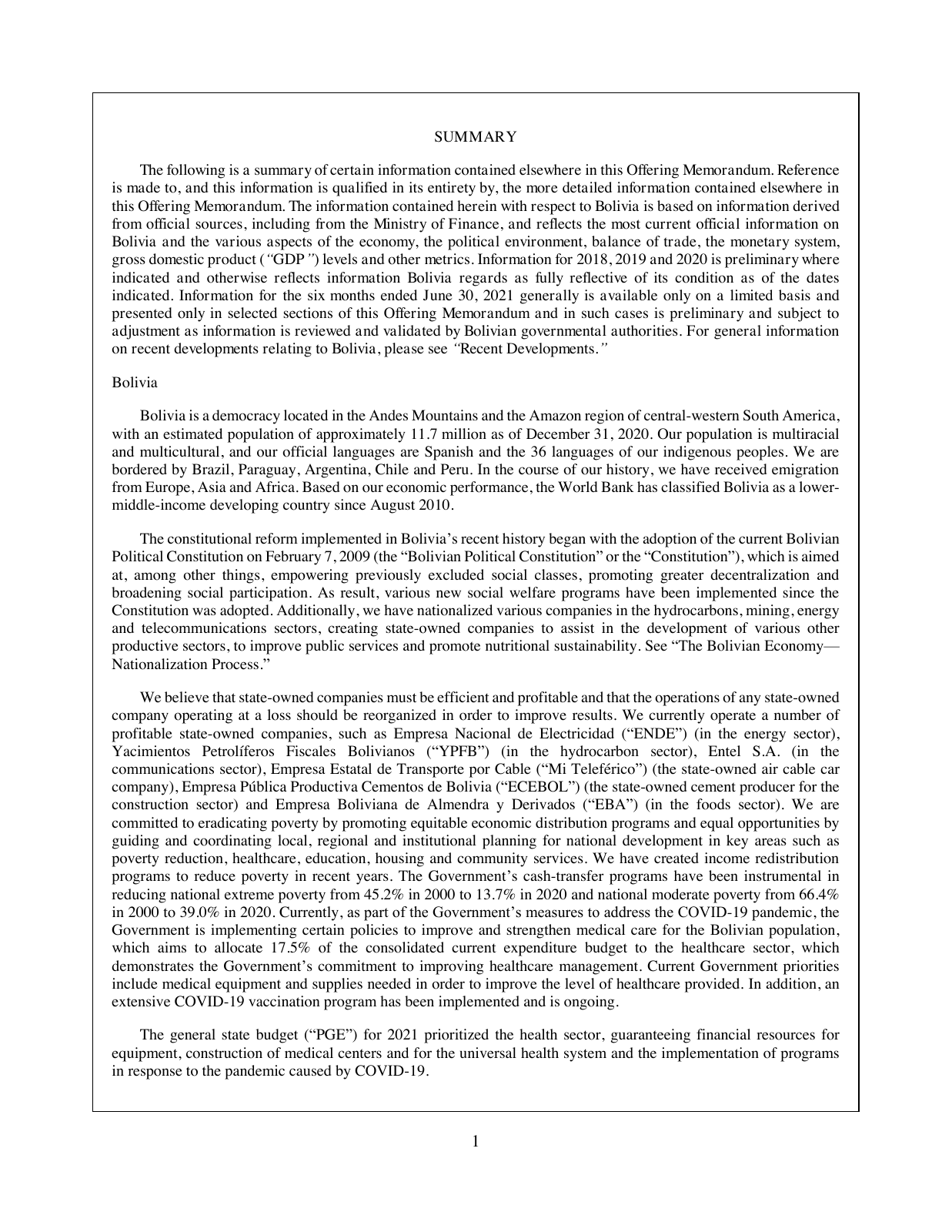
We're going to start with this 2-page PDF. Page 1 is basically all text, so it should be extremely simple.
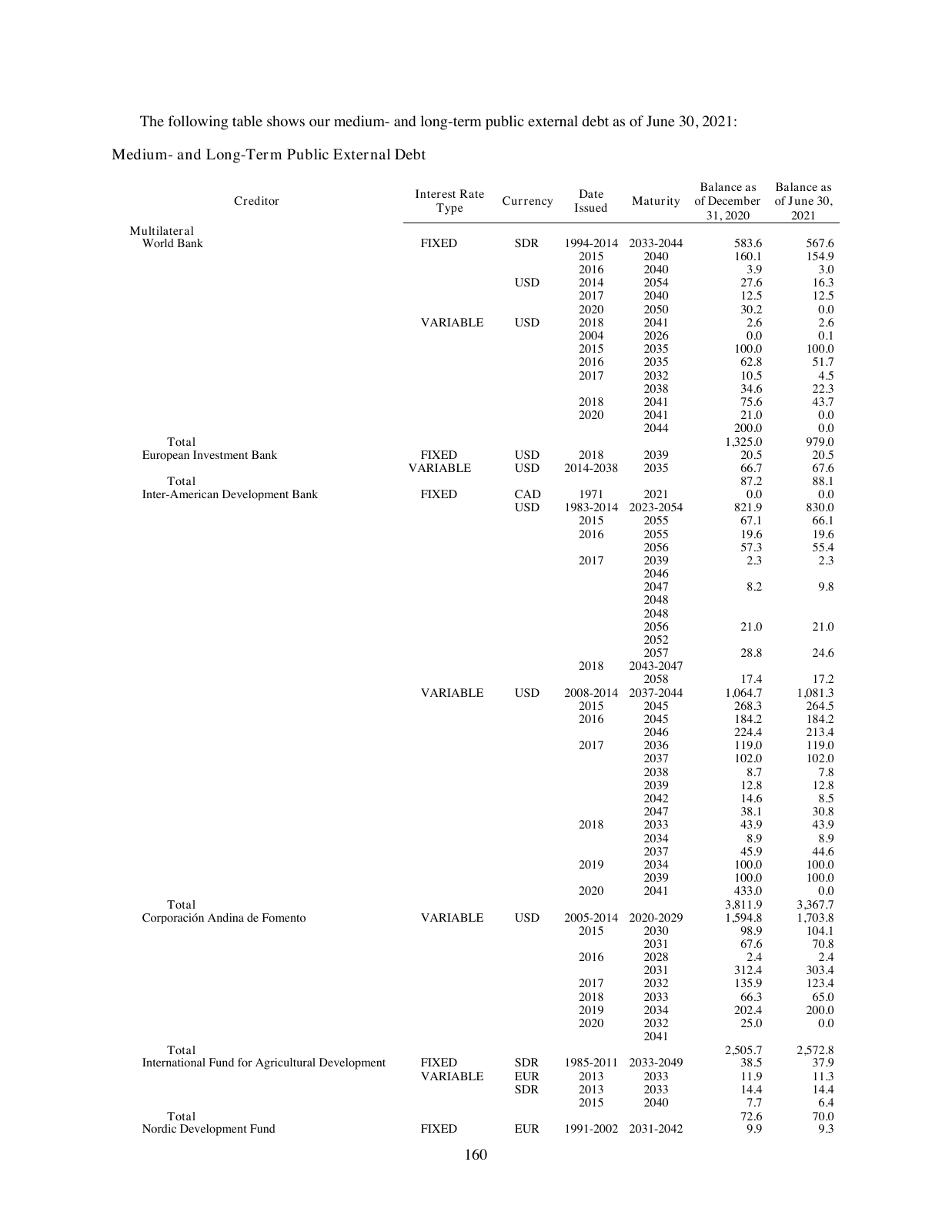
And then this next page of the document is a fairly complicated table with merged cells and different hierarchies.
Page 1: text extraction is enough
Let's start with page 1. PDFs can contain both images or the actual text. If the text is there, we can pull it straight out of the file without needing an OCR model.
LiteParse: extract the text layer
An open source tool called LiteParse can do this, and it's a great first step for our router. LiteParse will extract the text from documents and optionally OCR it with Tesseract. We don't need the OCR part, so we'll leave that off. And this is a great place to start.
Here we see our PDF side by side with the output from LiteParse. As we annotate, we can see that LiteParse extracts the text almost perfectly. It's missing the page number and there's also one missing dash, but overall this would work great for almost every use case. And importantly, it's extremely fast and cheap.
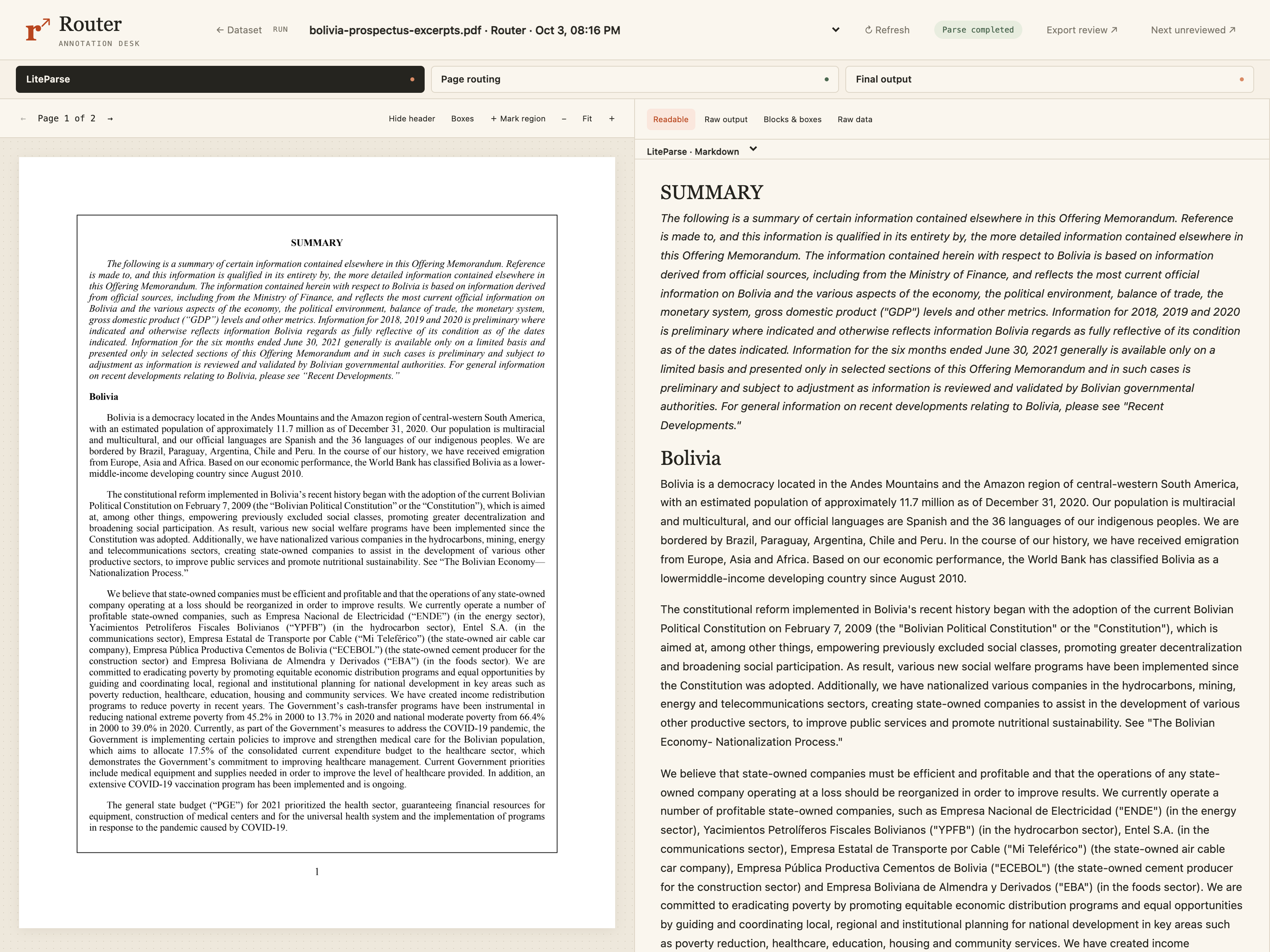
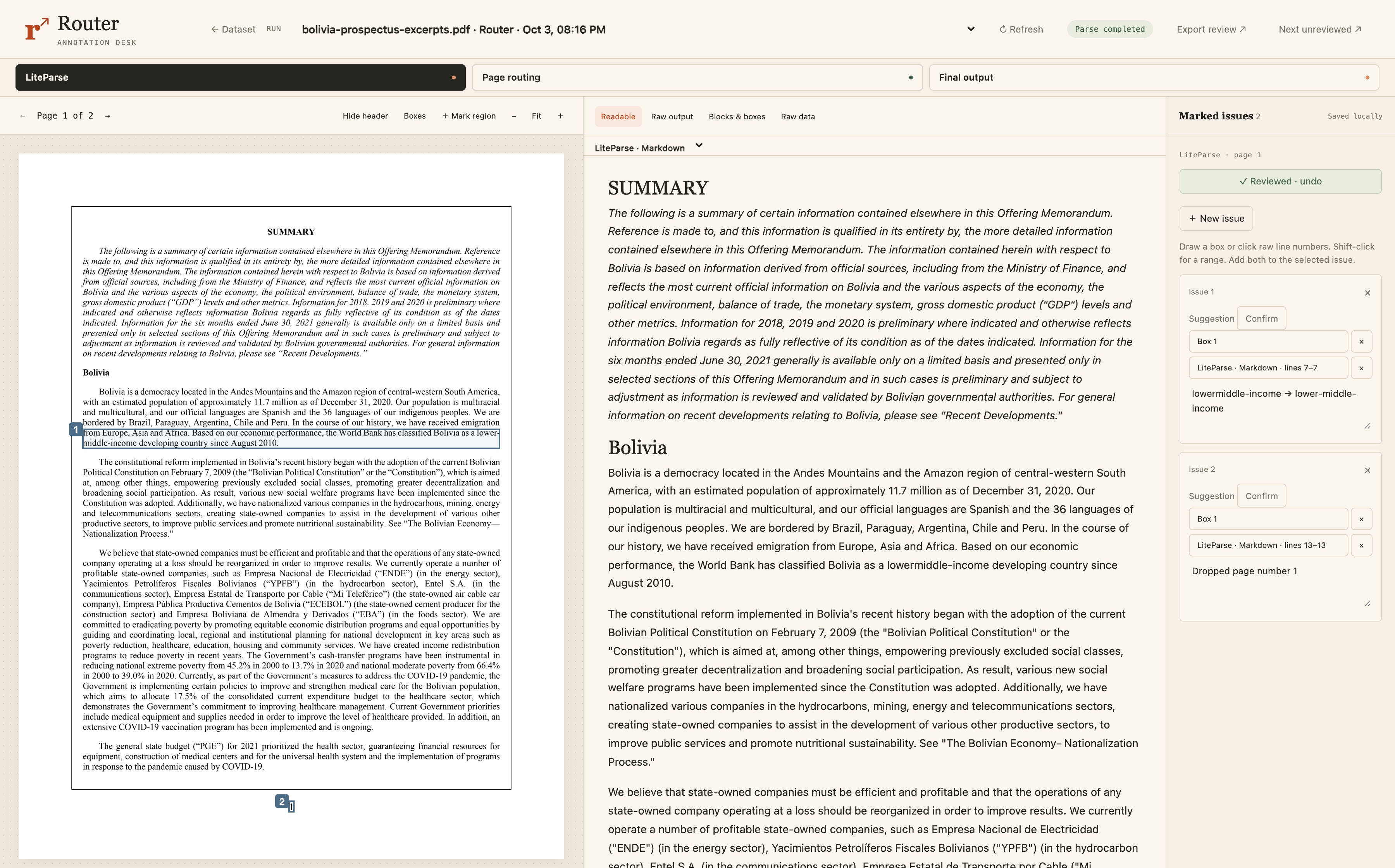
In this view, we see on the left is our original PDF, with bounding boxes highlighting where the errors are. On the middle, we still have our LiteParse output, and on the right we have our notes where we're writing what the issue is that goes to these bounding boxes. We'll do this for more and more steps of the router so we can see exactly what problems there are in each step and whether it makes sense to escalate it to a bigger model.
Page routing: accept the result and stop
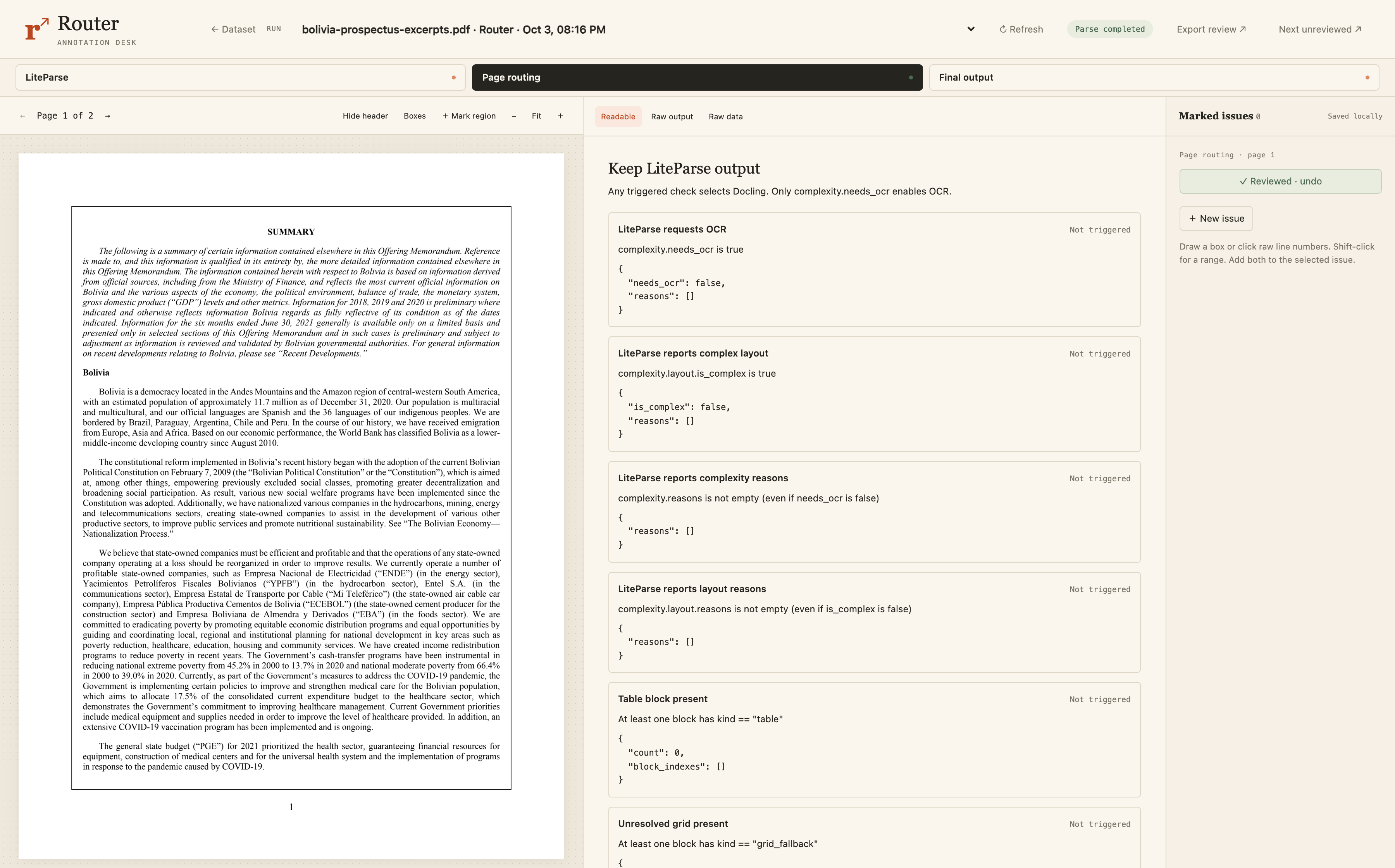
After LiteParse, it goes to the routing step. We can see at the top, we're at the page routing step in the 3-step router. Since we're happy with the LiteParse outputs, we want it to decide not to send it to a larger model. In this router, the rules are deterministic checks, code.
In addition to LiteParse extracting the text, it also does fast checks to kind of guesstimate if there's tables, cells, if you have embedded images, or if there's a complex layout. If we see those, then we'll want to escalate it to an OCR model.
In this case, it correctly identified that it's just a simple parse and LiteParse outputs are sufficient. That's why they all say not triggered.
Page 2: processing the table
Now let's go to page 2 and walk through the same steps. This is the table, so it's a lot more complicated.
LiteParse: inspect the broken table
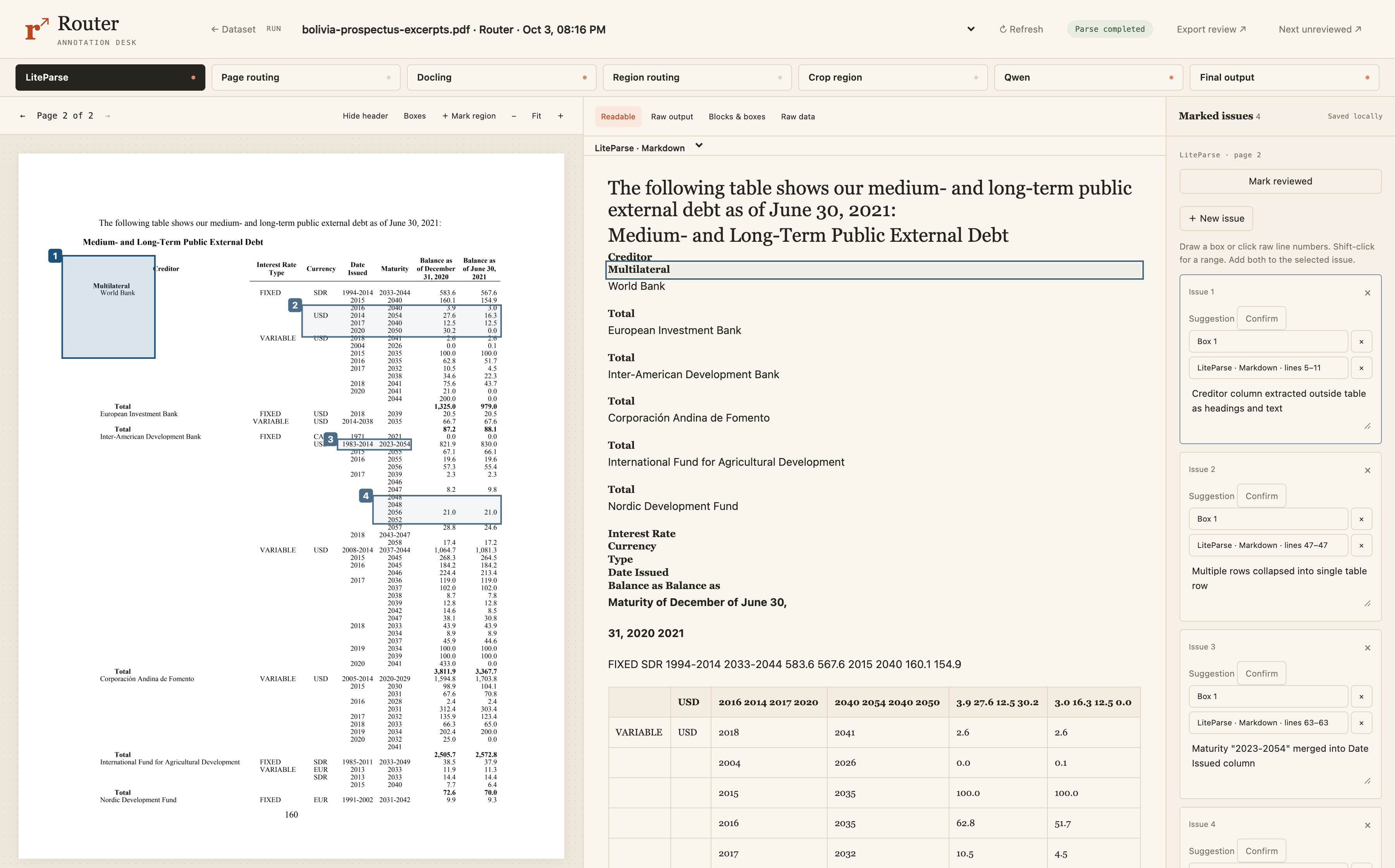
First, our router processes it with LiteParse. As we look at the output, we see that creditor, multilateral, World Bank, total, all of those are not in the table. This should be in the left column of the table, but they're showing as text above it.
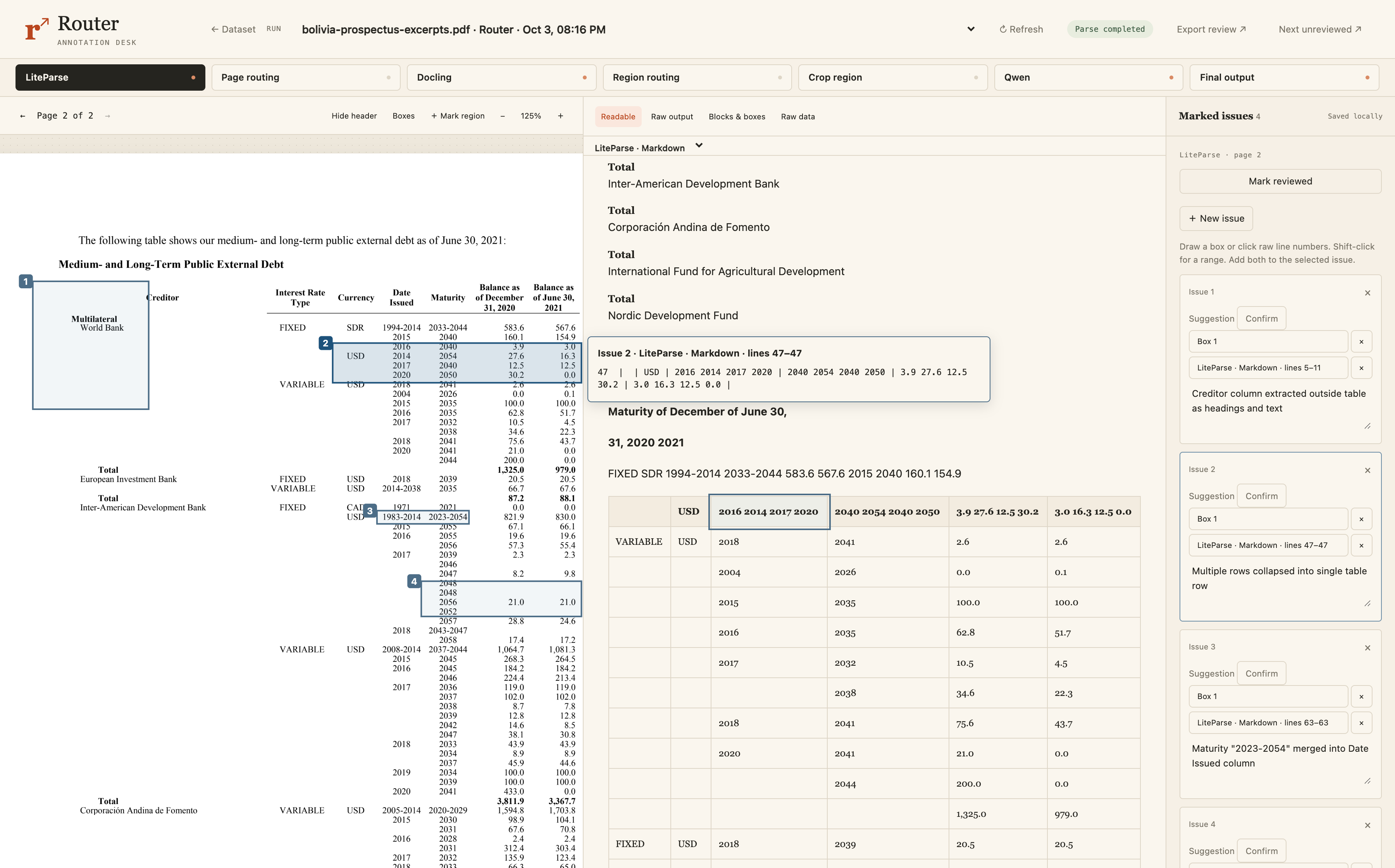
In addition, cells get mangled and it also incorrectly breaks the table into two and makes some cells of the header a new table.
This is just totally broken for a lot of reasons, and there really isn't any use case where this would be okay to use.
Page routing: send the page to Docling
Now we can look at the page routing checks. In this case, we want it to decide that it needs an OCR model because the text extraction failed. We got the information, but it was too mangled.
Our rules do trigger it due to sparse text, complex layout, and a table presence. Several of these simple checks triggered, so the page gets routed to the next step.
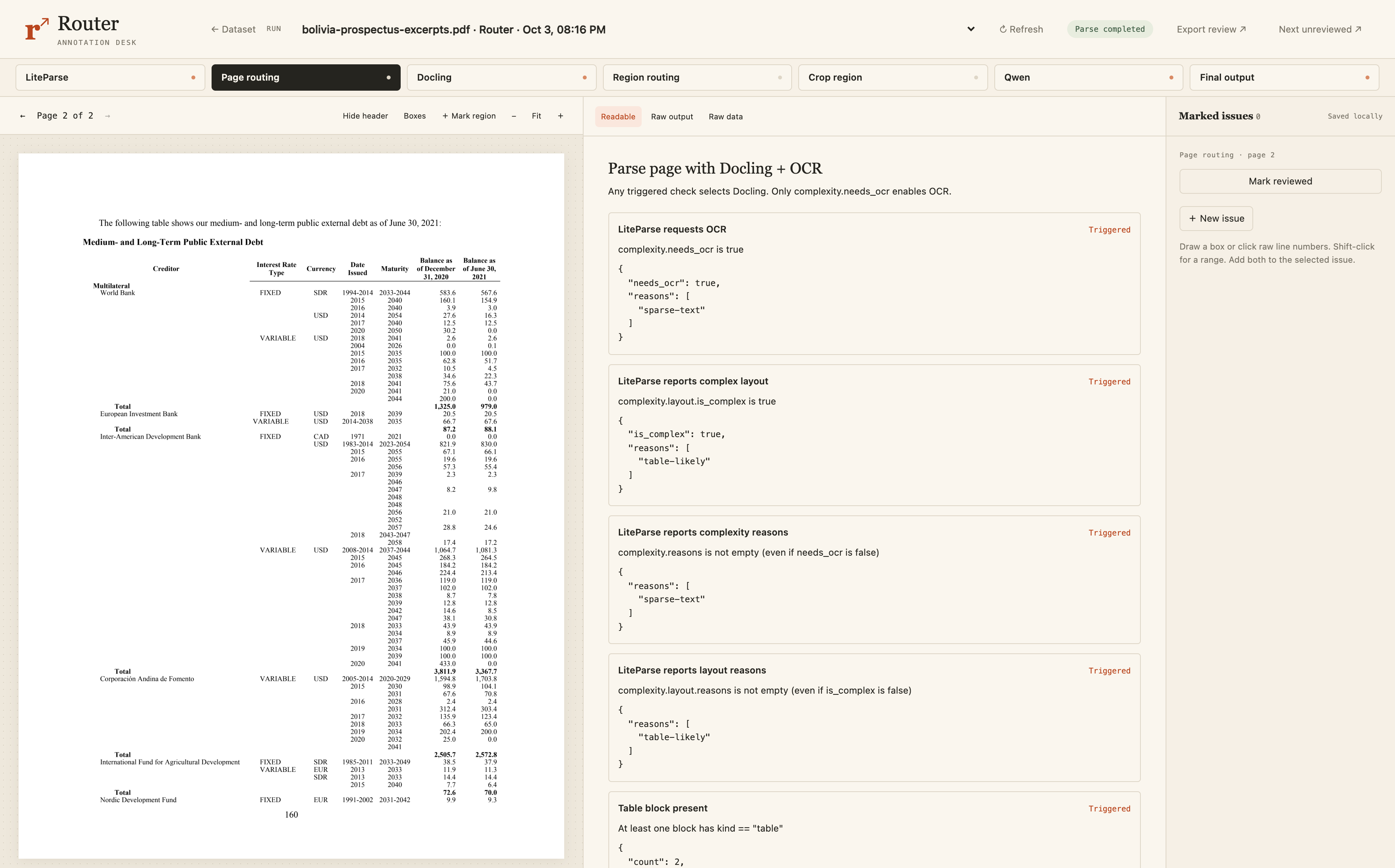
So page 1 was simple enough, didn't need another step. It stayed with LiteParse, and page 2 is being correctly identified as needing additional work.
Docling: inspect the remaining table errors
The next step in our router is Docling, which is a document processing pipeline by IBM. Docling did a much better job at keeping the table together as we see, but there's still some issues.
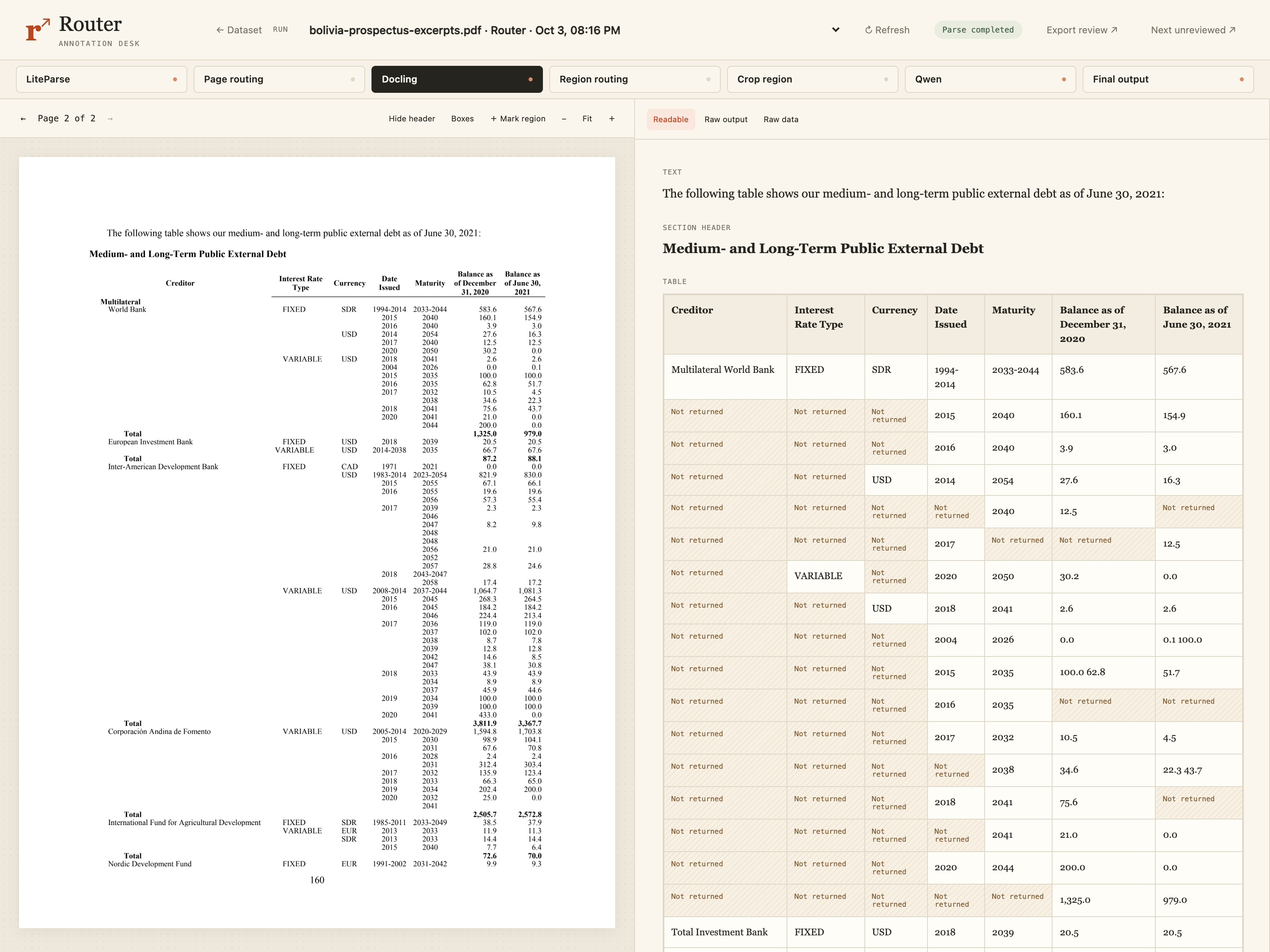
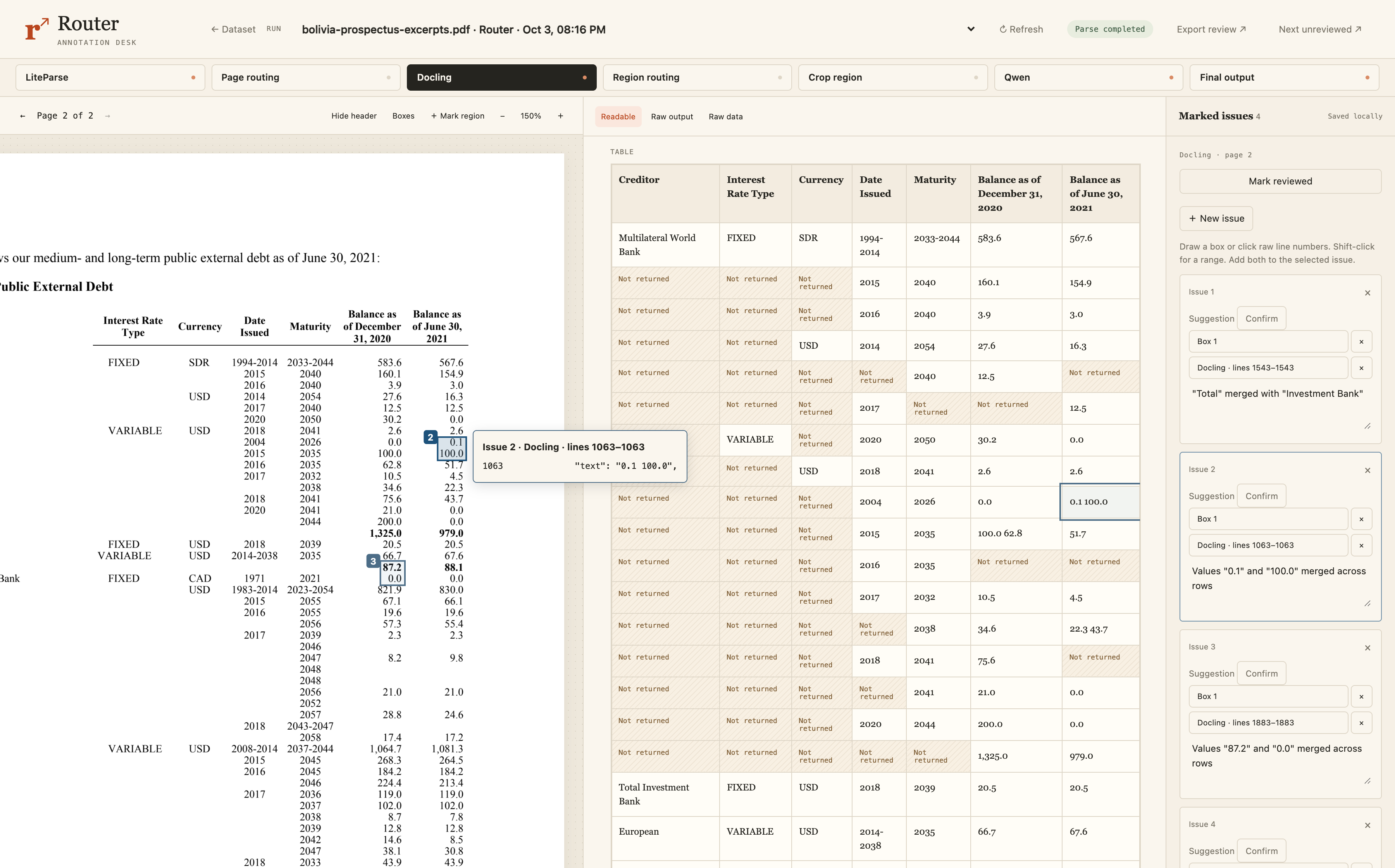
For example, the 0.1 and 100 should be in 2 different cells, but the output put them in the same cell.
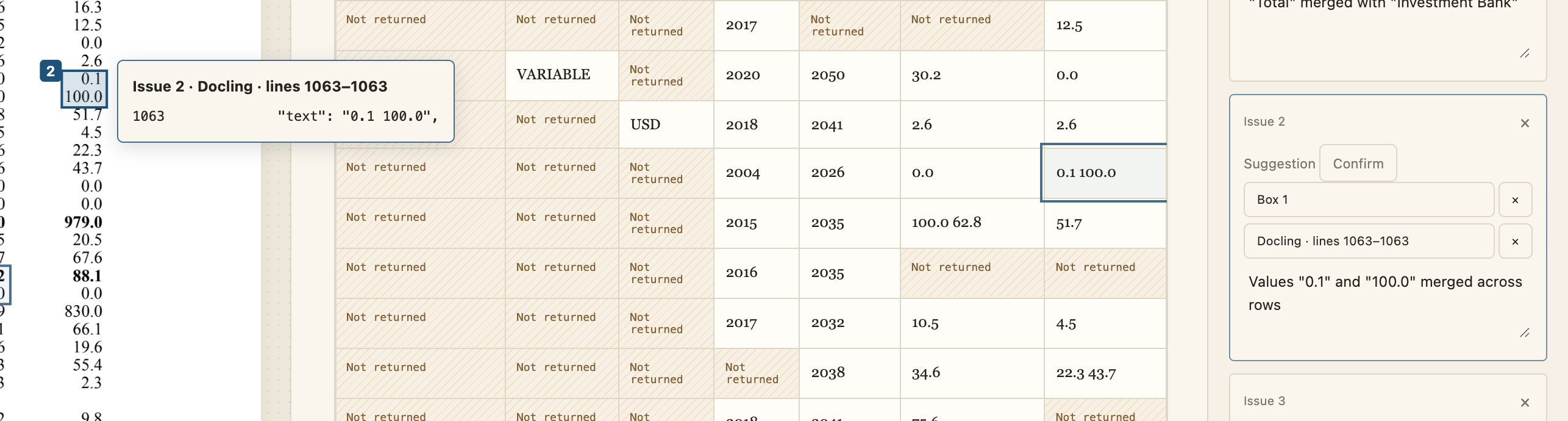
And even when we go to the raw output instead of the rendered version, we see it here with two values in one cell separated by a space.
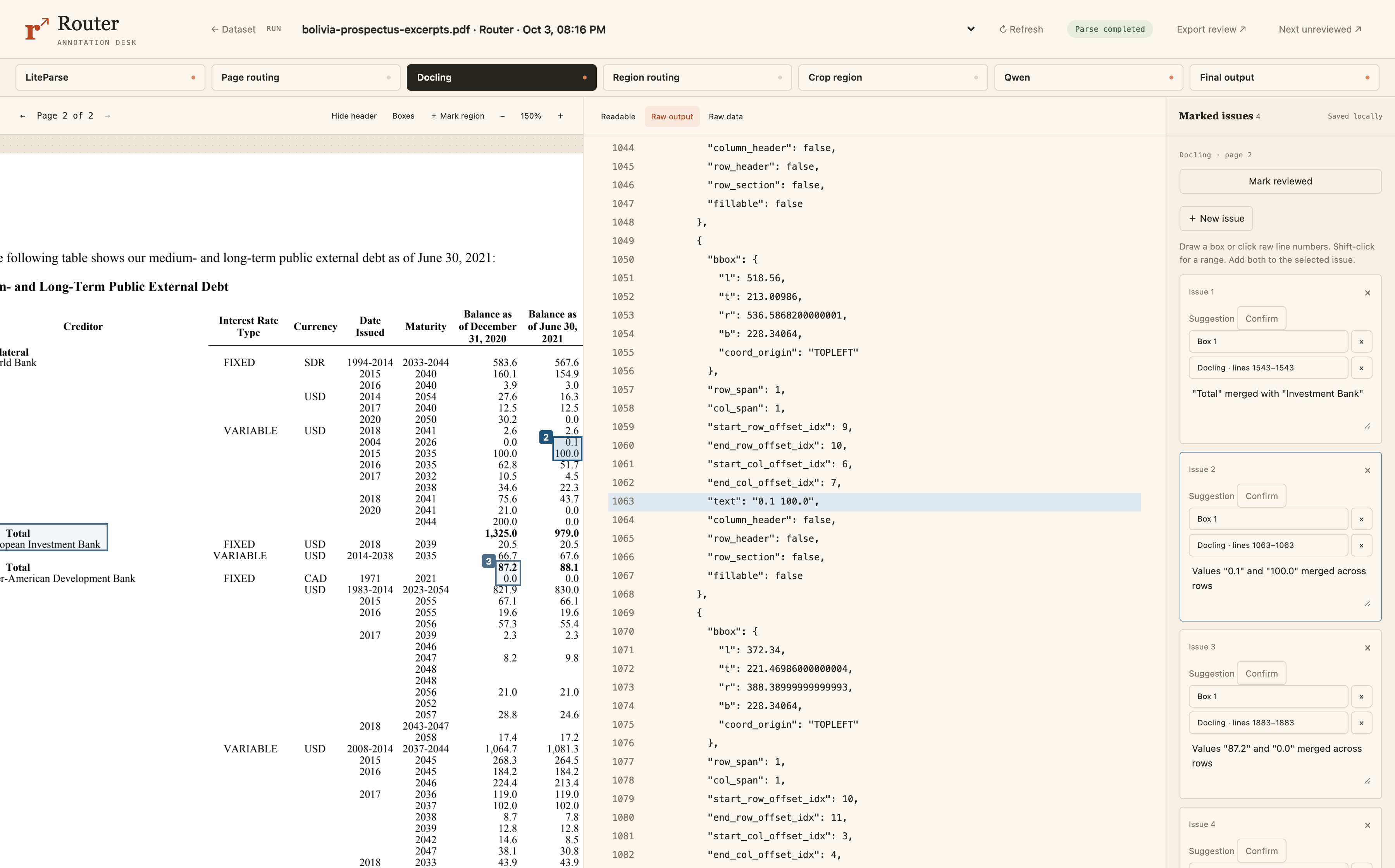
While this is much better and we're seeing more targeted errors, it still isn't good enough to be useful. So hopefully our router is gonna decide to send it somewhere else.
Region routing: decide which region needs another attempt
In this case, we have different routing criteria. It ran with Docling, so we need to look at Docling's output for the routing decision instead of the LiteParse output.
In this router, there's a deterministic step looking for multiple numbers in one cell. This triggered based on the exact error we saw in the table, a number, a whitespace, and then another number in the same cell.
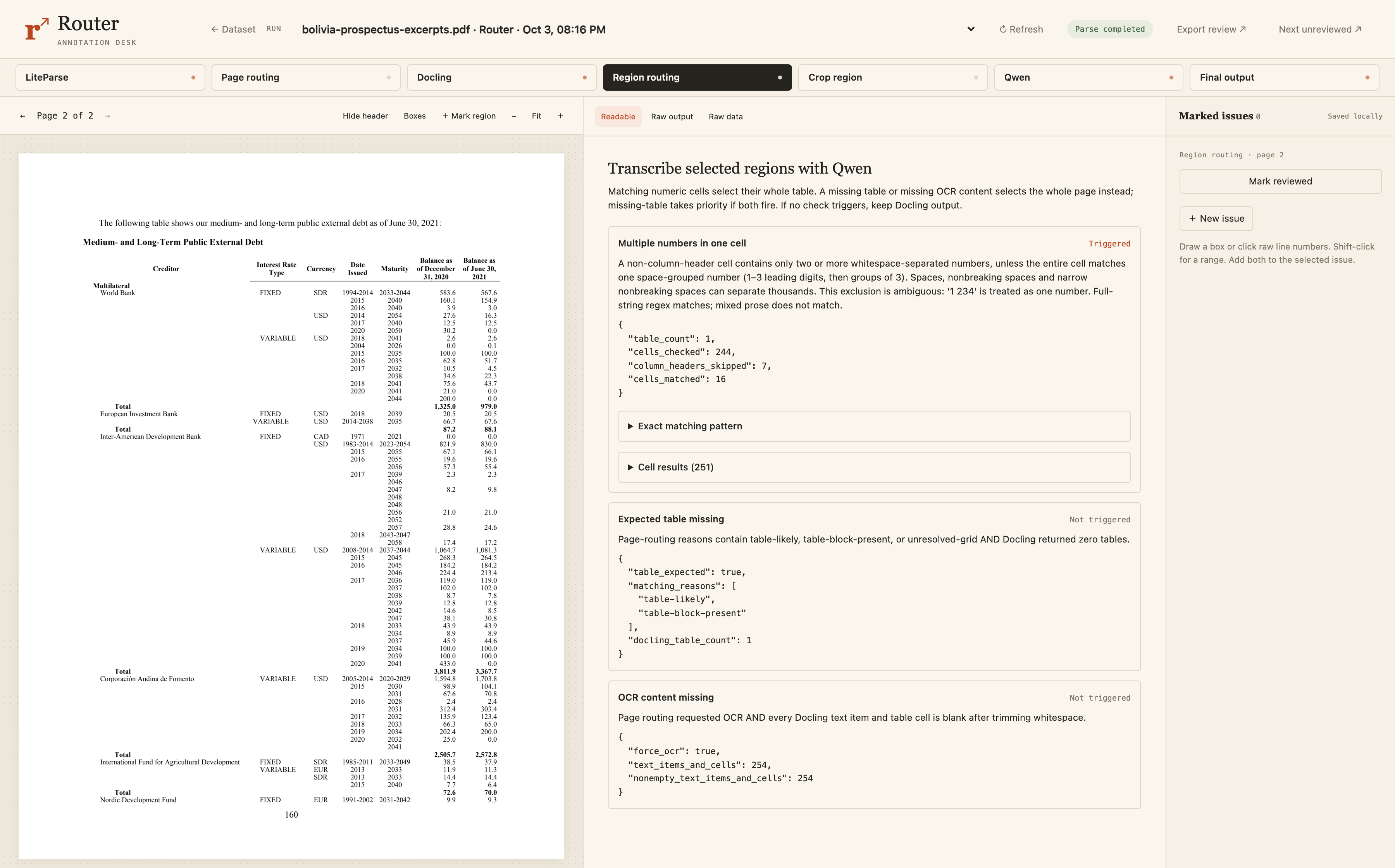
So we move on to the next step.
Crop the table for Qwen
The next step crops the table based on the bounding box. So this is the most expensive model that needs a GPU that only is used to process problem areas and not the entire page. The text above the table isn't in this crop. This is just the area with the problem, and we send that to Qwen. In this case, it happens to be most of the page because the table takes up most of the page, but it could be a much smaller crop in different examples.
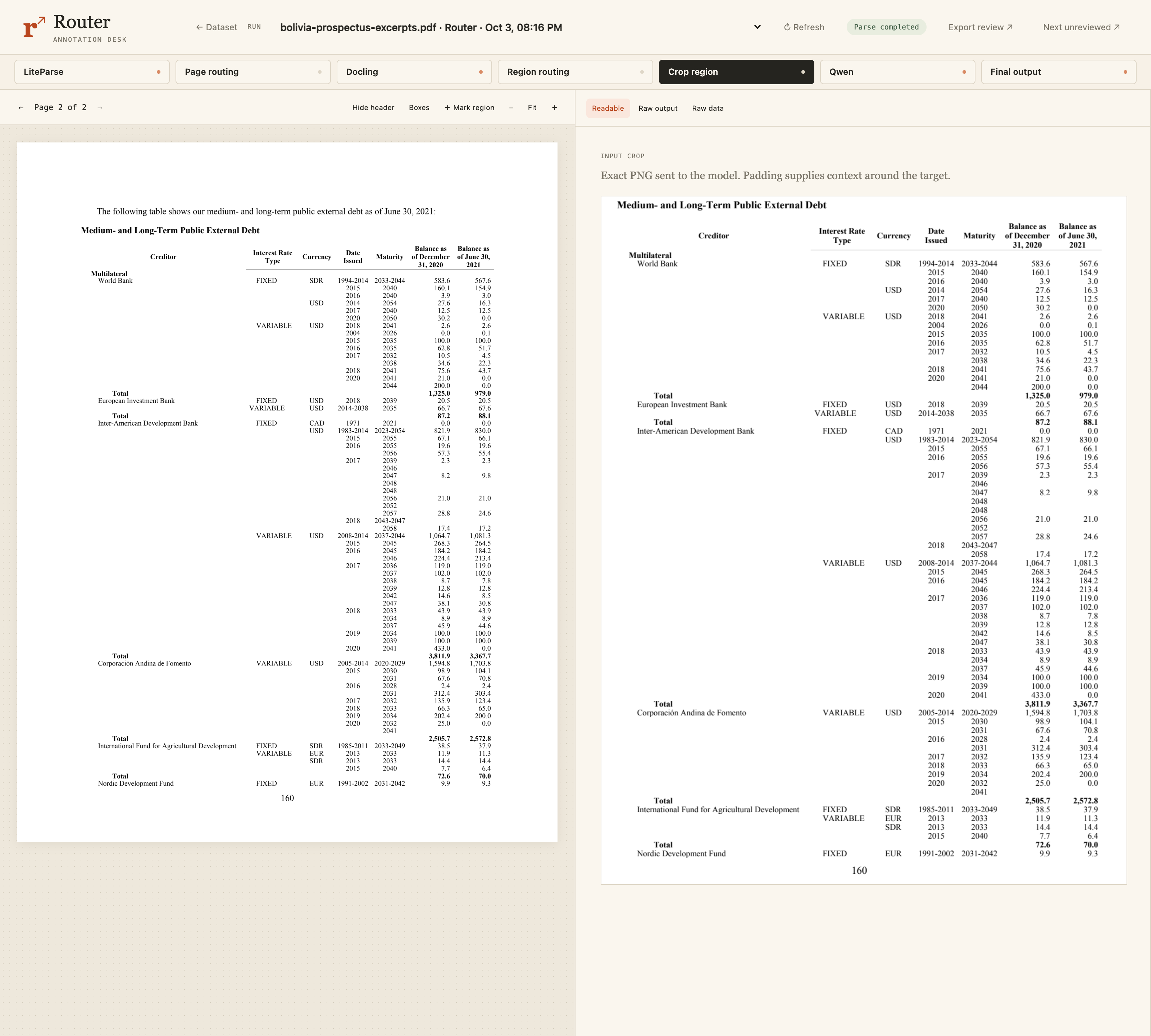
Qwen: inspect the improved table
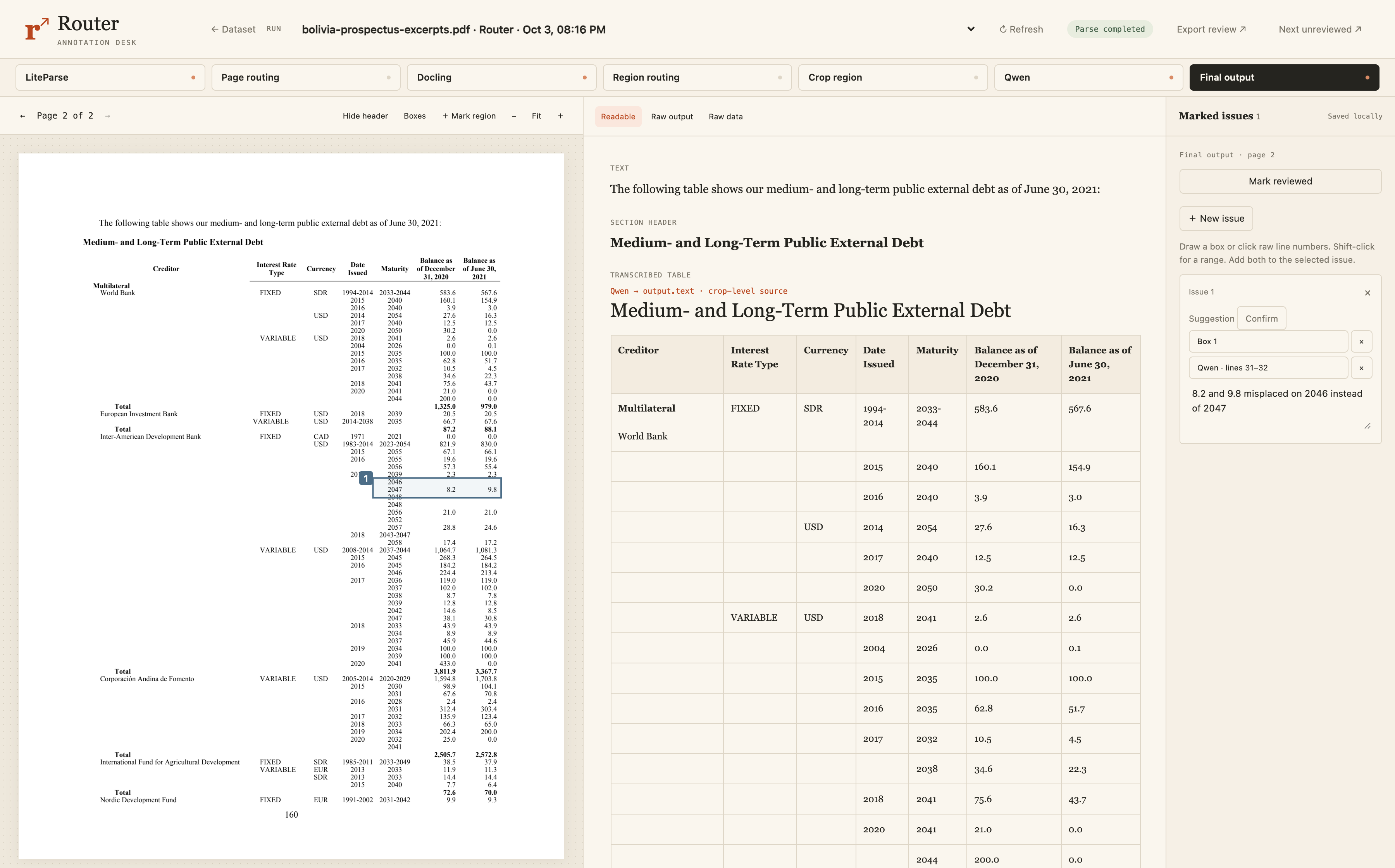
And now we look at Qwen's output. We've gotten much better results than Docling, but we still have a small error, which could be a big deal. The values 8.2 and 9.8 should be in the 2047 row. They're moved up one row, and this could be easy to miss if you weren't checking carefully.
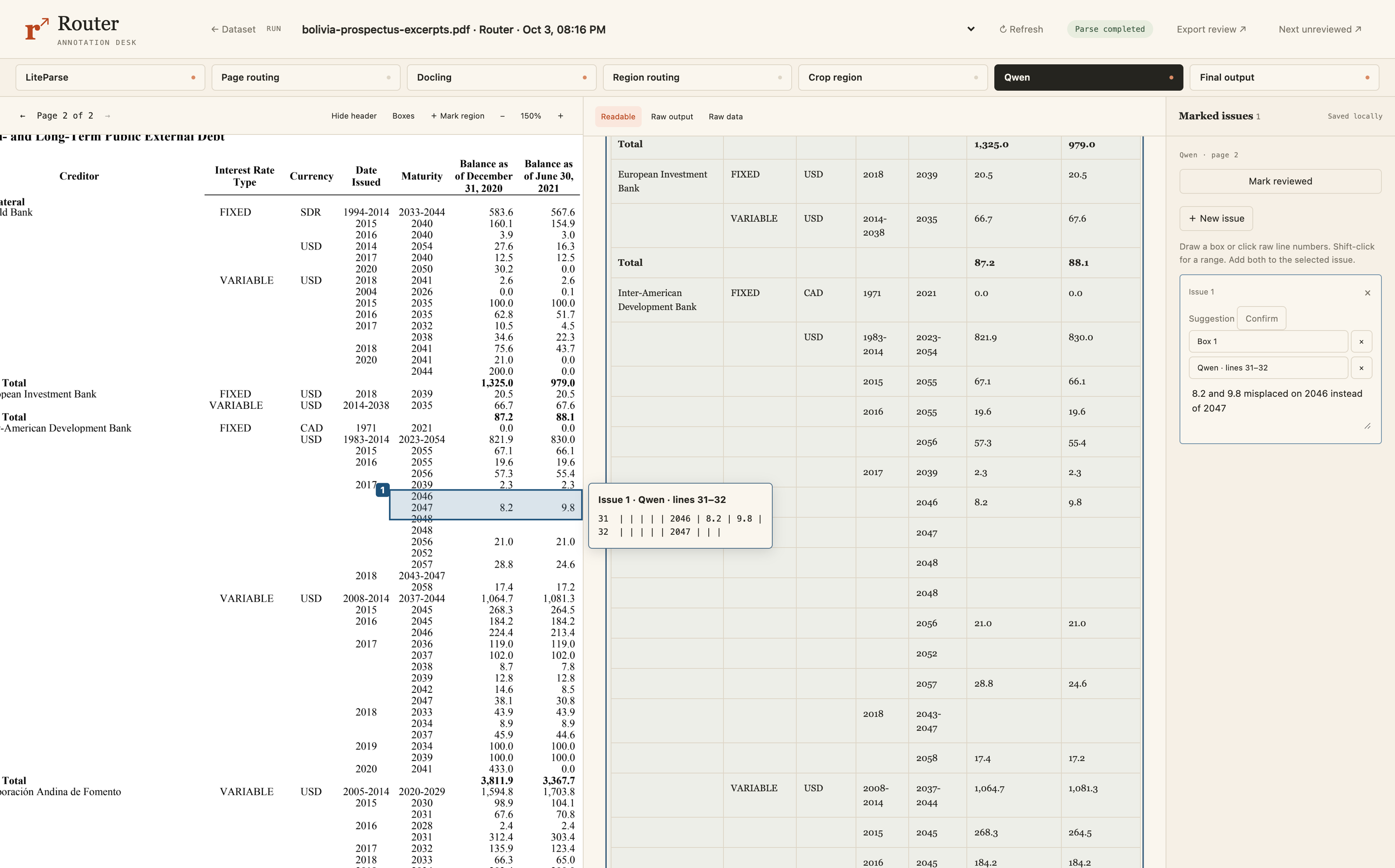
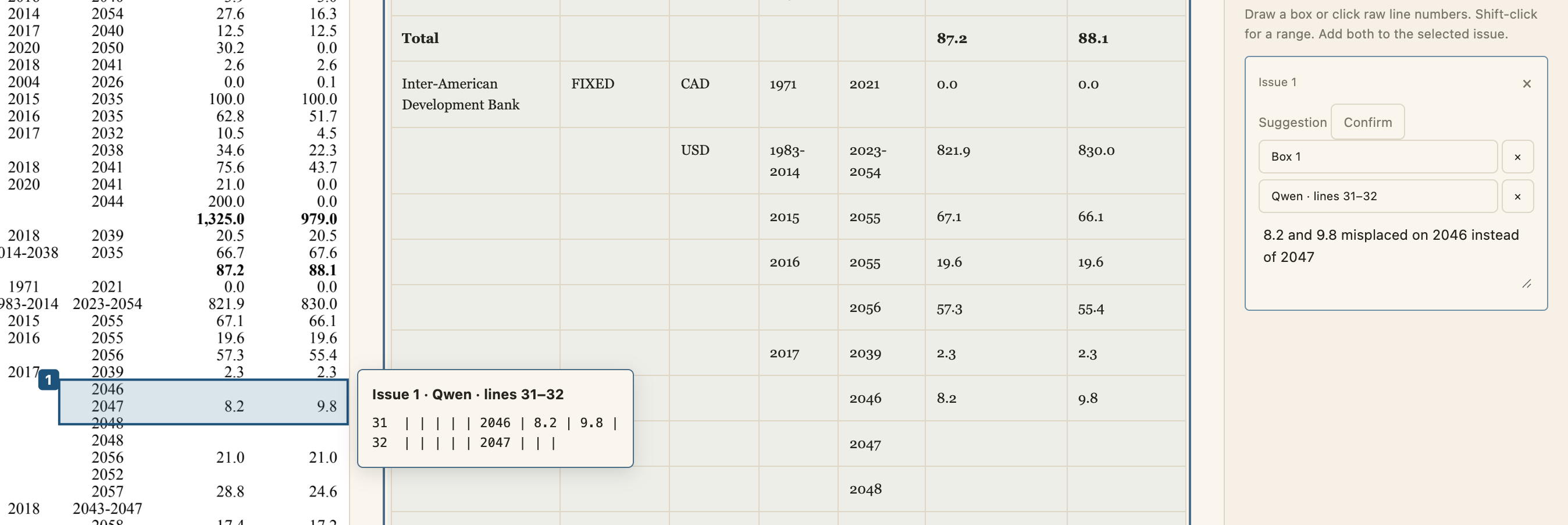
But this router has reduced our cost significantly from using Qwen on every page, and it's increased the accuracy significantly from using LiteParse or Docling alone.
Even with the router, we still need error analysis 'cause there's just no silver bullet.
You could check out my video on error analysis in OCR as well as my guide on formative and summative evals for deeper dives on that.
Assemble the final page
Once Qwen has processed the crop, its table gets put back together with the surrounding text. The Qwen table replaces the one from Docling or LiteParse. So that's the routing flow. You process it, check it, and decide whether it needs another step.
Router failures
So we've seen one page stop right after text extraction and another page goes through every step. So now we're going to look at some cases where the router breaks. These are like common failure cases I see in commercial systems.
Electric bill: stopping too soon
Here's a bill where I would've expected the router to try Qwen. There's so much visual structure and a complex layout. It seems very clear a vision model is gonna be needed.
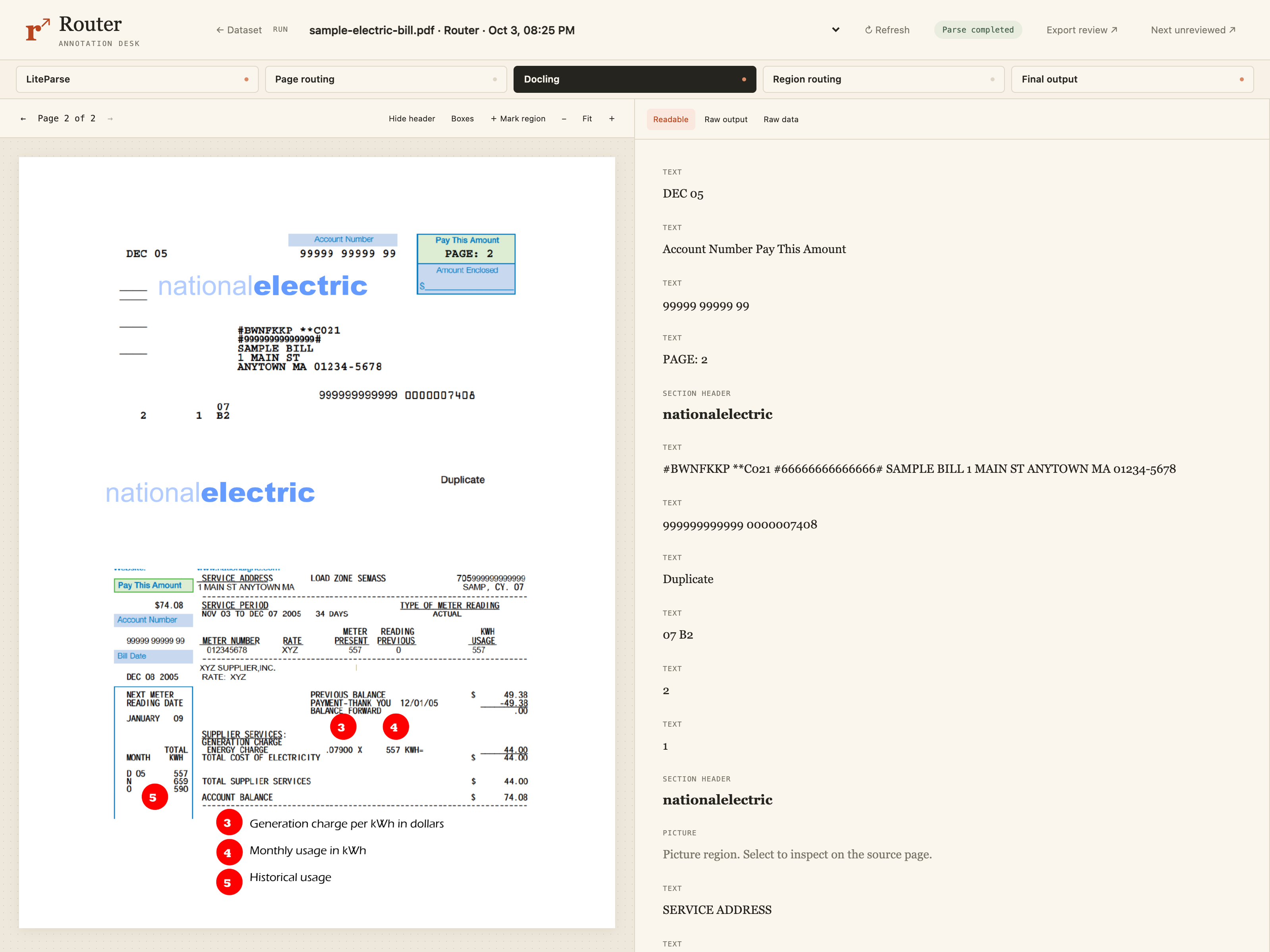
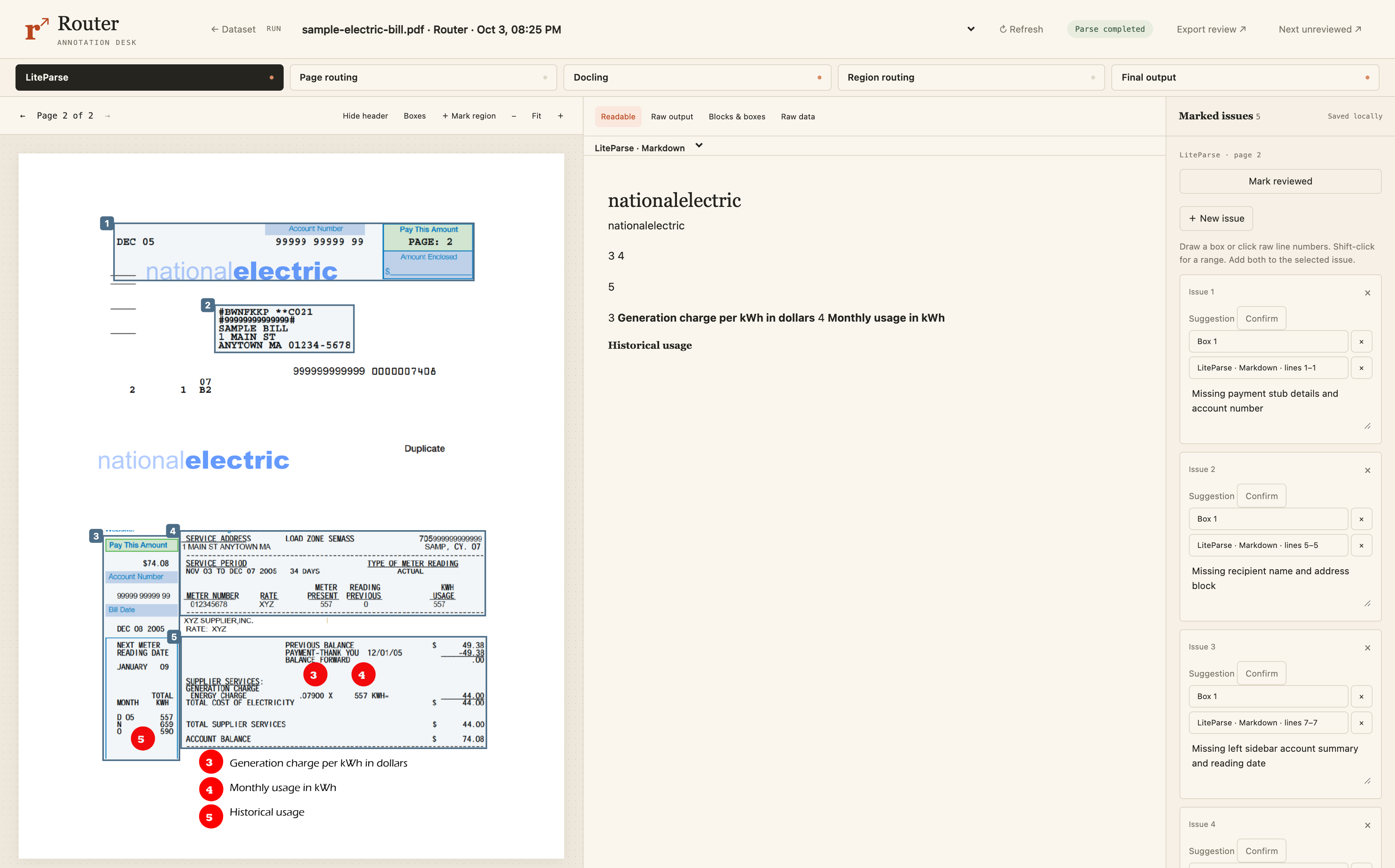
LiteParse extracted the text and it totally failed, but that's fine. It's fast and it's cheap. That's why it's the first step.
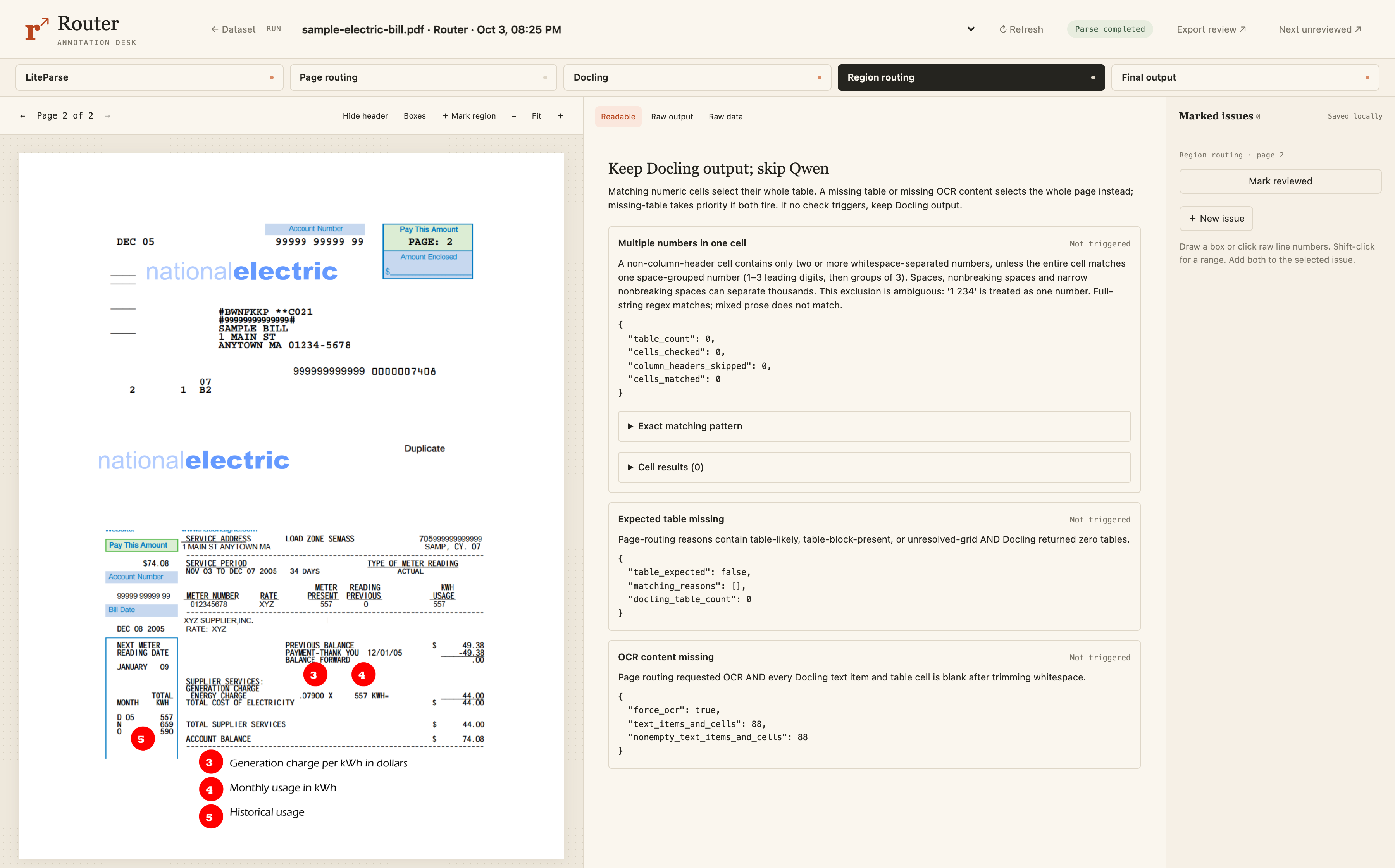
The routing step correctly identified that it needed to go to the next step, and that's the correct routing decision. So it did go to Docling.
After Docling, it went straight to the final output.
And this is because all the information is there, but it is super weird.
We should be looking at all the information on the top card before going down the bottom card, but it goes down the left side before jumping back up to the first card.
And also the service address needs to be connected to the actual address, but it's not. They're broken up by a lot of stuff. Same error on most other values. We see service address and then it goes into load zone, this 705999 ID. Pay this amount, and then now we have the actual service address. And so it's very hard to connect service address label to the actual address.
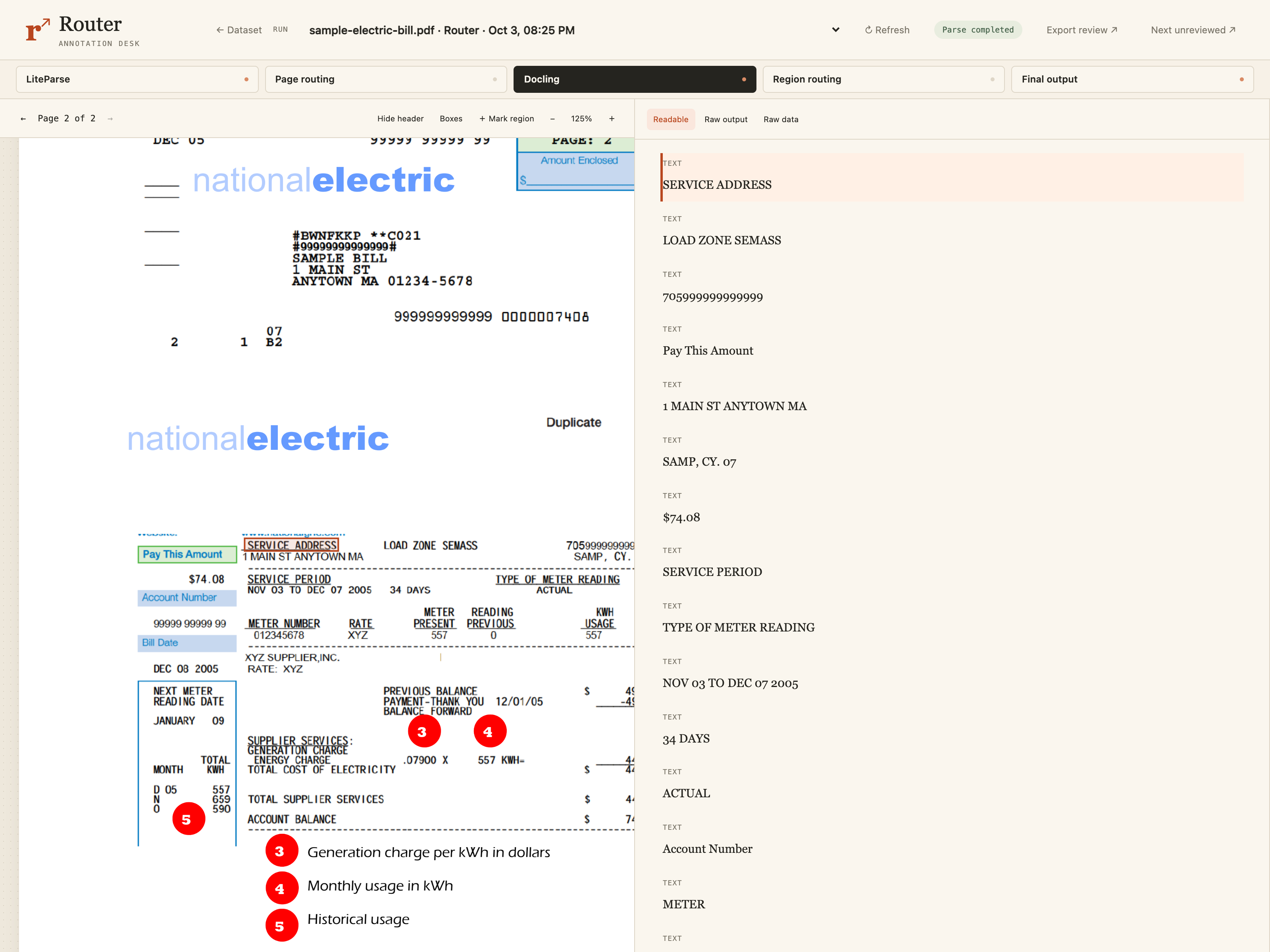
There are many more issues, but these two are already deal breakers.
So from here, this is where you'd say, okay, how do I create a routing rule for this?
In some cases, you could be very deterministic. For example, if you're working for National Electric, and you are OCRing historical invoices to reconstruct history, you can identify National Electric invoices, have a very targeted rule because you know you're going to get a ton of these formats.
If you're building a product where anyone can upload any kind of invoice, then you need to scan it accurately and you need to be a bit more creative. We're going to look at regression models for advanced routing soon.
But as always, the end use case matters for these decisions.
Ghana table: unnecessary escalation
So let's look at one more error and then we'll go into regression models. In this table, the final output looks great. Docling did a perfect job.
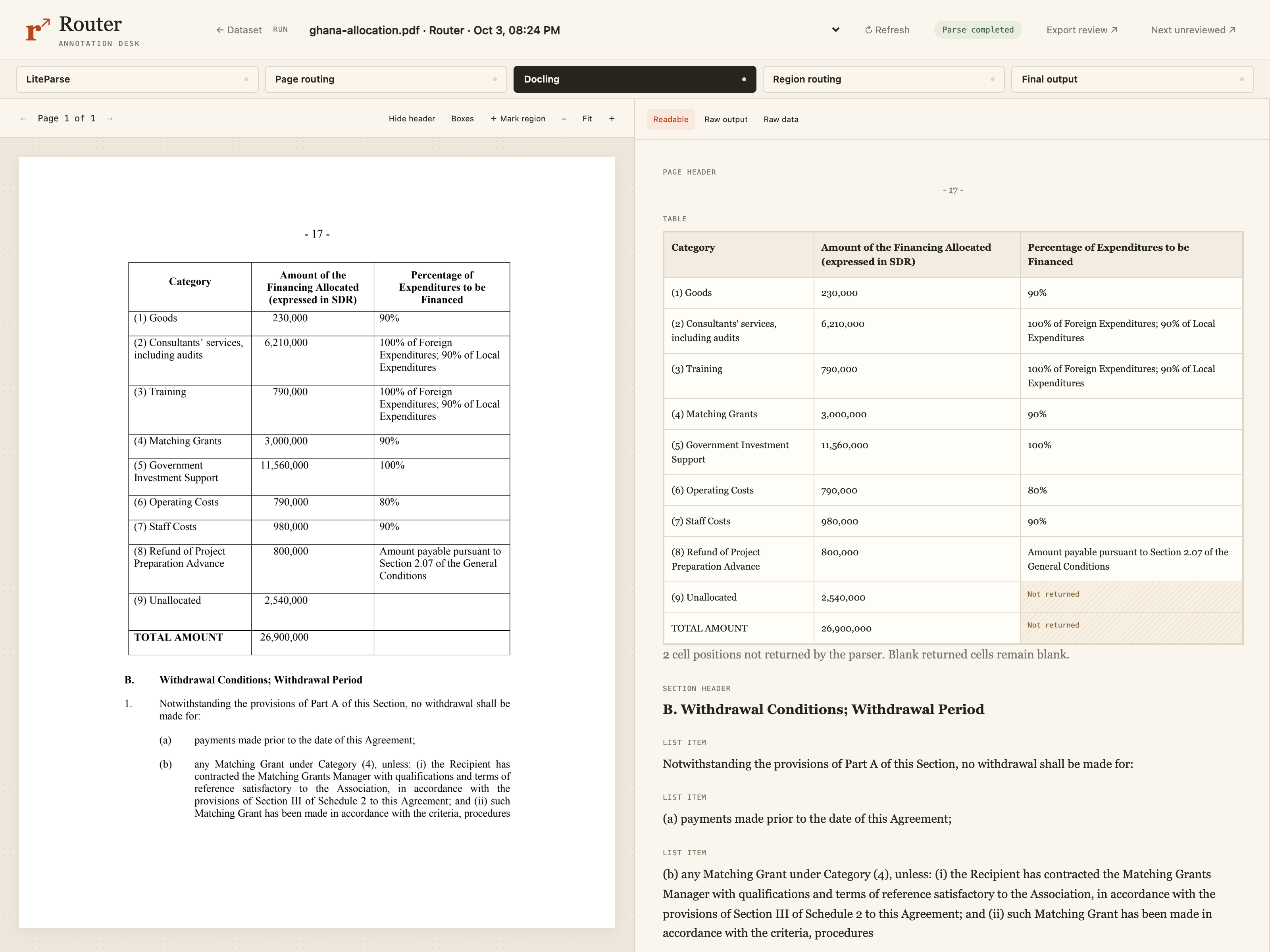
This means the rule to skip Qwen was a good call because it would have been extra cost when Docling did good enough.
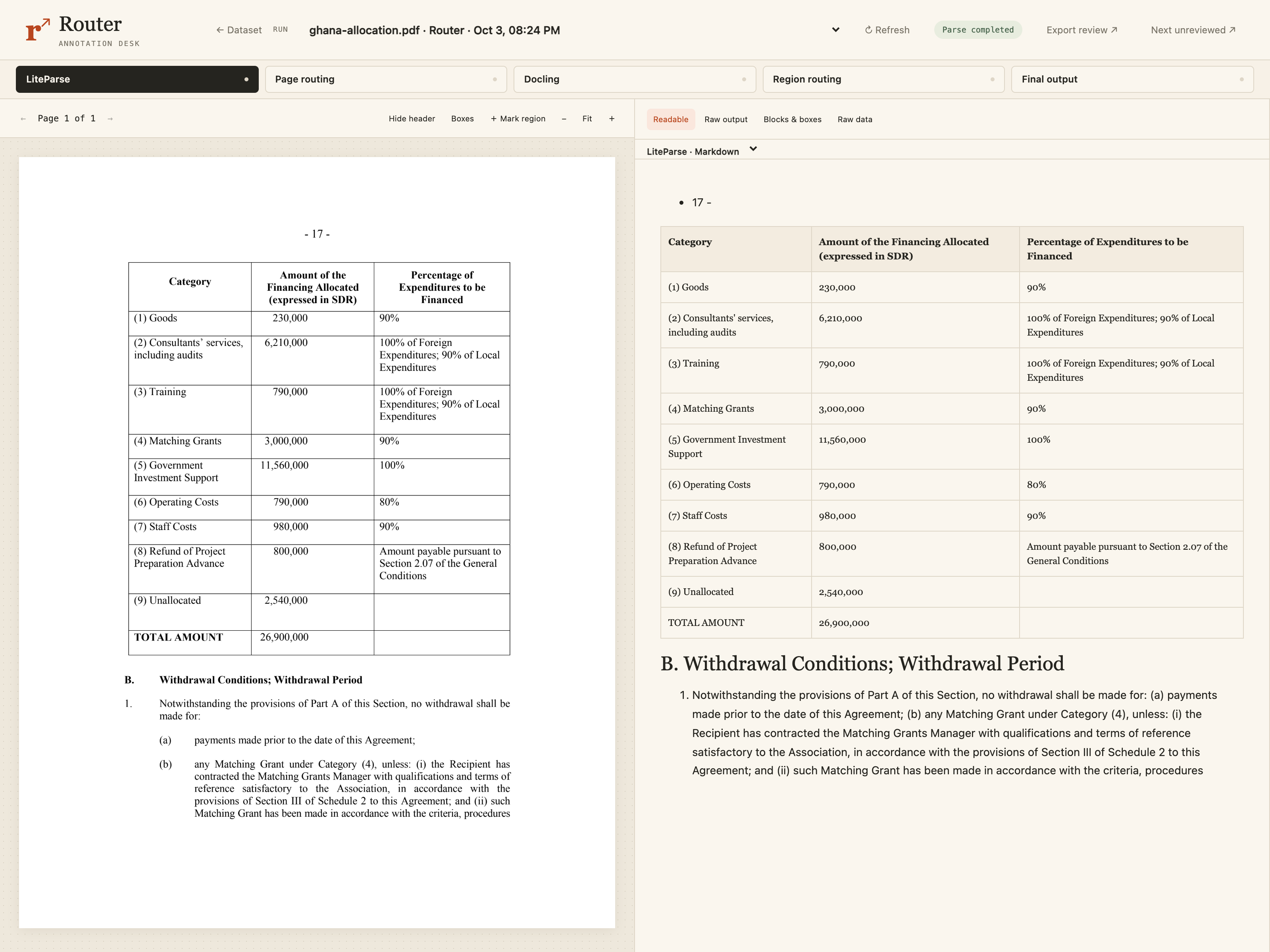
So now we need to know, was going to Docling required? To do that, we need to look at LiteParse and see if LiteParse did good enough.
LiteParse's output is a little bit less structured than Docling's if you look really carefully. But it's all very clearly in a table without errors. It preserved the information without OCR at all.
LiteParse said there was sparse text in a table with a complex layout, and that complex table check was what made it trigger.
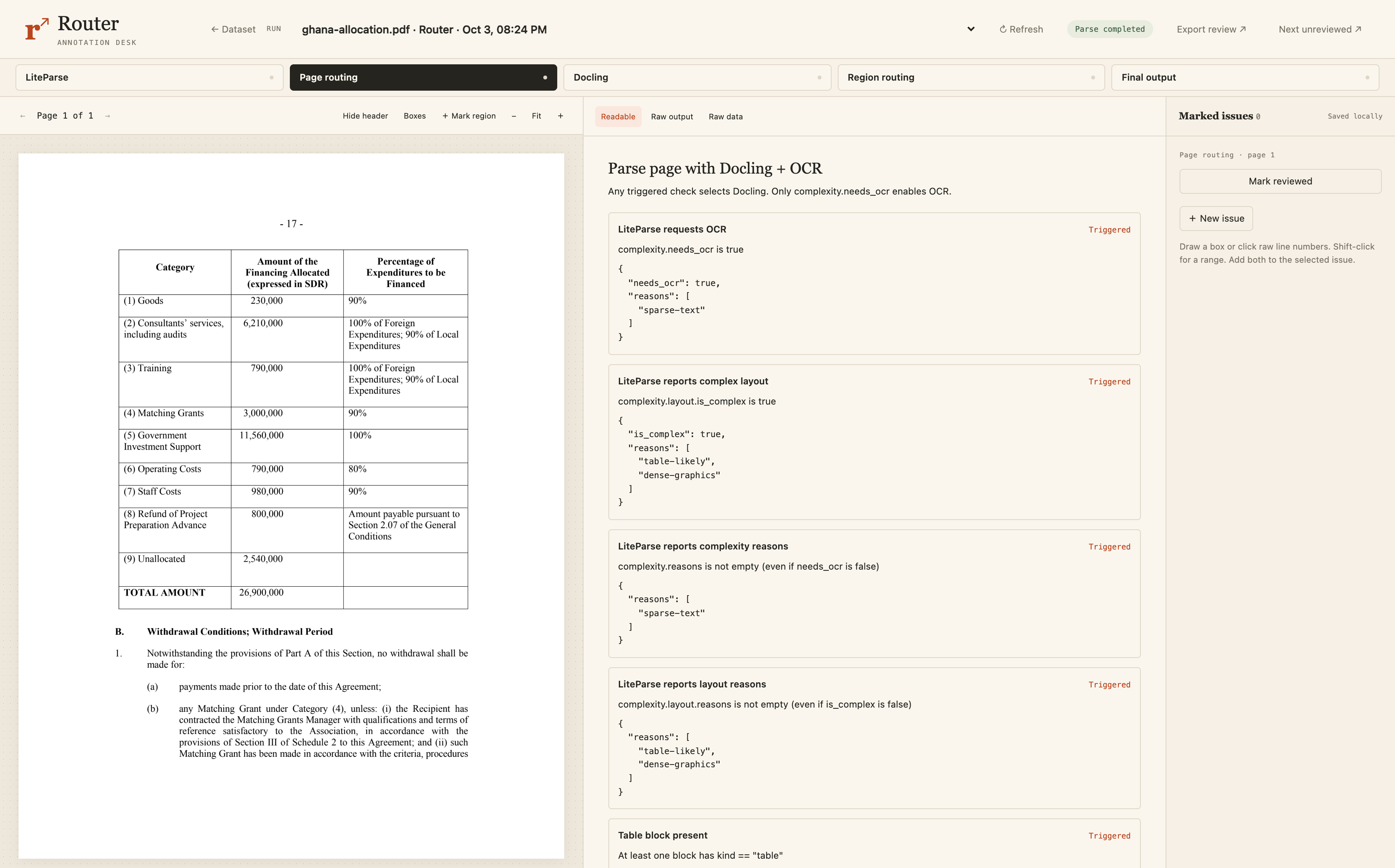
But this was simple enough that LiteParse did just fine. We did not need to go to Docling.
So this type of error didn't hurt accuracy, but it increased your cost and latency. And that covers the two main routing errors. The first was it didn't escalate when it needed to, and escalating when it didn't need to.
Training a model to make routing decisions
Okay. So what I showed you was a basic deterministic rule-based router. To improve it, we could keep adjusting those rules to handle more edge cases and fix these errors. But another option is to learn from examples using a small traditional regression model.
To do a routing properly, what I really need to know is how much more time will the next step take? And what's the accuracy improvement I will get for that? If I knew those two things, I could define a nice trade-off, an almost perfect one.
And so that's what we're going to try and predict.
Run both models on the same examples
To train a model, we need labeled data, which is basically just model inputs with the correct answer attached to them.
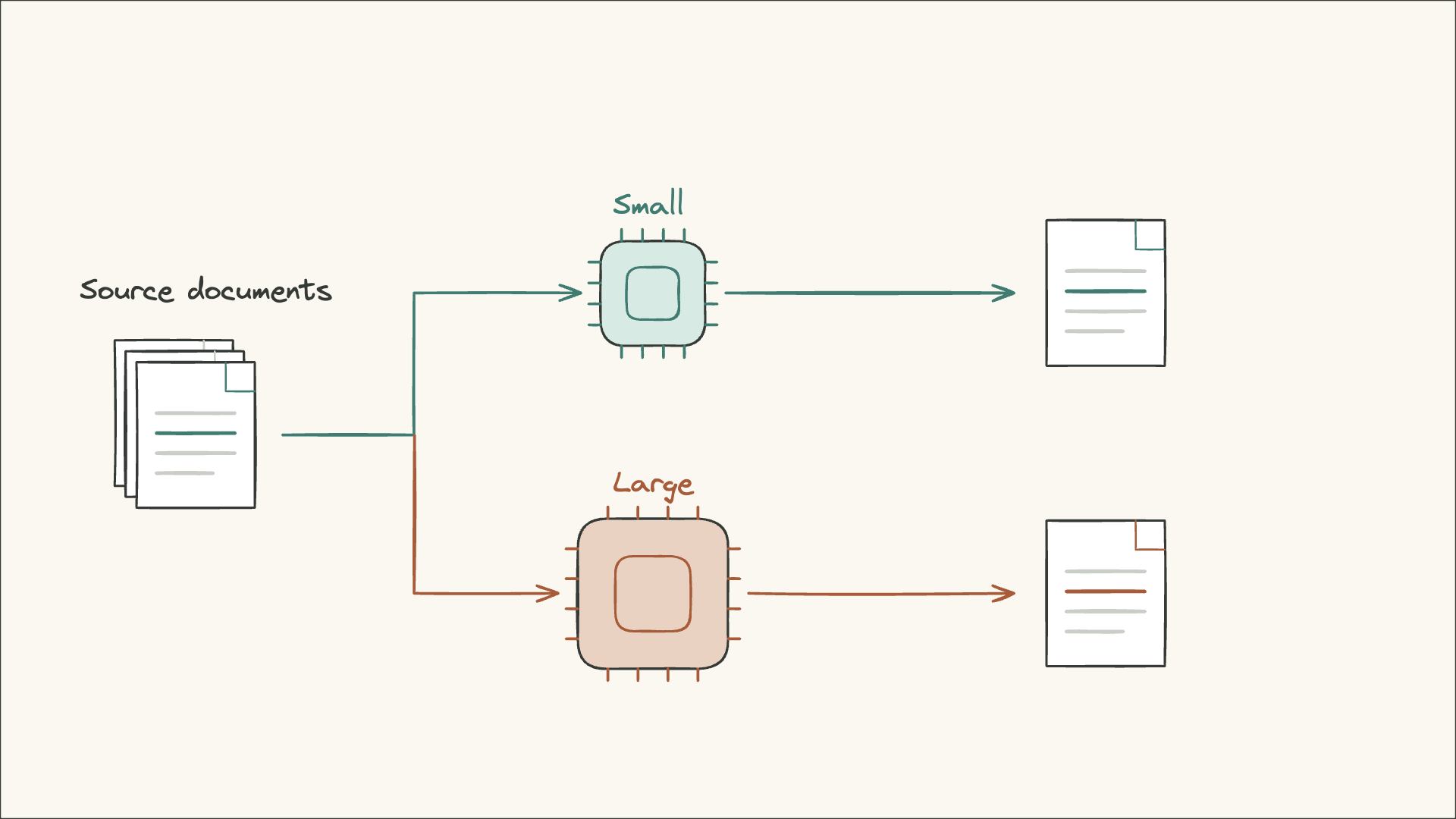
To create the correct answers, we can process the same source documents with two models.
First, we run them through a small model like Tesseract, and we measure accuracy and latency for each document.
Then we're going to do the same thing with a large model like Qwen, and we're going to measure accuracy and latency for each document again. So every document in our dataset went through both models, and we have latency and accuracy for both models on every document.
Measure the improvement and added cost
The goal is to end up with a small table like this. For every document, we have the small model's latency and accuracy and the large model's latency and accuracy.
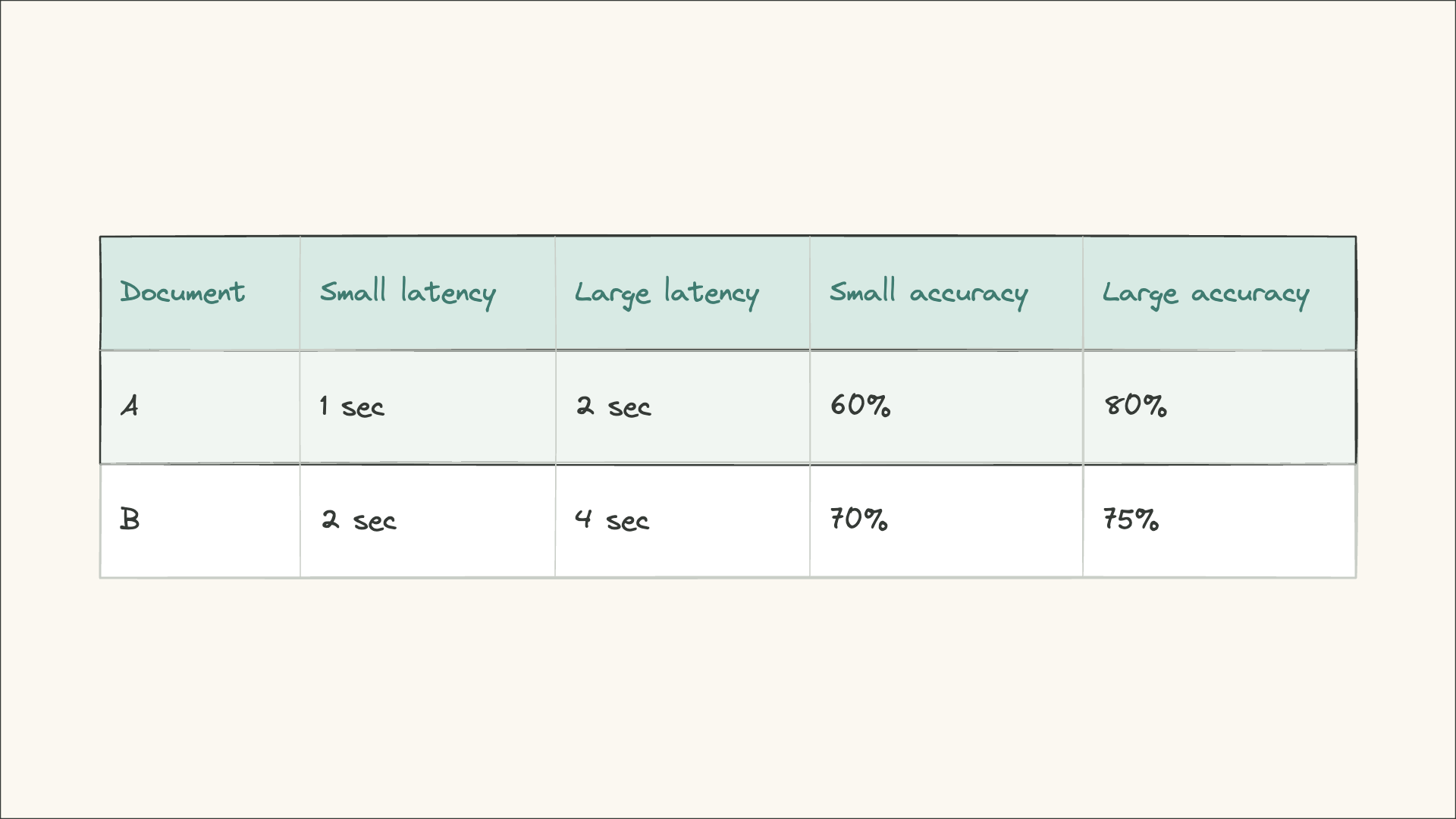
In this case, Document A goes from 60% to 80% accuracy. And so 80% minus 60% means there is a 20 percentage point gain. And it goes from 1 second to 2 second latency. So that accuracy costs us 1 second in latency.
Document B goes from 70 to 75% accuracy for a 5 PP gain. And it also costs 2 seconds of latency. So 2 seconds to 4 seconds.
Latency clarification: Once the small model has run, calling the large model adds 2 seconds for A or 4 seconds for B, plus routing overhead.
And that's what we want to predict. If I get a new document and process it through a small model, how much improvement will I get from running it through a large one? And how much more time will it take?
Train predictors using cheap features
Now that we have our targets, we need features we can use cheaply. If the routing model takes anywhere close to the time or cost of the larger OCR model, we lose all the benefits of routing and we may as well just use the expensive OCR model.
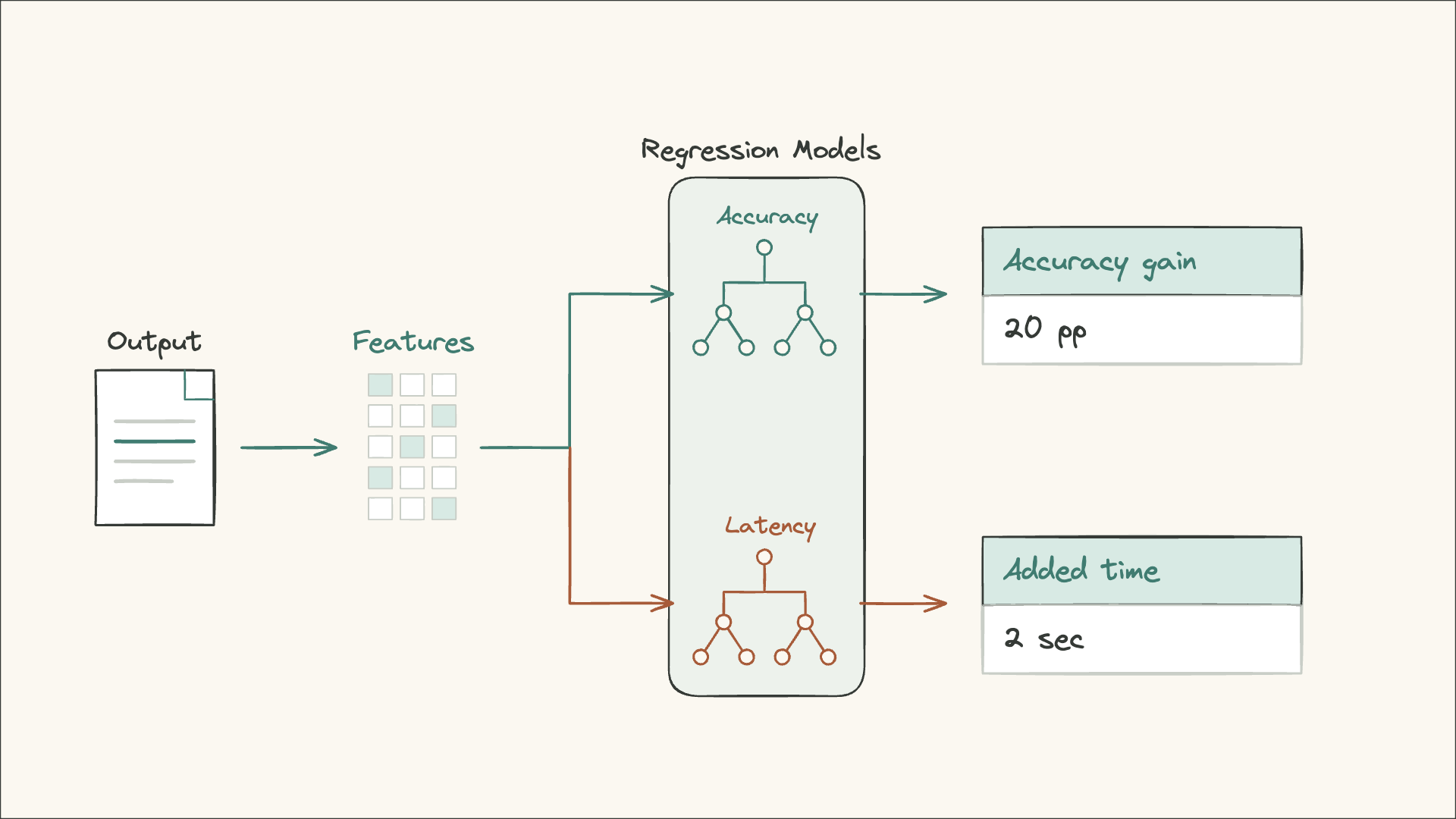
So we need inputs that we can use very cheaply when we're processing a document. So we take the document and the small model's output and we extract features we can use to make those predictions.
For example, we could use page width and height, aspect ratio. We can use confidence scores from Tesseract, or simple text statistics like word count, line count, and words per line. We can also use guesses at structure like we saw with LiteParse, row and column counts, whether the merged spans are present, and the fraction of empty cells. All of this is described in a blog post that Reducto recently did talking about their OCR routing setup. And so these are features that dedicated OCR labs are using to create these routers.
And those features are our inputs. The improvements and added time we measured are our training targets. We can use that dataset to train a very small regression model like a gradient boosted tree. It's kind of like data science ML stuff back from the pre-agentic LLM days, if you were in data science at the time.
So we trained two predictors, one to predict the accuracy gain and one to predict the added time. In Document A, we're predicting that 20 percentage point gain, the 80% minus 60%. If we've already run a small model and the larger model takes another 2 seconds, the added time is 2 seconds. So to recap, we want a model, we have our inputs, text count, confidence scores, tabular data, and our output is the increased accuracy and increased latency it will cost.
Route a new page using the predictions
Now that we've trained these regression models, our router looks like this. For each new page, we run the cheap step, the small model, and we use that output to create the features that are fed into our small regression model routers. We use the predictions to decide whether that expected improvement is worth that extra time for our budget. If so, we route it to the larger model. If not, we're done.
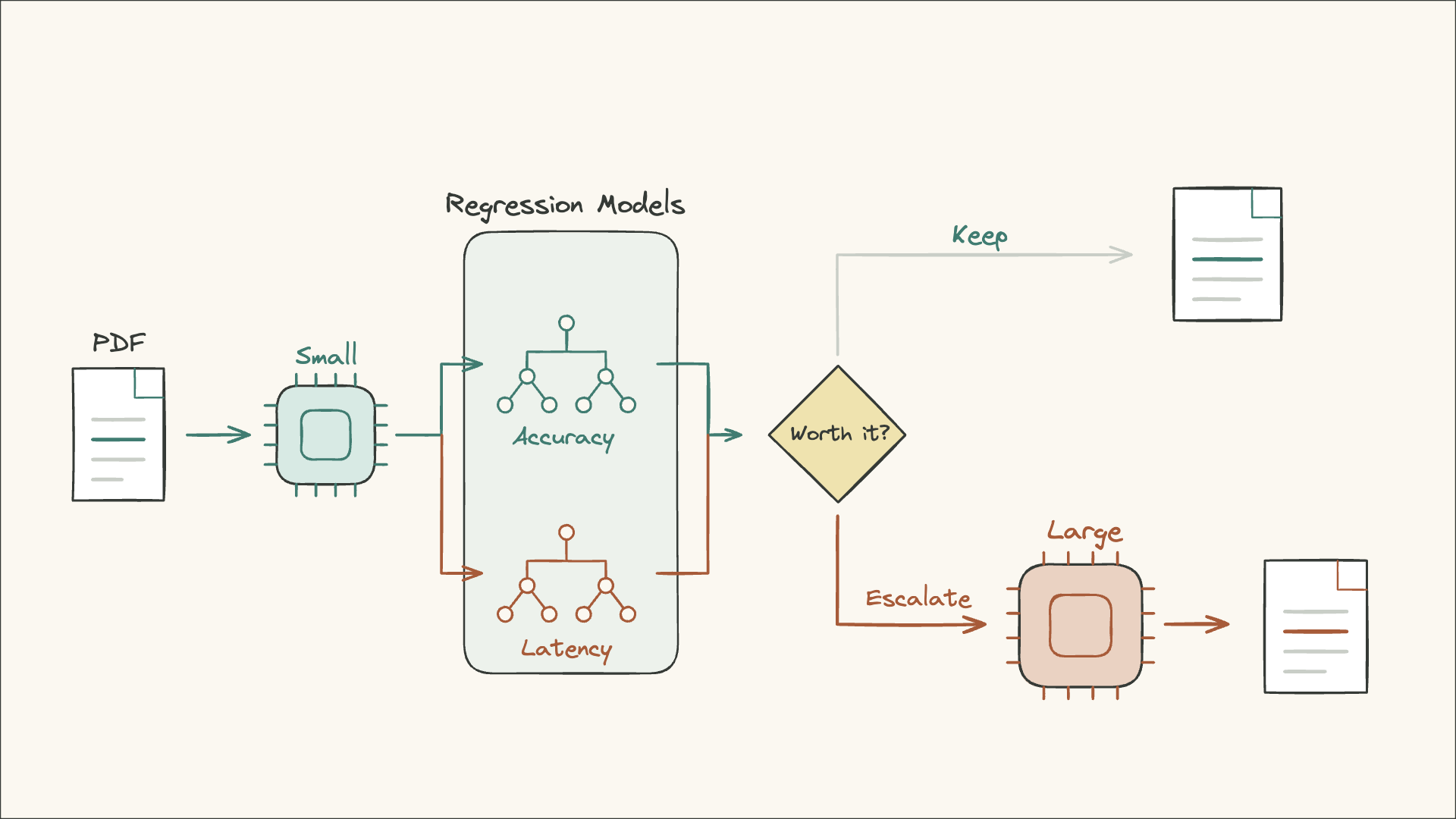
The routing model being super small and fast is important. We could make a more accurate router by taking the entire output of step 1 as text, or even the whole PDF as an image to predict the gain. But if we do that, then the routing step is so expensive we could have just run the bigger OCR model to begin with.
That's why we use these light tabular data statistics and use those as features.
Evaluating the router
With this new router, we still need to do error analysis, just like we did by looking at real examples and annotating the deterministic router. We do the same thing with this better model.
The annotation is where you're going to build all the intuition and get the best and most successful ideas for how to improve your OCR process.
I would recommend going through the process several times because this is where you're going to build intuition about, is Docling the wrong step in this pipeline or is it close? What are the issues that Docling has had with this? When does it need to escalate? What other patterns or routing steps should I add?
For example, if you see clear enough patterns in Docling to Qwen escalation, can you skip the Docling step and go straight from LiteParse to Qwen? Or do you need Docling output to identify those patterns?
I've linked the OCR annotation and formative and summative eval posts above. I hope you enjoyed this, and if you want to stay up to date on all my upcoming material, subscribe at isaacflath.com/subscribe.