How to Choose an OCR Model
 Isaac FlathJuly 24, 2026
I invited Joe Barrow to give a public talk on how to choose an OCR model. This post covers what he shared about choosing between OCR APIs, open pipelines, and self-hosted vision-language models.
Prices and license terms were current when Joe gave the talk.
Why you should care about OCR
Your users care about OCR. Until about a year ago, Claude could only handle PDFs that were text based.
If you uploaded a scan, Claude couldn't see it at all. This is a large company with a product that wasn't handling OCR, and users noticed. They complained a lot about Anthropic's poor PDF handling.
Documents are also heterogeneous. For a recent project, Joe's team processed ~7 million pages of local laws. Many were scans or multi-column layouts where reading order wasn't present in the PDF. A good OCR model gives you a homogeneous version of those heterogeneous documents.
PDFs themselves are pretty evil. Vic Parachuri from Datalab made a website called WTF PDF, where you can upload a PDF and see whether it hits any bad edge cases. For instance, TeX-compiled PDFs don't have spaces in them. They use a system called glue that prints glyphs at specific locations.
If you pull the text from a PDF with a PDFium wrapper such as pypdfium2 but without post-processing heuristics, you get an entire run of characters with no spaces. In an AI-powered app, everything is downstream of OCR quality. You start with documents and extract the information before doing the actual task.
OCR quality becomes a bottleneck for the business logic and everything you display to users. Once you've built your app on top of a specific OCR model, you are locked into a vendor.
OCR is very sticky. Joe learned this at Pattern. Once everything was built on a specific OCR model or set of models, it was difficult to rip it out and replace it with something better or something that could do better layout analysis.
Joe's background
Joe has an NLP PhD from Maryland.
He led ML at Pattern Data until recently and is now at Adobe Research in the Document Intelligence Lab. He gave this talk as an independent researcher.
The opinions are his own and are not cosigned by Adobe.
What does OCR mean?
OCR output falls into four rough levels:
- Raw text: Get all the text runs out of a PDF and concatenate them with spaces.
- Markdown: Preserve headers, paragraph spacing, subheadings, and parsed tables.
- Grounded text: Return word or line bounding boxes so you can highlight a line and show where the relevant evidence came from.
- Full document structure: Return reading order, layout, semantic roles, rotation information, and parsed tables.
Concatenating raw text was a common way to build AI-powered document apps: pull the text out, throw it into the LLM context, and hope something good happened. It creates quality problems, so you may need something richer from the PDF.
All of these outputs count as OCR. The one you choose depends on what your product needs.
The OCR landscape
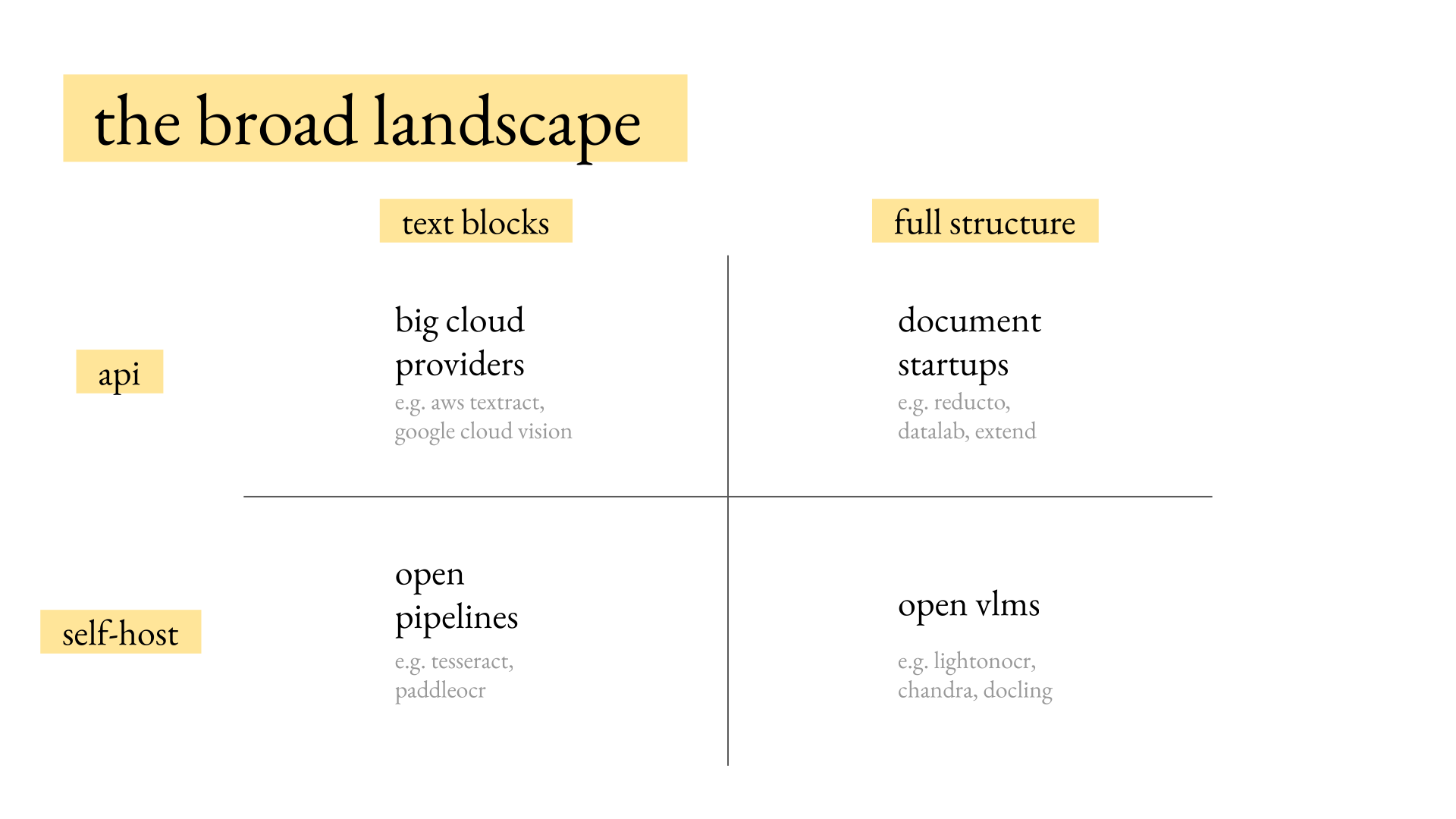
Two axes guide how you build OCR into a product. The first is whether you need text blocks from the PDF or semantic roles such as headings and paragraphs.
Do you need the full structure, including tables and figures? That choice determines much of the cost and quality.
The second axis is whether to self-host a model, which can lower costs but takes more engineering time, or rely on an API. These two axes cluster the models into four groups. Big cloud providers include Amazon with AWS Textract and Google with Google Cloud Vision.
Startups such as Reducto, DataLab, Extend, and LlamaIndex are building fully featured OCR models. On the self-hosted side, open pipelines such as PaddleOCR, Nemotron OCR, and Tesseract provide cheap, fast text blocks.
Open VLMs that produce more structure include LightOnOCR, GLM-OCR, Chandra, Chandra 2, Docling, and Surya OCR. There are probably 50 to 60 open models, but only a few you might want to consider.
Do you need text blocks or document structure?
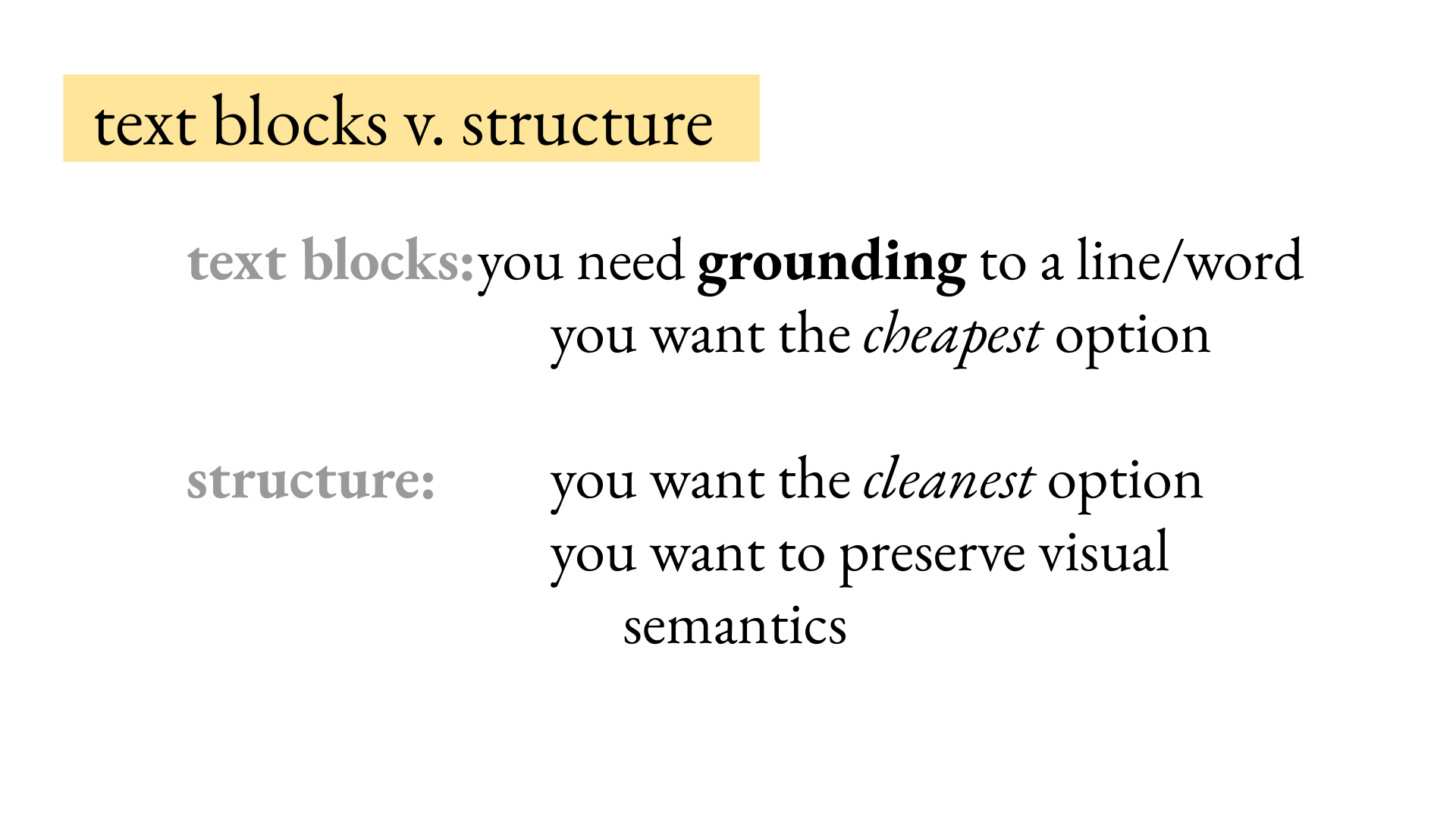
Do you need text blocks or structure for the downstream app? Text blocks from APIs can ground LLM output to a specific line or set of words using word bounding boxes. Structure gives the downstream LLM a semantic representation of the document in reading order.
Document structure groups lines into the paragraphs they belong to and assigns semantic roles such as paragraphs, headings, and tables.
It also gives you reading order, which line-level OCR doesn't guarantee. Some models include layout: the bounding boxes of each element.
Models may also return parsed tables, figure alt text, and, more recently, chart de-rendering. A model can de-render a chart into a CSV of the data used to construct it.
These features aren't present in every model. Choose text blocks when you need word-level grounding or the app needs to show evidence.
Text blocks are also the cheapest option. Models that return only text blocks are almost an order of magnitude cheaper because they are typically simple pipelines. The same difference appears between cloud APIs and document startups.
Choose structure when you want to preserve the document's visual semantics: where the paragraphs are and how the content appears in the document.
We noticed at Pattern that preserving document semantics is a free performance improvement for downstream information extraction, AI-powered question answering, and other tasks.
Giving the LLM runs of text from Textract may be cheap and fast, but it typically leaves performance on the table. RAG and information extraction pipelines usually benefit from preserving document structure because LLMs are trained on plenty of Markdown and similar structured text.
Complex document layouts reduced to lines give the LLM jumbled-up garbage, even from good providers such as Textract.
Should you use an API or self-host?
Use an API for ease and support
With an API, you're paying for ease of use and personal support. If documents don't work well with a startup's API, you can tell them, "I have this set of documents and I'm getting bad output." They may consider those documents when retraining their models and pipelines, especially for a larger enterprise customer.
Self-hosting doesn't provide that support. You have to fine-tune the model yourself. Use an API when you want to minimize the time spent handling OCR for the app.
Self-host for control and scale
Building an OCR pipeline is doable at scale, but time-consuming when you're focused on the product. Self-host when you need to control throughput or concurrency.
An API typically limits you to fixed concurrency. At Pattern, the number of simultaneous documents its OCR providers allowed in flight often became the bottleneck. With a model hosted on Modal or similar infrastructure, you can pay for more throughput instead of asking a provider to raise the limit. You also control the weights.
Your OCR model will not change underneath you. You can fine-tune it for your domain or add speculative decoding. Self-hosting can also be cheaper.
The math generally works only if you value your time at $0, but hosting a VLM can cost much less than a startup API charging $5 or $10 per 1,000 pages. Bulk processing lowers that number further.
For a huge enterprise batch job, the math can work even when your time isn't free. For an AI product still looking for product-market fit, self-hosting will not be cheaper, though it avoids vendor lock-in.
Solving batch and online OCR with high throughput is a neat engineering challenge. You can get a first pass with a weekend's effort, but a system that handles large throughput takes longer.
Big cloud providers or document startups?
Big-cloud services such as AWS Textract typically cost $0.60 to $1.50 per 1,000 pages. Textract starts at about $1.50, and Google Cloud and Azure are in a similar range.
Volume pricing lowers the cost as monthly usage climbs into the millions of pages. Textract bottoms out at about 60 cents per thousand pages, but typically returns only word and line boxes with their text.
It does not include semantic structure. You may need to add table parsing, grouping or clustering, and reliable reading order downstream.
AWS sells some of these features à la carte. Form or table processing can cost $10 or $15 per 1,000 pages for each feature.
Startups such as Reducto, Extend, DataLab, and LlamaIndex cost about $5 to $20 per 1,000 pages, with volume discounts. The lower end is typically called "fast" and the upper end "accurate," though each company uses different names.
They return table processing, figure bounding boxes, grouping, and the page's Markdown or HTML. That output can be much more useful to a downstream LLM.
Open pipelines or open VLMs?
Open pipelines
Open pipelines such as Tesseract and PaddleOCR are fast and cheap to run.
They typically have 10 to 100 million parameters. PaddleOCR has a version that runs on a phone. Devices such as the Boox writing tablet, similar to a Remarkable, run PaddleOCR locally.
These devices typically run a model such as PaddleOCR and get text lines only. Paddle recently released a DocLayout model for layout, which you can use to aggregate text lines into paragraphs after the fact.
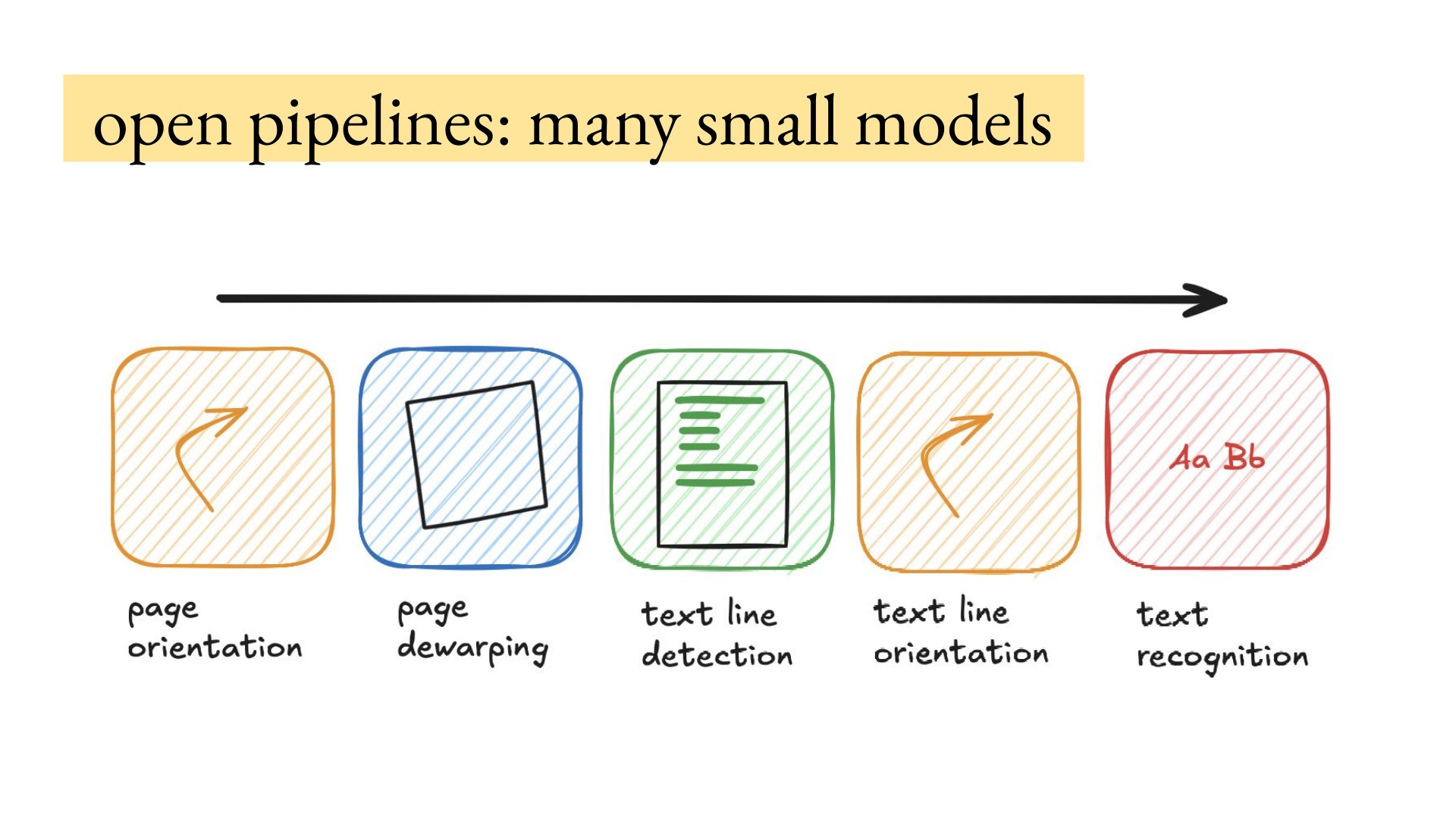
Open pipelines are typically composed of many small models. PaddleOCR first detects page orientation to determine whether the page is rotated.
They dewarp the page if it's a scan. They identify all the lines on the page and rotate individual lines when needed. In the arXiv paper on the slide, there's a header on the left in a different orientation and a line across the top. The pipeline then recognizes the text in each identified line.
Open pipelines therefore return line bounding boxes and the text within each line, but not necessarily reading order or document structure.
Open VLMs
VLMs are much heavier, normally 600 million to about 8 billion parameters, so cost follows model size.
VLMs natively produce document structure. Chandra and Surya return structure rather than text lines. They can carry more hallucination risk.
Passing an empty page into some open models can produce a boilerplate hallucination. But after looking at probably a million pages of OCR output from the big clouds, Joe has seen that risk there too with crusty scans. Textract detects the text lines, then recognizes their text.
He has seen the word "the" repeated 100 times when the scan is effectively noise. With VLMs, you're paying at the compute rate. A 600-million-to-1-billion-parameter model costs about 20 cents per 1,000 pages on an H100, assuming you keep the H100 saturated.
For an 8-billion-parameter model, you might be looking at $3 or more per 1,000 pages on an H100.
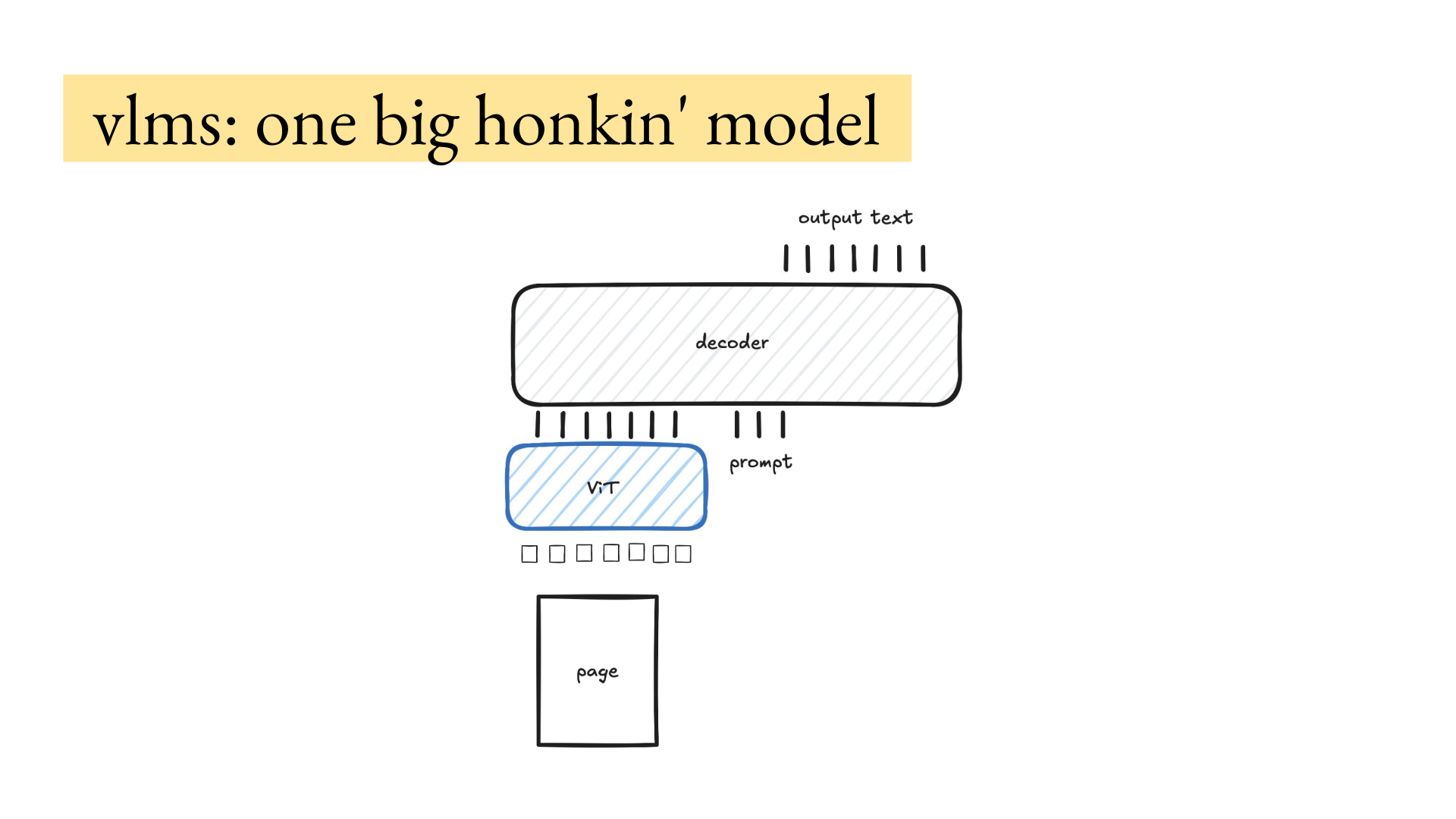
VLMs are typically one big honkin' model trained end-to-end. You feed in the page and prompt, then get output text, perhaps as HTML with bounding boxes. That's what Chandra and Surya do.
They use the Qwen-HTML format, typically in a single shot. Multi-shot and pipeline VLMs are outside the scope of this talk. If you over-index on cost and latency, choose pipeline models for handwriting, and ignore quality, the models can be fast while the whole app suffers.
Paying more can be worth it. Processing a thousand pages per second does not help if they're all wrong and the app's output is garbage.
Two different use cases
Seven million pages of local laws
Joe and a friend at Berkeley collected ~7 million pages of laws from every city and county around the United States that they could get their hands on.
They needed to do it on the cheap because they didn't have huge resources to process all ~7 million pages. At $5 per 1,000 pages, it would cost more than the Berkeley lab was willing to pay. It was also a hobby for Joe, so he valued his time at $0 but wasn't willing to put a bunch of money into it.
They needed the text, headers, and reading order. Then they could split the data into individual laws and make sure each law was coherent.
On a two- or three-column page, the laws had to remain grouped and coherent. They didn't need graphics, figures, or tables because they planned to throw away the raw PDF after finding the laws and releasing the dataset.
The right option was to self-host a VLM that outputs Markdown: LightOnOCR-2 from LightOn AI, a strong 1B model near the top of olmOCR-Bench.
They ran it for about 30 cents per 1,000 pages, all in, including reprocessing.
The run took between a weekend and a week.
A startup doing live document extraction
Now consider a vertical startup doing information extraction for legal companies, hospitals, or financial records. A user uploads PDFs, asks questions, and extracts information live. That creates a different set of constraints.
This is a common startup setup: build on an existing OCR model, then add value with AI-powered information extraction and business logic. This is not a fixed dataset or batch job.
The system has to scale with live users. If the output is grounded to the PDF, you need word bounding boxes to highlight the words relevant to the AI output.
You might also want structure to feed the LLM, which requires some post-processing.
At a startup, engineering time is very much not free. Tinkering with OCR takes time away from the app, business logic, and customer value. A good decision might be Textract with a post-processing layer that aggregates its output into structure for the LLM.
There is no best OCR model. The right choice depends on your needs and the outputs of different approaches on your data.
Most of you should not self-host
Most of you should not self-host. Only ~5% of teams should.
If you're product-focused and trying to find product-market fit, use an API. Self-hosting isn't worth your time. You are not the OCR person.
You're trying to build a startup for financial records. If you are in that ~5%, hosting is easier than you might think and fun as hell. The rest of this talk is for you.
How to choose an open model
Test candidates on your data
First, look at the actual data. Do you have crusty scans, handwriting, or medical terminology?
Popular OCR benchmarks such as OmniDocBench and olmOCR-Bench are indicative, but they won't tell you how models perform on your data.
The only way to choose an open OCR model is to test it on your data.
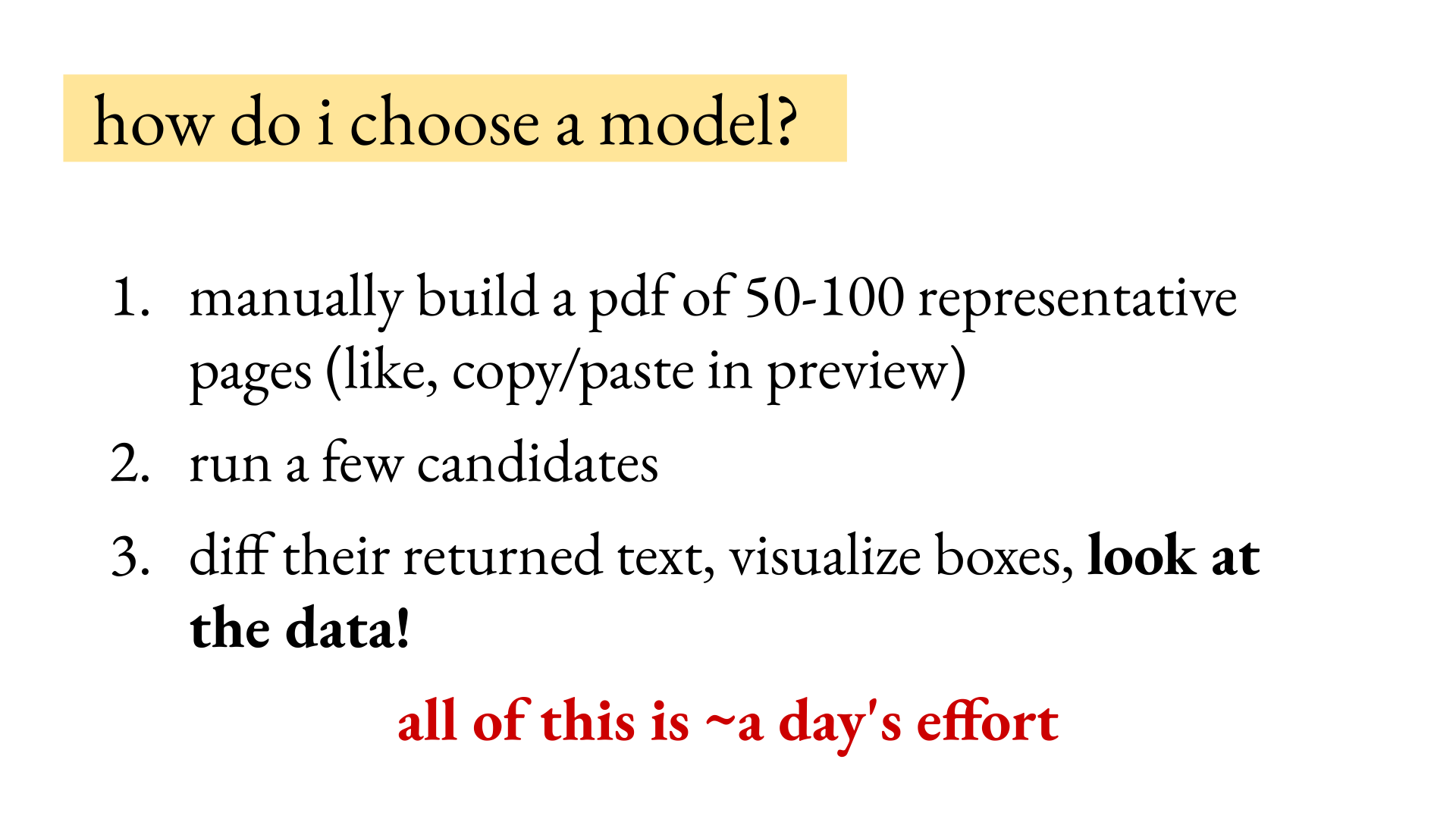
- Manually build a set of 50 to 100 representative pages. The easiest way (this sounds stupid) is to open several PDFs and copy and paste pages into one new PDF with Apple Preview or Adobe Acrobat. One PDF is easier to send through each cloud API or hosted server.
- Choose five to 10 candidate models from the grid and run the same PDF through each. Diff the returned text between candidates.
- Inspect the failures and visualize the boxes. This makes it easy to see that one model returns junk on handwriting, which many pipeline models do. You can Claude up a visualizer for the OCR outputs.
This should take about a day, including looking at the outputs and standing up some vLLM instances.
Check the license
Look at the model's license before choosing candidates. Chandra and Surya from Datalab are good models, but their model weights are free only if your organization stays under $2 million in both annual revenue and total funding and does not compete with Datalab. Broader commercial use requires a license.
Conversely, there are good open licenses you can use at any stage of commercialization. LightOnOCR is Apache licensed. GLM-OCR is MIT licensed and relies on PaddlePaddle's DocLayout model, which is Apache licensed.
You have to adhere to both licenses. Do not put your company at risk by using a model you don't have the license for. Plus, it's good karma to adhere to software licenses.
How to host the model
Choose a model and inference engine
You need three things. First, decide on a model.
Second, decide on an inference engine. Joe prefers vLLM, and many OCR models are released with vLLM as the default system, though SGLang is also very good. ~50% of the models released with an inference engine have SGLang support as well.
Choose infrastructure
Third, choose infrastructure to run that model on. Joe has enjoyed using Modal. Pattern moved everything over to it.
For the laws work, Joe and his collaborator built the OCR on Modal. There are other good infrastructure and inference providers, such as Baseten. You can also use a big cloud such as AWS, though the shape of your needs will determine what you want.
AWS is great for a huge batch of data you need to process once, but SageMaker scale-in and scale-out is clunky compared with Modal's scaling based on the number of requests in the queue. You can get surprisingly far by running either billion-parameter model through vLLM in a Modal container.
You're exposing an OpenAI-style client and need to pass in the GLM-OCR prompt. For LightOnOCR, there is no prompt. You pass in the image as a user message.
Check throughput and cost
Both models run on an H100, assuming you saturate it in batch. In Joe's experience, they cost around 20 to 30 cents per 1,000 pages, even at Modal prices. That gives you about 10,000 pages an hour on an H100.
The math is about three pages a second times 3,600 seconds in an hour. Joe has also served LightOnOCR on his local rig of four 3090s. You get close to three or four pages a second, assuming you can saturate the GPUs. Four 3090s are roughly equal to one H100.
The decision matrix
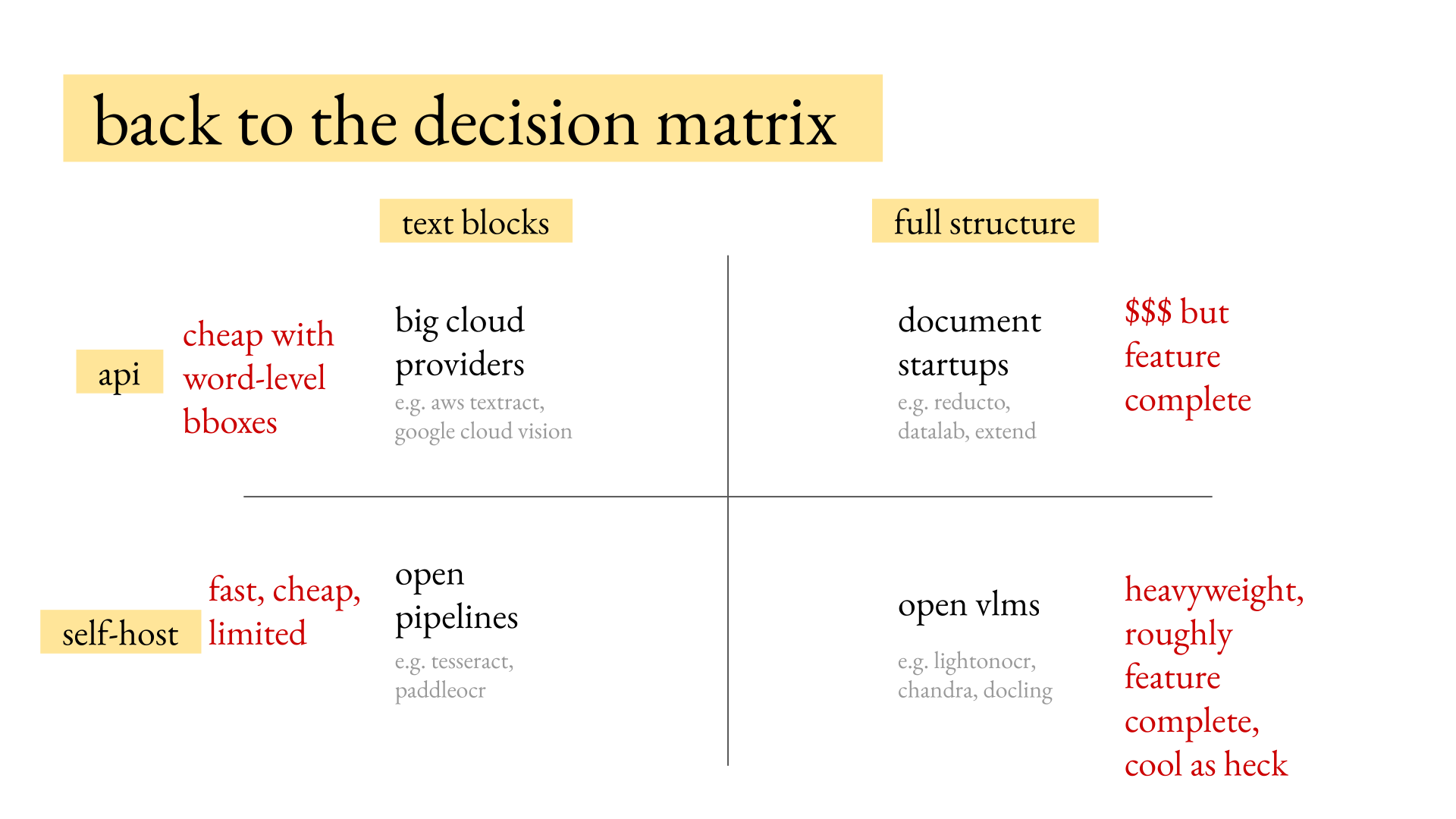
The decision process is:
- Decide whether the downstream product needs text blocks or full document structure.
- Decide whether the workload belongs on an API or a self-hosted model.
- Run a small set of candidates against the same 50-to-100 representative pages.
- Inspect the raw outputs, compare failure modes, and check the license before choosing.
Those first two decisions tell you which quadrant to start in. With full-structure document startups, you're paying a lot of money, but you're getting high-quality, feature-complete output that you can feed into an LLM.
Open VLMs are typically heavyweight and roughly feature-complete, though usually a little worse than the document startups. Many open VLMs are released by startups. Chandra and Surya are from Datalab, which has a stronger in-house model.
Open pipelines such as PaddleOCR can be very high quality but are still limited compared with the niceties you get from open VLMs. They are fast, very cheap, and can even run on an edge device, which would be free for you. Big cloud providers are typically quite cheap at scale.
Big cloud providers return word- and line-level bounding boxes.
You can reach Joe on X at @barrowjoseph.